
24/7 Customer Support

Free returns

Same-day & Next-day Delivery

Quality Guaranteed

Unlock Your Welcome Offers: FREE Delivery | Up to 80% OFF | Free 30-day JoyPlus trial
Download the APP
Augmented reality, or AR glasses, are rapidly moving from science fiction to a practical accessory for work and play. Promising a private, cinema-sized screen in a portable package, these devices are catching the eye of dedicated gamers, frequent travellers and professionals looking for a new way to be productive. However, the market is filled with technical jargon and ambitious claims, making it easy to choose a pair that disappoints.
As a Joybuy Product Recommendation Officer, my role is to help you navigate this emerging technology. This guide cuts through the hype, focusing on the practical considerations for UK buyers to help you find the right wearable display for your needs and avoid common purchasing mistakes.
Before diving into features, it is crucial to be aware of the most common issues that lead to buyer's remorse.
To make an informed choice, focus on these non-negotiable specifications.
While Full HD (1080p) is a good baseline, the visual experience is defined by more than just pixels.
This is where the "it just works" promise is tested.
Comfort is paramount for any wearable.
Instead of a generic list, we have matched some noteworthy options to specific user profiles.
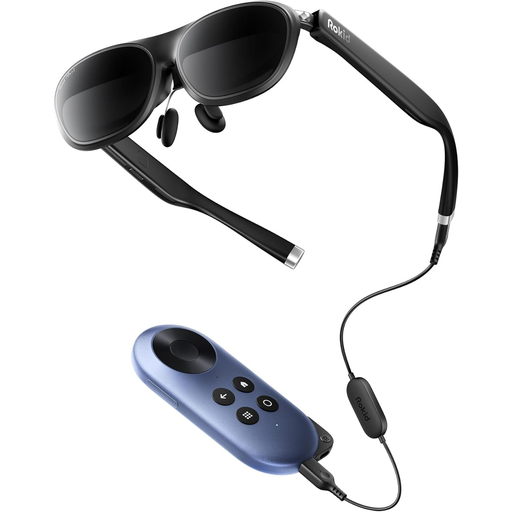
Why This Fits Their Persona: This user wants a portable cinema and gaming setup that works straight out of the box. The Joy 2 bundle is ideal as it pairs the high-quality Max 2 glasses with the Rokid Station, a dedicated Android TV device. This means you can stream films, play games and access apps without needing to connect your phone.
It directly solves the "Display-Only vs. All-in-One" confusion. By bundling the glasses with the Station, it provides a complete, self-contained entertainment system that handles HDCP for streaming services.
Features a large 50° FoV for an immersive view, a smooth 120Hz refresh rate and built-in diopter adjustment for myopia up to -6.0D. The Station has its own 5000mAh battery.
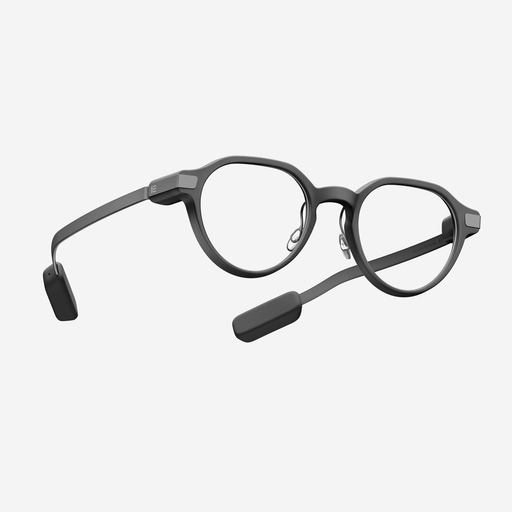
Why This Fits Their Persona: This user needs a discreet, all-day wearable for productivity on the go. The Even G2 looks like a pair of premium spectacles and is camera-free by design, making it socially acceptable in professional settings. It excels at delivering glanceable information like notifications, navigation and even a teleprompter for presentations.
It sidesteps the comfort and ergonomics pitfall. Weighing only 36g with a design focused on all-day wear, it prioritises a comfortable fit over a massive, immersive screen, making it genuinely practical for daily use.
Camera-free design enhances privacy and social acceptance. It offers a long battery life (up to 2 days of regular use) and useful AI-powered features like real-time translation and meeting summaries.
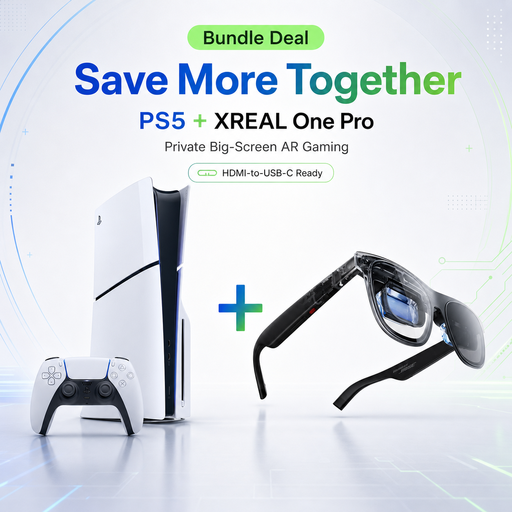
Why This Fits Their Persona: This is for the gamer who wants a private, big-screen PS5 experience without needing a television. It's a perfect solution for playing in a shared house, a bedroom or when the main TV is occupied. This bundle provides everything needed for an immersive, plug-and-play console gaming setup.
This exclusive bundle completely eliminates the "universal compatibility" myth. It pairs a specific console with a compatible set of AR glasses, guaranteeing that the connection works seamlessly for a high-quality gaming experience.
Delivers a massive 171-inch equivalent Full HD display with a 120Hz refresh rate, ideal for fast-paced PS5 games. The XREAL glasses offer native 3DoF tracking for a stable screen that follows your head movements.
We have compiled a complete, real-time list of products that fully satisfy these strict selection criteria and UK safety regulations.
Can I wear AR glasses with my prescription spectacles? It depends on the model. Some, like the Rokid Max 2, feature built-in diopter adjustment dials that correct for short-sightedness, allowing you to use them without your glasses. For other models or for users with astigmatism, you will typically need to order custom prescription lens inserts that clip onto the inside of the AR glasses.
Do AR glasses cause eye strain or get hot during use? Like any screen, prolonged use can lead to eye strain. It is recommended to take a 15-minute break for every hour of use. Many modern AR glasses incorporate eye-comfort technologies, such as flicker-free displays and low blue light certification, to minimise strain. The devices can become warm during operation, particularly when playing intensive games, but they are designed with heat dissipation systems to keep the temperature at a comfortable level.
How long does the battery last on a pair of AR glasses? Battery life varies significantly. Many AR glasses, especially those focused on being lightweight, do not have an internal battery and draw power directly from the connected device (e.g., your smartphone or laptop), which will drain its battery faster. Other systems include a companion 'station' or 'dock' with its own battery, providing several hours of use without draining your primary device. All-in-one smart glasses like the Even G2 have their own internal battery designed for a full day or more of intermittent use.