Choose the controller for your console and the arcade sports game’s required controls before considering wireless convenience. For Nintendo Switch Sports-style motion play, check the sport’s supported Joy-Con or Joy-Con 2 arrangement and the number of people playing; for button-led games on Xbox, PlayStation, PC or mobile, start with a controller supported by that device and game. In a kitchen diner, wireless play avoids a cable across the room, but charging or batteries and somewhere to put controllers afterwards still need planning.
Who is this for?
Motion-sports players sharing a room
If friends or family play movement-led Nintendo sports in the kitchen diner, the chosen sport’s motion controls and local-player requirements matter more than whether a controller works for ordinary menu navigation.
Players with an existing console or device
Anyone playing on Xbox, PS5, PC, Mac or mobile needs to establish device and game compatibility before weighing up controller layout or other features.
Players who put controllers away between sessions
Quick sessions in a shared eating space make wireless pairing, charging or battery replacement, and post-game storage practical parts of the choice.
What matters when choosing?
Start with the game and platform, then work out how many compatible controllers the people playing need. Wireless convenience is worth assessing only alongside its power and storage requirements.
| Concern |
What to check |
Who this matters to |
| Motion play and local players |
Check the chosen sport’s supported controller arrangement and how many controllers the players need. Nintendo lists single, paired and leg-strap Joy-Con play styles for Nintendo Switch Sports, depending on the sport. |
When friends want to play movement-led sports together, I need each player’s controls to suit the selected sport. Around 50% of consumers put motion play and local-player fit first. |
| Platform and game compatibility |
Confirm the exact console or device, the game’s controller support and any connection or firmware requirement for the model you are considering. |
If I already play on a particular console or device, I need a controller my game will accept before its layout or extras matter. Around 30% of consumers place compatibility first. |
| Wireless setup and upkeep |
Check how the controller is powered, whether a charging accessory is included or needed, and where it can be stored between sessions. |
For short games in a room also used for meals, I want fewer cables out during play without being caught by a flat controller next time. Around 20% of consumers make wireless practicality and upkeep their primary concern. |
Mistakes to avoid
-
Assuming any gamepad will handle motion sports
Nintendo lists different Joy-Con and Joy-Con 2 arrangements for Nintendo Switch Sports depending on the sport. A pad that operates menus may not provide the required way to play.
Check the selected game and sport’s controller instructions before deciding which type and how many to buy.
-
Treating Joy-Con generations as physically interchangeable
Original Joy-Con can pair wirelessly with Nintendo Switch 2 but cannot attach directly to it; Joy-Con 2 is for Nintendo Switch 2.
Match the controller generation to the console and decide whether attached handheld play matters as well as play around the room.
-
Planning a session around a quoted battery life
Controller runtime can vary with software and use. A published figure is not a promise that a controller will last for every session.
Check the model’s power arrangement and charge it, or prepare suitable replacement batteries, before a group game.
-
Putting an old controller or battery in household rubbish
GOV.UK advises that unwanted electrical products and batteries should be collected separately from household rubbish.
Use an appropriate electrical or battery recycling collection point when the controller or battery reaches the end of its life.
Brands to consider for these controller routes
Nintendo
Joy-Con controllers are the direct route to the motion-led play styles Nintendo specifies for Nintendo Switch Sports.
- Original Joy-Con can act as individual controllers; Nintendo lists several Joy-Con and Joy-Con 2 arrangements for compatible sports and local play.
- The supported arrangement depends on the sport, and Joy-Con 2 is for Nintendo Switch 2 rather than the original Switch.
Xbox
Xbox Wireless Controller is a conventional gamepad option for compatible button-led sports games.
- Microsoft lists Xbox Series X|S, Xbox One, Windows PC, Android and iOS among its supported devices.
- Device compatibility does not make it a substitute for a game’s required Joy-Con motion-play arrangement.
PlayStation
DualSense suits players looking for a PlayStation-layout controller for a compatible game.
- Sony lists compatibility with PS5, PC, Mac and mobile devices.
- Some features depend on game support and may require a USB connection.
8BitDo
Its differently named Ultimate 2C models illustrate why third-party controller compatibility must be checked by exact variant.
- 8BitDo describes the Ultimate 2C Bluetooth Controller as a Switch model with six-axis motion control.
- 8BitDo says Switch 2 use requires a firmware update; the separate Ultimate 2C Wireless model has a different stated platform route. Check the game’s required controls as well.
Controllers on Joybuy
These choices cover conventional controllers for the named Xbox, PlayStation and PC routes, plus a wireless Nintendo Switch controller. For a sport that specifies Joy-Con controls, check those requirements rather than assuming a third-party Switch controller can take their place.
 No image available
Microsoft Xbox Elite Wireless Controller Series 2
Consider this for a button-led sports game that accepts a controller on Xbox One, Xbox Series X|S or PC. Confirm support for your game and the number of controllers needed for local play.
View on Joybuy
 No image available
Sony DualSense Wireless Controller – HYPERPOP Remix Green
This PS5, PC, Mac and mobile variant is a choice for a compatible sports game when you want the DualSense layout. Check the game’s controller requirements, including whether any feature you want works on your device.
View on Joybuy
 No image available
Turtle Beach Rematch Wireless Controller for Nintendo Switch – Invincible Mario
This wireless Switch controller is worth considering only after checking that the chosen sports game accepts its control arrangement. If the game specifies individual Joy-Con or Joy-Con 2 play, do not assume this single controller replaces that setup; keep it away from kitchen-diner spills.
View on Joybuy
 No image available
Turtle Beach PDP Victrix Pro BFG Wireless Controller for Xbox and Windows PC – Black
Consider this for a compatible button-led game on Xbox Series X|S, Xbox One or Windows 10/11 PC. Check the exact game’s support and its controller count before setting up local multiplayer.
View on Joybuy
 No image available
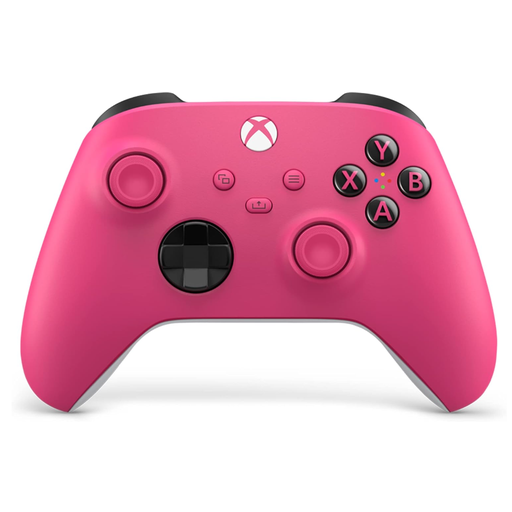
Xbox Wireless Controller – Deep Pink
This is a conventional Xbox controller for a sports game that supports gamepad input. Check compatibility with your chosen game and how many controllers its local mode requires; plan for replacement batteries when using its two-AA power arrangement.
View on Joybuy
Common questions
Which controller works for Nintendo Switch Sports?
Choose from the Joy-Con or Joy-Con 2 arrangements supported by the sport you intend to play. Nintendo lists single and paired controllers, as well as a Joy-Con and leg-strap setup, across the game’s play styles; check the selected sport before buying a standard gamepad instead.
Can I use original Joy-Con with Nintendo Switch 2?
Yes, original Joy-Con can pair wirelessly with Nintendo Switch 2, but they cannot attach directly to it. Confirm that your chosen game and play style accept them before relying on that arrangement.
Will I need a separate charging accessory?
That depends on the exact controller and what comes with it. Check whether it has an internal rechargeable battery or uses replaceable batteries, then confirm whether a suitable charging method is included before planning where it will be kept between games.
What should I check about warranty and returns?
Check the warranty for the exact controller variant and the selling retailer’s return terms before ordering. Sony’s UK direct-sale DualSense listing, for example, states a one-year warranty; that does not establish the terms for another seller or variant.
Can an old controller go in household rubbish?
No. GOV.UK advises using an appropriate collection point for unwanted electrical products and batteries rather than putting them in household rubbish.


