Choose Joy-Con or Joy-Con 2 for a sports game that supports the motion-play style you want; Nintendo Switch Sports, for example, supports specified Joy-Con configurations but not Switch or Switch 2 Pro Controllers. For a sports game designed around conventional pad inputs, consider an Xbox Wireless Controller or PS5 DualSense instead. In either case, match the controller to the exact game, device and any accessories needed for your chosen play style.
Who is this for?
Motion-sports Switch players
If you want to swing, bowl or make other physical movements, start with the control options for your exact game. Nintendo says Nintendo Switch Sports supports particular Joy-Con and Joy-Con 2 arrangements, with options varying by sport.
Sports-game players using a standard pad
If your football, tennis or basketball game uses sticks, triggers and buttons, choose a controller compatible with both the game and your PS5, Xbox or PC. Motion features are not a requirement simply because the game is about sport.
Local multiplayer buyers
If you are adding a player for sessions in a bedroom, check how many controllers the game needs and whether each can be used independently. Nintendo says individual original Joy-Con controllers can operate separately, but player arrangements depend on the game.
What matters when choosing?
Pick the sports game and device first, then check its permitted control style. After that, consider whether you need another controller or a particular accessory for local play.
| Concern |
What to check |
Who this matters to |
| Motion play |
Check the exact game and sport for supported Joy-Con configurations, play modes and any leg-strap requirement. |
If I want to swing a racket or bowl through movement, the controller must work with that game’s motion controls; around 50% of consumers put motion play first. |
| Device compatibility |
Match the controller to your console or computer and confirm that the sports game accepts its standard pad inputs. |
When I switch between a sports game and other games on my existing device, I need a pad that works with both; roughly 30% of consumers prioritise device and game compatibility. |
| Additional players |
Check the game’s local-player controller arrangements and how the extra controller will be charged. |
For occasional games with someone else in the bedroom, I need the right number of usable controllers without an accessory surprise; about 20% of consumers make extra-player flexibility their main concern. |
Buying pitfalls
-
Assuming every sports game accepts motion controls
Control schemes depend on the title. Nintendo says Switch and Switch 2 Pro Controllers do not work with Nintendo Switch Sports, even though they can be used for other games.
Check the official information for your exact game, including its supported controllers and whether the sport you intend to play uses motion input.
-
Assuming a newer Joy-Con works with every accessory
Nintendo says Joy-Con 2 cannot be used with the Nintendo Switch Sports leg strap, despite being supported for other control arrangements in that game.
If leg-strap play matters to you, check the controller generation and the game’s accessory instructions before choosing a setup.
-
Choosing customisation instead of the required control type
Xbox Elite Wireless Controller Series 2 has adjustable-tension sticks, trigger locks and interchangeable components. Those conventional-pad features do not replace motion controls in a game that requires Joy-Con input.
Decide whether your game needs motion controls or a standard pad before weighing up stick and trigger adjustments.
-
Forgetting the old controller
An old controller is electrical equipment. GOV.UK describes retailer take-back requirements for waste equipment of the same type as an item being purchased.
When replacing a controller, ask the retailer about its applicable take-back arrangements or check your local electrical-waste collection options.
Brands to consider
Nintendo
Nintendo’s Joy-Con controllers are relevant when a Switch sports game supports movement-based play.
- Nintendo says original Joy-Con controllers have accelerometer and gyroscope sensors and can operate independently.
- For Nintendo Switch Sports, supported arrangements vary by sport; handheld mode and Pro Controllers are not supported, and Joy-Con 2 cannot be used with the leg strap.
Xbox
The standard Xbox Wireless Controller is a conventional-pad option for supported games on Xbox consoles, Windows PC and compatible mobile devices.
- Xbox lists Xbox Wireless and Bluetooth connectivity for the standard controller.
- Elite Series 2 adds adjustable sticks, trigger locks and interchangeable components, but those features do not establish compatibility with a motion-controlled sports game.
PlayStation
DualSense is a conventional-controller option for supported PS5 sports games, with use on compatible PC, Mac and mobile devices under PlayStation’s stated conditions.
- DualSense offers haptic feedback and adaptive triggers where the game supports them.
- Those effects may require a USB connection in some uses. Check your charging and cable arrangements when buying a standalone controller.
Joybuy controller options
These controllers cover motion-led Joy-Con play and conventional-pad play on supported Xbox or PS5 sports games. Choose by your game’s control scheme and your device rather than treating the three as interchangeable.
 No image available
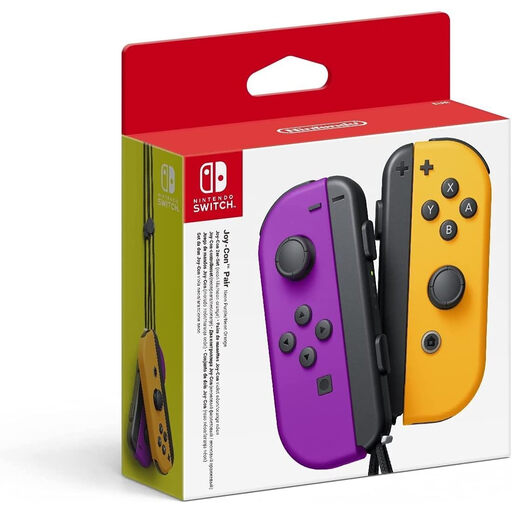
Nintendo Joy-Con Pair – Neon Purple/Neon Orange
Consider this pair for a Nintendo Switch sports game that supports original Joy-Con motion play, including supported play styles in Nintendo Switch Sports.
- Nintendo says original Joy-Con controllers contain accelerometer and gyroscope motion sensors and can work independently.
- Check the intended game’s controller arrangements, and confirm compatibility if you plan to use the pair with Switch 2.
Joybuy
 No image available
Xbox Wireless Controller – Robot White
Consider this standard pad for an Xbox or Windows PC sports game that accepts conventional controller inputs.
- Xbox lists Xbox consoles and Windows PC among supported devices, with Xbox Wireless and Bluetooth connectivity.
- Confirm support for your exact game and device; this is not a substitute for a game’s required motion controls.
Joybuy
 No image available
Sony DualSense Wireless Controller – HYPERPOP Remix Green
Consider this DualSense variant for a PS5 sports game that supports conventional controller inputs.
- PlayStation lists DualSense use with PS5 and compatible PC, Mac and mobile devices.
- Haptic feedback and adaptive triggers depend on game support and may require USB in some uses. Check the exact game and your cable arrangements.
Joybuy
Common questions
Do arcade sports games need a motion controller?
Only games or play styles that specify motion input need a motion controller. Nintendo Switch Sports has supported Joy-Con arrangements that vary by sport; for a game designed around sticks and buttons, check its device and standard-controller support instead.
Can I play Nintendo Switch Sports with a Pro Controller?
No. Nintendo’s UK guidance says neither the Nintendo Switch Pro Controller nor the Nintendo Switch 2 Pro Controller is compatible with Nintendo Switch Sports; check which Joy-Con arrangement your chosen sport uses.
Does Joy-Con 2 work with the Nintendo Switch Sports leg strap?
No. Nintendo says Joy-Con 2 cannot be used with that game’s leg strap. If you want leg-strap play, check the game’s instructions for the original Joy-Con setup.
What should I check about charging an extra controller?
Check how the specific controller charges and which accessories come with the variant you are buying. Nintendo describes charging original Joy-Con through the console or a separately sold Charging Grip, while PlayStation says a USB cable is not included with its standalone DualSense controller.
What can I do with an old controller when replacing it?
Ask the retailer about take-back for electrical equipment of the same type, or check local electrical-waste collection options. GOV.UK describes same-type retailer take-back requirements; confirm the arrangement available for your purchase before taking the old controller to a shop.


