For regular side-by-side drawing comparisons, start by considering two matching 27-inch 4K monitors: equal screen size and native resolution make it simpler to align drawings across the pair. Consider 31.5-inch 4K screens if a larger physical canvas matters more than pixel density and the desk can accommodate them, or a vertical-format secondary screen if stacked references matter more than two equal landscape views. Before buying either pair, check that the computer can drive both displays at their intended resolutions.
Who is this setup for?
Side-by-side drawing reviewers
If you keep a current drawing beside a revision, model view or reference sheet, two similarly sized screens give each document a comparable place in the workspace. Matching models also make stand alignment and display settings simpler to manage.
Detail-first technical users
For dense dimensions and fine annotations, consider the resolution and physical size together. A 27-inch 5K display is another detail-focused option, provided your computer and software can use it at a workable scale.
Laptop-based flexible-desk users
If a laptop will drive both monitors, check its documented external-display limit, the intended dock or cables, and the space needed to position both screens. A monitor's USB-C socket alone does not establish that the complete two-screen connection will work.
What matters when choosing?
Two matching 27-inch 4K monitors
Choose when: You need two equal landscape canvases for drawings, mark-ups or a drawing beside a model.
Allow for: The width of two screens, suitable video outputs and interface scaling that keeps small controls usable.
Two 31.5-inch 4K monitors
Choose when: A larger physical drawing canvas is more useful to you than the finer pixel density of a smaller 4K screen.
Allow for: More desk width and depth; the same 4K resolution is spread across a larger panel.
A vertical-format secondary screen
Choose when: Stacked references, schedules or tall documents are more useful than a second matching landscape view.
Allow for: Different dimensions and scaling beside the main screen; this is not an equal-canvas drawing pair.
| Concern |
What to check |
Who this matters to |
| Drawing detail and matching canvases |
Compare native resolution, screen size and usable software scaling. For a matched pair, check the exact model and stand adjustment on both screens. |
If I compare fine lines and dimensions across two drawings, I want each view to be similarly sized without making annotations awkward to read. Around 40% of consumers put drawing detail and consistency first. |
| Laptop connections and charging |
Check the laptop's support for two external displays at the intended resolutions, then confirm the ports, dock, cables and any required charging wattage. |
When I move between desks with a laptop, I need both drawing screens to connect reliably without assuming that USB-C also supplies the video outputs I need. Around 30% of consumers prioritise connection and peripheral handling. |
| Desk fit and screen placement |
Measure width and depth, including stands or arms, and check how the main screen, secondary screen and lighting can be positioned. |
On a constrained desk, I need room to view both drawings without persistent twisting or troublesome reflections. For around 30% of consumers, desk fit and positioning are the primary concern. |
For particularly fine text, ASUS United Kingdom lists its 27-inch PA27JCV at 5120 × 2880 and 218 PPI. That makes 5K worth considering for detail-led work, but you should check graphics output, cables and comfortable software scaling separately; resolution alone does not establish colour accuracy for a project.
Buying pitfalls
-
Assuming two USB-C monitors will work with any laptop
USB-C or Thunderbolt on a monitor does not establish how many external displays a particular laptop can drive at their native resolutions.
Check the laptop maker's external-display specification against the planned monitor inputs, dock and cables before ordering a pair.
The connection plan may require a dock, suitable cables or adapters.
-
Treating a larger 4K screen as a sharper screen
At the same resolution, a larger panel spreads its pixels over more space. BenQ UK lists the 31.5-inch 4K PD3225U at 140 PPI, while ASUS United Kingdom lists the 27-inch 5K PA27JCV at 218 PPI; these are different combinations of size and resolution.
Decide whether physical canvas size or fine-detail density matters more, and assess the intended viewing distance as well as the resolution.
-
Overlooking desk depth and alignment
The Health and Safety Executive advises positioning a screen about an arm's length away, with its top level with the eyes, and avoiding a posture that twists the back. Two large panels need enough room to make that positioning practical.
Measure the desk, check stand or arm adjustment, place the main work area in front of you and reassess reflections once the screens are positioned.
Monitor arms or a different desk arrangement may be needed to position both displays.
-
Building a matched pair around a legacy listing
LG UK labels the 28MQ780-B DualUp discontinued, and Dell UK lists the older U2723QE as unavailable. Their specifications can inform a format choice without establishing that two matching units can be bought now.
Confirm the exact model, condition, warranty and availability of two units before planning the pair.
Relevant brands to consider
Dell
Dell's UltraSharp 27-inch and 31.5-inch 4K models are relevant to matched landscape drawing setups.
- Dell UK lists the U2725QE as a 27-inch 4K monitor with height, pivot and swivel adjustment.
- Check the exact UltraSharp model and its ports rather than assuming that specifications or availability carry over from an older listing.
BenQ
BenQ's PD series provides a 31.5-inch 4K route for desks where a larger physical canvas is the priority.
- BenQ UK lists the PD3225U at 31.5 inches, 3840 × 2160 and 140 PPI, with Thunderbolt connectivity and up to 85 W power delivery.
- Its larger 4K panel has lower pixel density than a 27-inch 4K panel; check desk fit and the laptop's connection requirements.
ASUS ProArt
The cited ProArt models offer 27-inch 4K and 5K routes for drawing detail and colour-managed workflows.
- ASUS United Kingdom lists the PA27JCV at 27 inches and 5120 × 2880, and the PA279CRV at 27 inches and 3840 × 2160.
- Manufacturer colour specifications do not establish that a particular drawing workflow is correctly calibrated; check the project's colour space and calibration requirements.
LG
LG's DualUp illustrates a vertical-format alternative when stacked references matter more than matching landscape screens.
- LG UK describes the 28MQ780-B as a 27.6-inch, 2560 × 2880, 16:18 monitor with an adjustable Ergo stand.
- LG UK labels that model discontinued, so use it as a format reference rather than assuming current availability.
Joybuy monitors for drawing comparison
These 27-inch 4K monitors are options to assess for a two-screen drawing desk. If you want a matched pair, check that two units of the exact model are available and that your computer can drive both; the OLED model also calls for a separate decision about prolonged static drawings.
 No image available
iiyama ProLite XUB2792UHSU-B6 27-inch 4K UHD Monitor
Consider this 27-inch 4K model if you want two screens of the same size and resolution for drawing comparison. Check the stand range needed to align the pair, and confirm USB-C charging capability if you intend to power a laptop through the monitor.
View on Joybuy
 No image available
BenQ MA270UP Nano Glossy 27-inch 4K IPS Mac Monitor
The 27-inch 4K IPS format makes this a candidate for two similarly sized drawing screens, while its stated height-adjustable stand is relevant to positioning them. Its Nano Glossy finish is worth considering alongside your room's reflections; check computer compatibility and dual-display output before relying on a laptop connection.
View on Joybuy
 No image available
ASUS ProArt PA27DCE-K 4K OLED Monitor
This 4K OLED model is an alternative to the IPS monitors for a drawing desk, not an interchangeable IPS variant. Its product information warns that prolonged high-brightness static images may cause OLED burn-in, a material consideration if drawings and interface elements remain on screen for long sessions. Confirm the USB-C charging wattage if laptop charging matters.
View on Joybuy
 No image available
LG 27UP650K White 27-inch 4K IPS Monitor
The 27-inch 4K IPS format is relevant if you want two matching landscape screens for drawing review. The product name also specifies 60 Hz, HDMI and DisplayPort; confirm the exact number of HDMI inputs for your connection plan, as the product information gives conflicting counts.
View on Joybuy
 No image available
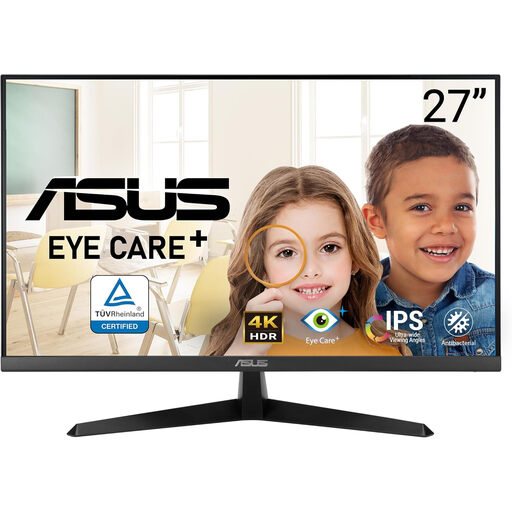
ASUS Eye Care VY27UQ 4K UHD 60 Hz Monitor
This 4K model is another screen to assess for a same-model drawing pair. Before choosing two, check whether its stand adjustment or mounting options let you align them at your desk, and whether its connections suit the computer or dock you plan to use.
View on Joybuy
Common questions
Should both monitors be the same model for comparing drawings?
Usually, a matching pair makes it simpler to align screen size, native resolution, stand height and display settings. A different second screen can still make sense for a specialised reference task, but check how its scaling and position will work beside the main drawing display.
Can any USB-C laptop run two external monitors?
No: the monitor's USB-C connection alone does not determine the laptop's external-display capability. Check the laptop maker's documented display limit at your intended resolutions, then confirm the dock, ports and cables needed for both screens.
How should I position two monitors for drawing review?
Place the screen used most often in front of you and arrange the second so you can consult it without persistent twisting. The Health and Safety Executive advises keeping the top of a screen level with the eyes and positioning it about an arm's length away; check desk depth, adjustment and reflections when applying that advice to two screens.


