What to decide before buying
Identify the work barrier and the employer's adjustment responsibilities before comparing devices. Then check whether the proposed equipment works for the individual task and at every location where it will be used.
| Concern |
What to check when buying |
Who this matters to |
| Assessment and responsibility |
Describe the difficult work task; ask whether an employer assessment and reasonable adjustment should come before a personal purchase or an Access to Work request. |
If I cannot tell whether a different device or a wider workstation change would help, I want the barrier assessed before I pay for equipment. Around 27% of consumers put assessment and responsibility first. |
| Alternative input |
Identify whether the barrier is typing, reaching, pointing or clicking; check the proposed input method against the actual tasks and work devices. |
When a standard keyboard or mouse is difficult to operate, I need controls I can use for my work rather than a different shape chosen on appearance alone. Around 27% of consumers put alternative input first. |
| Use across locations |
Check each work device, operating system and permitted connection method; assess the home and workplace setups separately. |
I move between work locations and need my equipment to connect and be practical to set up at each desk. For around 20% of consumers, multi-location use is the primary concern. |
| Specialist access |
Specify the communication or control task, then check interfaces, software, mounting and configuration through an individual assessment. |
If ordinary input changes do not let me control the computer or communicate for work, I need the complete access method considered before choosing a device. Specialist access comes first for around 26% of consumers. |
Keyboard and mouse options on Joybuy
These keyboards and mice are options to examine when alternative conventional input is relevant to an assessed work task. Check individual fit and compatibility at both work locations; specialist switch or communication access calls for a different, assessment-led choice.
 No image available
HP 960 Ergonomic Split Layout Wireless Keyboard with padded wrist rest
Consider its split layout if the arrangement of a standard keyboard is the identified typing barrier; assess whether the layout and padded wrist rest suit the task.
Wireless keyboard; confirm the connection method works with each managed work device.
View on Joybuy
 No image available
HP 920 Ergonomic Wireless Mouse, black, with detachable wrist rest
Consider this mouse when a change to the pointing setup is under assessment; check whether its shape and controls suit the worker's movement and tasks.
Wireless design and detachable wrist rest; confirm work-device connectivity.
View on Joybuy
 No image available
V7 MW500BT Bluetooth Vertical Mouse, 2.4GHz, six buttons
Consider the vertical form when conventional mouse use is the identified barrier, but assess whether its shape and controls can be used for the actual work tasks.
The product name lists Bluetooth and 2.4GHz modes and an adjustable 1600 DPI sensor. Check the connection method and system requirements for each work device.
View on Joybuy
 No image available
Targus ErgoFlip EcoSmart® Wireless Mouse
Consider its shape as an alternative pointing arrangement only after identifying the movement and controls the worker needs; check individual fit before purchase.
Wireless design; confirm compatibility with managed work devices and the intended desk setup.
View on Joybuy
 No image available
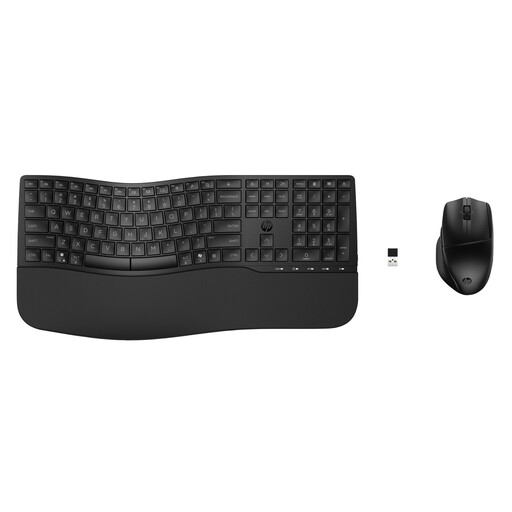
HP 680 CFT Dual-Mode Keyboard and Mouse Set
Consider the set if changes to both keyboard and mouse input are being assessed; check each device against the worker's separate typing and pointing needs.
Dual-mode design; confirm the available connections and compatibility at both work locations.
View on Joybuy
Questions about equipment and support
Should I buy a special keyboard or mouse before asking my employer?
Discuss the work barrier with your employer first if the equipment may be a reasonable adjustment. GOV.UK gives a special keyboard as an example of a possible adjustment and says Access to Work in England, Scotland and Wales does not pay for adjustments an employer must make.
When should a hybrid worker have a display screen equipment assessment?
An individual assessment is relevant where display screen equipment rules apply to the worker's home and workplace computer use. The Health and Safety Executive says these rules can apply to long-term home and hybrid workers who use display screen equipment daily for continuous periods of an hour or more; the assessment should cover both situations.
Can Access to Work support specialist equipment used at home?
Access to Work may consider specialist equipment or assistive software for eligible disability-related work needs in England, Scotland and Wales, including work done at home. According to the Department for Work and Pensions, this support is additional to, rather than a replacement for, reasonable adjustments the employer must make; an individual application does not guarantee a particular item.
Which support route applies in Northern Ireland?
Workers in Northern Ireland should use Access to Work (NI) rather than applying the England, Scotland and Wales scheme guidance. According to nidirect, the person with the disability must apply, and support is considered in light of personal and business benefit in each case.
What should I check before using a wireless keyboard or mouse at two work locations?
Check its pairing or receiver method, power needs and compatibility with each managed work device before relying on it across locations. AbilityNet notes that wireless peripherals can use Bluetooth or a USB receiver; the workstation at each location still needs to be considered separately.


