Start with the everyday task that is difficult and try the relevant accessibility features on the phone, tablet or computer already in use. Consider a peripheral when the main obstacle is typing or controlling that device; investigate a dedicated communication aid or switch-based system when dependable communication or an individual access method is central. Those specialist routes call for careful trials, compatibility checks and, for electronic communication aids, an individual assessment.
Who these options suit
People adapting a device they already use
If reading, navigation, writing or reminders are the main difficulty, try the relevant built-in feature during the actual task. GOV.UK identifies accessibility features on mainstream devices; Apple and Microsoft document options for their own systems. Check the device version, language and apps involved.
People who need a different way to control a device
When a standard keyboard, mouse or touchscreen is difficult to use, a different input method may be worth trying. AbilityNet and Pretorian Technologies describe keyboard and mouse alternatives and switch equipment; the connection, positioning and intended software all matter.
People seeking dependable communication support
When expressing messages reliably is the central task, an app or electronic communication aid needs to fit the person’s communication and access method. AbilityNet recommends a comprehensive speech and language therapist assessment before selecting an electronic communication aid.
What to check before choosing
Identify the task that matters most, then try the proposed method with the device and apps used for that task.
| Concern |
What to check |
Who this matters to |
| Reading and screen navigation |
Try the screen reader or display settings on the exact device. Check the websites and apps needed for everyday use. |
If reading a screen or finding controls is the main barrier, I need access that works throughout my usual tasks. About 31% of consumers put screen access first. |
| Writing and alternative input |
Check device connections and app compatibility, then try the input method in a sustained task. |
Typing messages or operating a pointer can be difficult even when the software itself is usable. For about 31% of consumers, changing how they enter text or control a device is the primary need. |
| Everyday communication |
Check the proposed communication and access methods through an individual assessment and a real-task trial. |
If I need to express messages dependably, occasional dictation may not meet that need. Dependable communication comes first for about 23% of consumers. |
| Memory and information capture |
Try recording, playback or reminders, including how information will be retrieved later. |
When remembering a task or reviewing spoken information is the difficulty, I need a routine I can use again later. About 15% of consumers chiefly need memory or information-capture support. |
Common buying pitfalls
-
Assuming a connection means the task will work
A keyboard, mouse or switch interface may connect to a device without providing the required action in the intended app.
Check the device model, operating-system version, ports, input method and app against the manufacturer’s compatibility information before ordering.
An adapter, receiver, batteries or switch interface may also be needed for the chosen setup.
-
Choosing an electronic communication aid without a trial
AbilityNet advises that selecting a communication aid involves the person’s abilities, preferences and communication needs, not just the device specification.
Seek a comprehensive speech and language therapist assessment and try the proposed communication and access method with relevant communication partners.
Personalisation, training and changes to the setup can take time.
-
Judging an input device only by its specification
A technically compatible keyboard, mouse or switch can still be difficult to position or operate repeatedly.
Try its placement, reach and controls during the task it is meant to support. For a specialised input method, prioritise an individual trial.
Brands to consider
Apple
Built-in accessibility options across iPhone, iPad and Mac.
- Apple describes VoiceOver for spoken or braille screen access and Voice Control for voice-led navigation.
- Apple says feature, app and service availability varies by region and language. Try the required workflow on the exact device.
Microsoft
Windows accessibility options for PC-based screen access and voice control.
- Microsoft lists English-UK for Voice Access and says it can control a PC and enter text by voice.
- Voice Access requires Windows 11 version 22H2 or later and internet access for initial setup and language-file download.
Smartbox
Specialist communication software, including Grid options for Windows and iPad.
- Smartbox describes options for communication and alternative access that can be explored in a trial.
- Confirm the platform, access method and support needed through an individual assessment rather than choosing by the software name alone.
Pretorian Technologies
Assistive switches and interfaces for alternative physical input.
- Pretorian describes its Ultimate Switchbox as a USB interface for up to six switches, with programmable keyboard, mouse and gamepad functions.
- Check the chosen switches, computer connection, operating system and software workflow together.
Joybuy products for specific tasks
These selections cover recording spoken information and trying different keyboard or mouse input. Choose by the task and check whether the controls and connections work for the intended user.
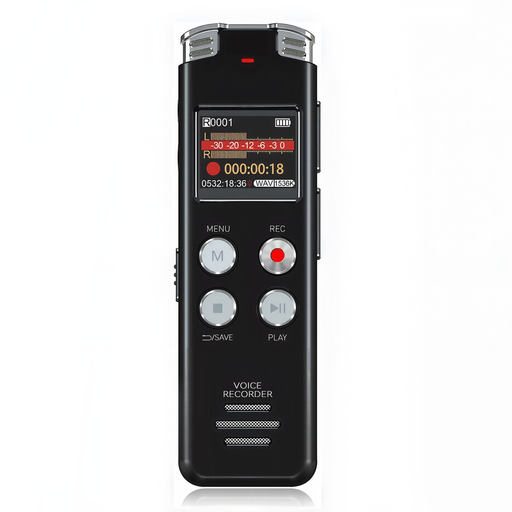 Image unavailable
Rexsun L357 128GB digital voice recorder
Consider this for capturing spoken information to review later, rather than for reminders or broader device access. The product name specifies 128GB storage and an LCD screen; try the recording, playback and display controls to see whether they are usable for the intended person.
View on Joybuy
 Image unavailable
HP 960 wireless split-layout keyboard
Consider this if changing the typing arrangement is the priority and a keyboard remains a usable input method. Its name identifies a split layout and padded wrist rest. Check the keyboard layout and connection with the intended device, and try the key arrangement if possible; the design alone does not establish individual comfort.
View on Joybuy
 Image unavailable
V7 MW500BT Bluetooth vertical mouse
Consider this if pointer control is possible but a different grip shape is worth trying. The product name specifies Bluetooth and 2.4GHz connection options, six buttons and adjustable sensitivity up to 1600 DPI. Check device compatibility and whether its shape and controls suit the intended hand and task; it is not a switch interface.
View on Joybuy
Frequently asked questions
Should I try built-in accessibility features before buying hardware?
Yes, if you already have a device that might support the task: try its relevant features in the apps you actually use. GOV.UK notes that mainstream phones, tablets and computers often include accessibility features. If the task remains difficult, consider a compatible peripheral or a more specialised access method.
When is an assessment important for a communication aid?
For an electronic communication aid, AbilityNet recommends a comprehensive assessment by a speech and language therapist. Motor, visual, cognitive, language and communication needs can all affect the choice; trial the proposed setup before committing to it.
What should I check before choosing a keyboard, mouse or switch?
Check the exact device and operating system, its connection options and whether the intended app accepts the selected input. A switch setup may also need an interface that maps the action to a keyboard or mouse command. Try the physical placement and controls, not just the connection.
Can I use Windows Voice Access in UK English?
Microsoft lists English-UK as a Voice Access language option for Windows 11 version 22H2 or later. Initial setup and language-file download need internet access; Microsoft says voice recognition can then work offline.


