Who these tools can help

Workers finding standard computer controls difficult

For people who need to complete computer-based work when a standard keyboard, mouse or touchscreen creates a barrier. Start with built-in settings for limited needs, then consider specialist input, screen-reading or speech-recognition tools when required tasks remain difficult. GOV.UK, Microsoft Support and AbilityNet describe these routes.

Higher-education students needing accessible study access

For students who need reliable access to course reading, writing, online learning or note-taking, and may need equipment, software, training or non-medical support tailored to study barriers. Student-support arrangements differ across the UK nations; guidance from GOV.UK, SAAS, GOV.WALES and nidirect sets out separate routes.

People considering their first specialist tool

For buyers deciding whether a dedicated keyboard, trackball, screen reader or dictation package solves a specific activity barrier better than existing device settings. Compatibility checks and a trial, hire option or assessment are particularly useful where fit and workflow matter.

What to check before choosing

Priority What to check Your needs
Task and access method Define whether reading screen content, writing, navigating apps, pointing, clicking or communicating is difficult. Check whether built-in features directly support that activity before adding equipment. I need an access method that helps me complete the particular task that is difficult, rather than a general-purpose device labelled as assistive.
Keyboard and pointer fit Check layout, key position, physical size, button arrangement, cursor settings and the connection method. For wireless input, confirm any receiver or adapter needed for the intended device. A standard keyboard or mouse may not suit my reach, movement precision, hand position or tolerance for sustained use.
Software compatibility Confirm the exact operating system and version, language support, setup download requirements, microphone input and essential work or study applications. Windows Voice Access requires Windows 11 version 22H2 or later; Microsoft lists English-UK support. I need the tool to work with my own computer, language settings, connections and the software I rely on every day.
Assessment and support For costly, bespoke or multi-part setups, ask whether an assessment can consider equipment, software, training and support together. Check the route that applies to your UK nation and circumstances. I want to avoid choosing a self-funded setup that may need training, adjustment or a broader support plan for work or study.

Common buying pitfalls

  • Choosing a device because it is labelled assistive

    A tool that helps with pointer precision may not address reading screen content or producing written work. Built-in features, specialist keyboards, alternative pointers, screen readers and speech tools address different barriers.

    Define the difficult activity first: reading, writing, navigating, pointing, clicking, maintaining hand position or communicating. Test the relevant feature or trial device against that activity before choosing.

    A poor fit can mean adaptation time and the need to replace equipment.

  • Assuming a voice tool works the same way on every setup

    Windows Voice Access, Mac Voice Control and Dragon Professional have different operating-system and setup conditions. Installation alone does not show that a tool supports a required work or study workflow.

    Check the exact operating system, supported language, first-use download or activation, microphone setup and the applications you need. Validate supplier claims about recognition or productivity in your own environment.

  • Overlooking connection and physical-control requirements

    Alternative input devices can depend on a particular receiver or adapter, while button placement, speed settings and mounting can affect practical use. Pretorian states that its SimplyWorks Trackball requires a SimplyWorks receiver for wireless computer input.

    Confirm every item needed to connect the device to your computer, tablet or phone, and check that the button layout, size and cursor settings can be used comfortably.

    You may need additional accessories, charging arrangements or mounting support.

  • Self-funding a bespoke setup before checking support routes

    Work and student-support routes are based on individual needs and can consider more than one retail item. A combination of hardware, software, training and support may need a different decision than a single purchase.

    Before buying substantial or customised equipment, ask an employer, disability adviser, student-finance body or assessment provider about the support route that applies to you.

Relevant brand references

Microsoft

A built-in Windows route for people using Windows 11 who need voice-led PC control and text authoring without separate speech-recognition software.

  • Microsoft states that Voice Access can control a PC and author text without an internet connection after setup, and is available from Windows 11 version 22H2.
  • Check your Windows version, microphone, language and required applications before relying on it for work or study tasks.

Apple

A built-in macOS route for Mac users needing voice navigation, onscreen interaction, dictation and editing.

  • Apple states that Voice Control can navigate the desktop and apps, interact with onscreen content, dictate and edit text.
  • The first-time download requires an internet connection, and voice control should be checked against the intended workflow.

NV Access

Developer of NVDA, a free and open-source Windows screen reader for people who are blind or vision impaired.

  • NVDA provides speech and Braille feedback for Windows without a download charge, according to NV Access.
  • Confirm support for essential apps, Braille hardware and any third-party add-ons before using it for critical work or assessment tasks.

Freedom Scientific

Developer of JAWS, a dedicated Windows screen reader with a downloadable trial for blind and visually impaired users.

  • Freedom Scientific describes JAWS as a Windows screen reader and provides a trial download.
  • Verify current system recommendations, edition, licensing and compatibility with the services used for work or study.

Nuance

Developer of Dragon Professional for document-heavy and workflow-customised dictation on Windows.

  • Nuance states that Dragon Professional v16 supports live speech-to-text, transcription of existing single-speaker audio and custom voice commands.
  • Nuance describes it as optimised for Windows 11 and backwards-compatible with Windows 10; check the exact edition, licence, microphone and required applications.

Pretorian Technologies

A UK assistive-input manufacturer relevant to users needing a trackball, remote-switch support or configurable mouse alternatives.

  • Pretorian lists SimplyWorks Trackball compatibility with PC, Mac, Chromebook and phones or tablets via an adapter.
  • Wireless computer input requires a SimplyWorks receiver; check settings, dimensions and charging against the user's movement pattern.

Maltron

A UK specialist-keyboard manufacturer offering non-standard ergonomic, single-hand, expanded and alternative layouts.

  • The L90 dual-hand keyboard can be ordered for PC or Apple Mac compatibility, with layout options and an optional integral trackball.
  • Configuration fit and adjustment time matter. Maltron's statements about movement, tension and RSI-related effects are manufacturer claims.

Joybuy product options

Joybuy keyboard options for work or study where a non-standard typing position may be more relevant than a conventional straight keyboard.

HP 960 ergonomic split-layout wireless keyboard with padded wrist rest

HP 960 Ergonomic Split Layout Wireless Keyboard

Consider this option where sustained typing and hand position are the main barriers.

The listed features include a split layout, negative tilt, padded wrist rest, repositionable numeric keypad, 20 programmable keys, Bluetooth, 2.4 GHz connection and pairing for up to three devices.

Check the key spacing, split angle, UK key mapping and compatibility of programmable-key functions with your operating system before relying on it.

Joybuy
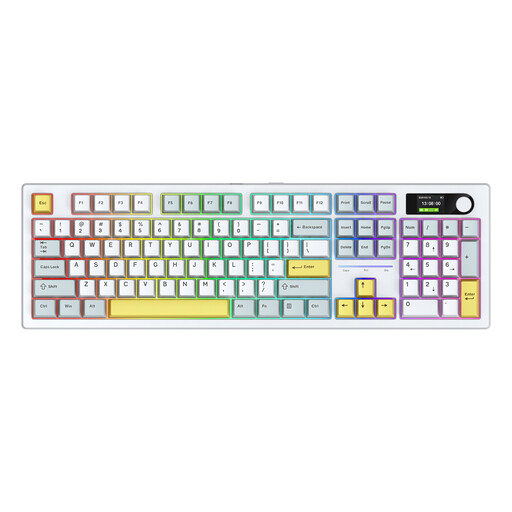
Siukie ACH105 Alice-layout mechanical keyboard

Siukie ACH105 Alice-Layout Mechanical Keyboard

This may suit a buyer exploring a non-standard typing position for work or study.

The product listing states an Alice layout, hot-swappable switches, Bluetooth 5.0, 2.4 GHz wireless and USB-C wired connectivity.

Confirm the UK key mapping, key spacing, switch force, dimensions and operating-system support before choosing it for an access setup.

Joybuy

Frequently asked questions

Should I buy specialist hardware before trying accessibility settings already on my computer?

Usually, start with built-in accessibility features when they directly support your task and device. Microsoft states that Windows Voice Access supports voice-led control and authoring on eligible Windows 11 devices, while Apple states that Mac Voice Control can navigate apps, interact with onscreen content, dictate and edit text. Move to specialist hardware or software when those settings do not address the specific barrier.

When should I seek a formal needs assessment before buying assistive computer technology?

Seek an assessment before purchasing costly, customised or interdependent equipment, or when you need equipment, software, training and support together. GOV.UK explains that England's DSA process uses a needs assessment after an application is approved, while Access to Work support in England, Scotland and Wales is based on individual workplace needs.

Can student funding support assistive computer equipment across the United Kingdom?

Possible support is nation-specific and depends on eligibility and individual needs. GOV.UK, SAAS, GOV.WALES and nidirect describe student-support routes that can include equipment, software or training; check with the relevant student-finance body and your university or college disability service before buying.

What compatibility checks matter for speech recognition or voice control?

Check the operating system and version, language support, initial setup requirements, microphone input, essential applications and any internet requirement for setup or licensing. Windows Voice Access requires Windows 11 version 22H2 or later, Mac Voice Control needs a first-time download, and Nuance states that Dragon Professional v16 supports Windows 11 and Windows 10.

What should I check before buying a specialised keyboard, trackball or switch-based device?

Verify the connection method, required receiver or adapter, intended device and operating system, charging needs, button or key configuration and physical dimensions. Also check whether a trial, hire or return option is available, since physical fit and adaptation can be central to whether the tool works for your tasks.