A compact handheld recorder is a practical choice for a quiet, one-to-one booth interview if you can place its microphones close to the speaker and confirm that it records WAV and allows headphone monitoring. In a reflective booth, or when both voices need close capture, consider a compatible lavalier microphone or a recorder with two separate microphone inputs, allowing for the extra equipment and setup. For material intended for preservation, the Oral History Society recommends uncompressed WAV; plan to transfer and back up the files after each session.
Who is this for?
One-to-one booth interviewers
If you record seated interviews in a quiet booth, a recorder you can position close to the interviewee may keep the setup straightforward. The University of Leicester’s East Midlands Oral History Archive advises placing a table microphone near the speaker.
Projects using reflective rooms
Hard surfaces can make microphone placement especially important. The East Midlands Oral History Archive advises close placement and notes that soft furnishings absorb echoes; consider whether a table recorder or a compatible lavalier will let you get close enough.
Community projects keeping an archive
If interviews will be retained or deposited, recording format and file handling matter alongside microphone choice. The Oral History Society recommends uncompressed WAV and advises transferring recordings to a computer and making backup copies after interviews.
What matters when choosing?
Start with the microphone position that your booth and seating arrangement allow. Then check the recording format and file-handling routine, and decide whether both speakers need separate microphones.
| Concern |
What to check |
Who this matters to |
| Voice clarity in a reflective booth |
Can you place the microphone near the interviewee? If using a lavalier, check its connector and power requirements against the recorder. |
If the booth sounds echoey, I need the voice closer to the microphone rather than relying on recording resolution to fix the room sound. Around 44% of consumers put close voice capture first. |
| Archive-oriented recording |
Check for uncompressed WAV at a suitable setting, headphone monitoring, and a workable transfer-and-backup routine. The East Midlands Oral History Archive advises at least 44.1 kHz/16-bit for archival recordings. |
When interviews must be kept, I need a recording and backup routine I can repeat after every session. For around 33% of consumers, that archive workflow is the primary concern. |
| Separate microphones for two speakers |
Check the number and type of inputs, whether your microphones need phantom power, and which cables or mounts the setup requires. |
If the interviewer’s voice must be as usable as the participant’s, I may need a microphone positioned for each person. Separate-microphone control comes first for around 23% of consumers. |
Mistakes to avoid
-
Choosing on 32-bit-float recording alone
That recording feature does not remove reflections or make a distant voice sound close. Microphone position still matters in a small booth.
Make a test recording in the booth with the microphone where you intend to use it. If speech sounds distant or echoey, try closer placement and a softer surface before deciding which recorder setup you need.
-
Assuming built-in microphones will capture both people equally
A recorder near the interviewee may pick up the interviewer from farther away. The East Midlands Oral History Archive’s advice to place a table microphone near the speaker makes that seating difference worth checking.
Decide whether the interviewer’s voice needs equally clear capture. If it does, assess a microphone for each speaker and a recorder with the required inputs.
-
Leaving the only copy on the recorder
Recording capacity is not a preservation routine. The Oral History Society advises transferring interview files to a computer and making backup safety copies.
Set aside time after each session to transfer, organise and back up the files.
-
Deciding access and reuse arrangements after recording
Local-history interviews may include identifiable information, while later archive access or publication can raise questions that are difficult to settle retrospectively. The Oral History Society advises establishing the legal basis before an interview begins.
Explain the intended storage, access and reuse arrangements beforehand, determine the appropriate lawful basis, and document the participant’s choices. Where consent is the lawful basis, the Information Commissioner’s Office says it must be specific and informed.
Relevant brands to consider
Zoom
Zoom’s H1essential and H4essential illustrate two different interview setups: a compact recorder with built-in microphones and a four-track recorder with two XLR/TRS inputs.
- Zoom lists 32-bit-float recording for both models; its H4essential specifications also list four tracks and two XLR/TRS inputs.
- Choose the H4essential’s additional inputs only if you need the separate microphones and can accommodate their cables and setup.
Tascam
The DR-07XP offers adjustable built-in microphones in a handheld recorder.
- Tascam lists WAV recording options including 32-bit float at sampling rates up to 96 kHz.
- If your plan calls for two individually connected XLR microphones, check for a recorder specified with those inputs rather than treating an external-microphone mini-jack as equivalent.
OM SYSTEM
The LS-P5 is a compact option to consider when you intend to record with built-in microphones and monitor the interview.
- OM SYSTEM lists a three-microphone system, headphone monitoring, 16 GB of internal memory and up to 37 hours of recording battery life for the LS-P5.
- If separate XLR microphones are central to the project, check for a recorder expressly specified with the inputs they require.
Joybuy recorder choices
These portable voice recorders are choices to assess for a straightforward interview setup. Before choosing either for archive-oriented work, confirm its WAV recording settings, microphone placement options and headphone monitoring against your booth and preservation plans.
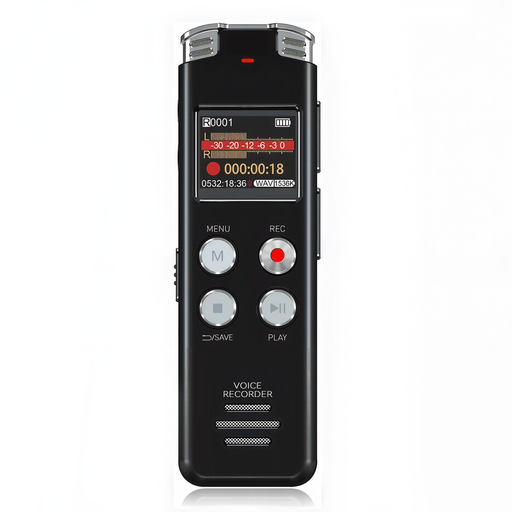 Image unavailable
Rexsun L357 128GB portable voice recorder with LCD screen, grey
Consider this portable recorder for a seated interview if you can position it suitably near the speaker. Its named configuration has 128 GB of storage and an LCD screen; confirm the recording format and microphone and monitoring arrangements before using it for an archive project.
View on Joybuy
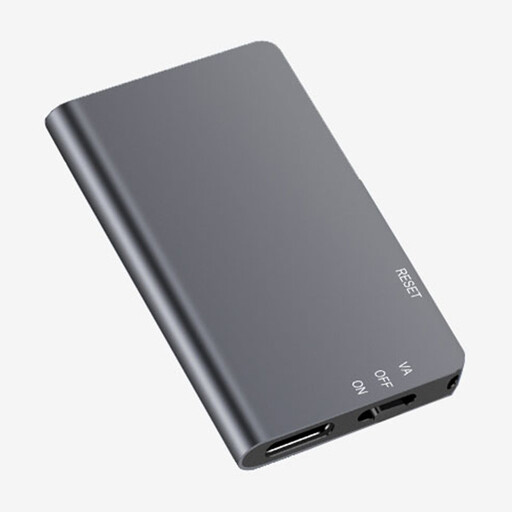 Image unavailable
Rexsun L810 64GB one-touch voice recorder, grey
One-touch recording may suit a simple seated-interview routine. This variant has 64 GB of storage; check its WAV settings, microphone options and headphone monitoring before relying on it for booth interviews intended for preservation.
View on Joybuy
Frequently asked questions
Will 32-bit-float recording fix echo in a small booth?
No. It can ease level-setting, but it does not remove reflections or correct a microphone placed too far from the speaker. Test the intended position in the booth and move the microphone closer if speech sounds distant.
Which recording format should a local-history project choose?
Choose uncompressed WAV for archive-oriented interviews, as recommended by the Oral History Society and British Library. The University of Leicester’s East Midlands Oral History Archive advises a minimum of 44.1 kHz/16-bit for archival recordings; check that the recorder offers the setting your project needs.
What should happen to the files after an interview?
Transfer the recordings to a computer and make backup safety copies. The Oral History Society recommends both steps after an interview, so plan how files will be organised and stored rather than relying on the recorder’s memory alone.
What should we agree with interviewees before recording?
Explain the intended recording, storage, access and reuse arrangements before the interview, and establish the appropriate lawful basis for handling identifiable recordings. The Oral History Society advises resolving the legal basis in advance; where a UK project relies on consent, the Information Commissioner’s Office says that consent must be specific and informed.


