What matters when choosing?
Start with the recording routine you will actually follow, then decide how much control you need over changing sound levels and background noise. At a shared desk, make privacy a separate check rather than treating it as an audio feature.
Compact recorder with built-in storage
Choose it when: You mainly make short solo notes and want to start without managing a removable card. Sony UK lists 16 GB built-in memory and a 29 g weight for the ICD-TX660.
Trade-off: Fixed built-in capacity offers less room to change your storage arrangement, and a compact body alone does not prevent nearby speech from being recorded.
32-bit-float handheld recorder
Choose it when: Your speaking level varies or you want to review and edit recordings later. Zoom lists 32-bit-float recording for the H1essential, while Tascam lists it for the DR-05XP.
Trade-off: Check storage and file handling on the exact model. Zoom's documented noise-reduction feature addresses steady background noise, not a guarantee that colleagues' speech will be excluded.
| Concern |
What to check |
Who this matters to |
| Voice clarity amid desk noise |
Check what kind of noise the exact model's controls address, and whether you can place its microphone close to your voice. |
When a fan or similar steady sound runs nearby, I want to hear my diary entry clearly without assuming a filter will remove other people's voices. Roughly 33% of consumers put clarity against steady desk noise first. |
| Quick daily capture |
Check how recording starts, whether storage is built in, and how you charge the recorder and transfer files. |
For brief notes between tasks, I want to press record and put the device away without dealing with a card each time. Around 27% of consumers make that low-friction routine their primary concern. |
| Editing and recording options |
Check recording formats, 32-bit-float support and removable storage; confirm an external microphone input on the exact model if you need one. |
If my speaking volume changes or I plan to edit entries, I would accept more file management for greater recording flexibility. That is the leading need for roughly 20% of consumers. |
| Privacy around colleagues |
Check workplace policy, likely capture of identifiable speech, and where recordings or transcripts will be stored and shared. |
At a shared desk, I do not want a personal note to retain someone else's conversation or reach an unintended audience. About 20% of consumers place that privacy concern first. |
Joybuy recorders for diary entries
These Joybuy voice recorders offer options for capturing diary entries, including compact one-touch models and a recorder listing transcription features. Compare their storage arrangements and test how they capture your voice at a shared desk; product titles that mention noise reduction do not establish that nearby speech will be removed.
 No image available
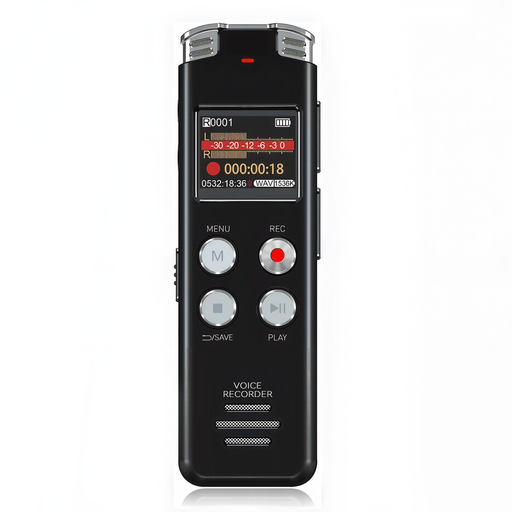
Rexsun L357 128GB Voice Recorder, Grey
Consider this portable recorder for diary entries if its stated 128GB capacity and LCD screen suit your routine.
The product name mentions intelligent noise reduction, but it does not establish which sounds the feature addresses. Test voice clarity and placement before relying on it at a shared desk.
View on Joybuy
 No image available
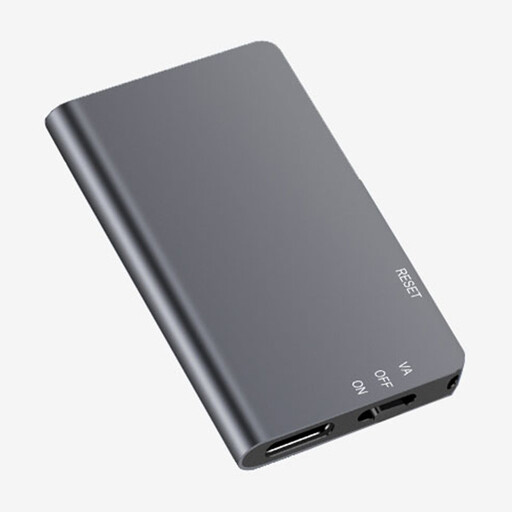
Rexsun L810 64GB One-Touch Voice Recorder, Grey
One-touch recording makes this a candidate for brief, recurring diary entries.
The product name specifies 64GB capacity. Check how it stores and transfers files, and make a test recording near the sounds you expect at your desk.
View on Joybuy
 No image available
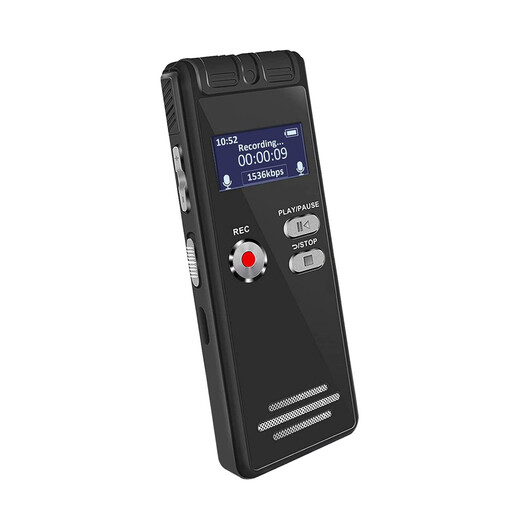
Rexsun L15 64GB Portable Voice Recorder, Grey
This portable recorder may suit regular diary entries if its controls and storage arrangement fit the way you save files.
The product name specifies 64GB capacity and an LCD screen. Before choosing it, confirm whether that capacity is built in or supplied on a removable TF card; do not rely on a noise-reduction label to exclude nearby speech.
View on Joybuy
 No image available
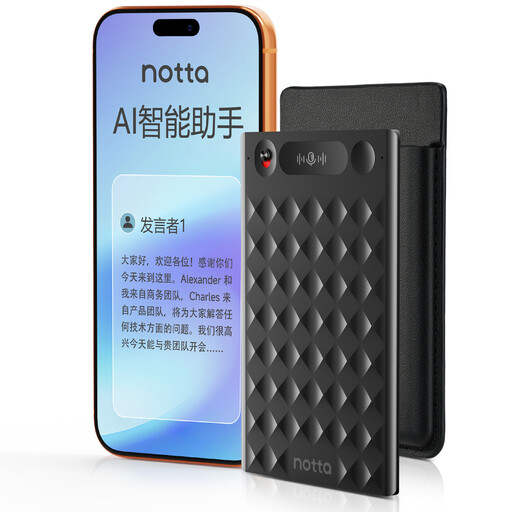
32GB AI Voice Recorder with Case, Black
Consider this model if you want diary recordings alongside the transcription, translation and summary functions named in its product title.
The title also specifies one-press recording and 32GB storage. Before using any app or cloud feature for a workplace diary, check where recordings and transcripts go and who can access them.
View on Joybuy
Common questions
Can I record a diary at a shared workplace desk without telling anyone?
Check workplace policy and seek appropriate permission before recording where other people's conversations could be captured. The Information Commissioner's Office distinguishes genuinely personal activity from organisational processing and describes recording conversations as particularly intrusive in an organisational setting; neither point settles the position at your particular workplace.
Will AI noise reduction remove a colleague's voice?
Do not assume it will. Zoom describes the H1essential's AI Noise Reduction as addressing steady background noise, which is not a promise to remove nearby conversation. Test the intended microphone position and use a private location when recording could capture others.
Is built-in memory or a microSD card easier for a daily diary?
Built-in memory avoids a removable-card routine if the recorder's stated capacity meets your needs; Sony UK lists 16 GB built-in memory for the ICD-TX660. A microSD-based recorder gives you a different storage workflow, including card compatibility, formatting and backups; Zoom documents those steps for the H1essential.
Do spoken diary entries need 32-bit-float recording?
Not necessarily: it is more relevant when your speaking level changes or you want to avoid adjusting input levels before entries. Zoom lists 32-bit-float recording for the H1essential and Tascam lists it for the DR-05XP. For short, consistent notes, weigh that feature against the recorder's storage and file-handling routine.
What upkeep should I allow for?
Back up diary files regularly and make a short test recording before an entry you particularly want to keep. If you choose a removable-media model, check card compatibility and condition as well; Zoom's H1essential manual covers inserting, formatting and testing microSD cards.


