Choose the microphone around the noise in your booth and the recording equipment you can use: a USB-capable condenser is an option for a quiet, controlled space, while a close-address dynamic microphone may better suit a setup focused on plosive control and vibration isolation. Neither choice makes a noisy booth quiet or removes the need to listen to and check finished chapters.
Who needs to consider what?
Booth-noise-conscious narrators
If ventilation, a computer or movement near the microphone is audible, prioritise a quiet recording space, consistent microphone placement and control of plosives and stand-borne bumps. ACX advises narrators to record in a quiet space; a directional pickup pattern does not replace one.
Computer-first solo narrators
A direct USB connection may make the initial recording chain simpler. If an XLR interface might be useful later, check whether the exact microphone offers both connections and which mounting and pop-filter accessories come with it.
Long-form quality-control narrators
Recording many chapters makes a repeatable setup and careful review of edited files important. ACX says its Audio Lab does not detect noise-floor or editing errors, so automated analysis cannot replace listening.
What matters when choosing?
For audiobook chapters recorded alone in a small booth, assess the space before choosing a connection or microphone type. ACX recommends a cardioid pattern for a single-voice recording and advises using a quiet recording space.
USB-capable condenser
Consider it when: The booth is already quiet and you want to record directly to a computer while keeping an XLR option. The RØDE NT1 5th Generation offers both USB-C and XLR connections.
Accept the trade-off: RØDE’s stated low microphone self-noise is not a measure of booth noise; room sounds and reflections still need attention.
Close-address dynamic microphone
Consider it when: You plan to narrate close to the microphone and value the windscreen or vibration-isolation features of a particular model.
Accept the trade-off: XLR-only choices need compatible recording hardware, and close narration requires consistent positioning. Check each model’s connections rather than assuming all dynamic microphones use XLR alone.
| Concern |
Buying checks |
Who this matters to |
| Booth noise, plosives and vibration |
Check the pickup pattern and the supplied windscreen, pop filter or shock isolation. Test the booth with ventilation and equipment running as they would during recording. |
If ventilation or desk bumps are audible while I narrate, I need to deal with them before recording whole chapters. Around 42% of consumers would put noise, plosives and vibration first. |
| Connection and setup |
Check whether the exact model uses USB, XLR or both, and what cables and mounting accessories come with it. For an XLR route, confirm the interface or mixer requirements. |
I want a workable way to record to my computer without assembling an unfamiliar signal chain just to begin. For around 33% of consumers, connection and setup would be the primary concern. |
| Capture and chapter review |
Record and edit a representative passage in the normal booth, then listen and check the finished file against your distributor’s requirements. |
Across a long chapter schedule, I need consistent voice capture and a way to catch faults in edited files. Around 25% of consumers would prioritise capture and review. |
Mistakes to avoid
-
Expecting a directional microphone to fix the booth
A cardioid or hypercardioid pattern focuses pickup, but it cannot make audible ventilation, reflections or handling noise disappear. ACX advises recording in a quiet space.
Before committing to a microphone route, record a passage with the computer, ventilation and furniture in their normal positions. Listen for background sound, plosives and bumps.
Finding persistent noise after recording chapters can mean spending time treating the space or recording passages again.
-
Relying on an automated check alone
ACX says its Audio Lab does not detect issues such as noise floor or editing errors. A file can therefore need further attention even after an automated check.
Listen through edited chapters for pauses, breaths, mouth noises, edit points and changes between sessions, as well as using the available file-analysis tools.
-
Ordering an XLR microphone without checking the chain
An XLR connection needs compatible recording equipment. Shure specifies that the SM7dB’s active preamp also needs +48 V phantom power from an interface or mixer.
Confirm the inputs, gain and phantom-power capability of your equipment, then check the exact model’s cables, mount, stand fit and pop-filter provision before ordering.
Relevant brands to consider
RØDE
The NT1 5th Generation is a cardioid studio condenser for narrators considering both direct USB-C recording and an XLR connection.
- RØDE states 4 dBA self-noise and lists a shock mount, pop filter, XLR cable and USB-C cable with this model.
- That self-noise figure describes the microphone, not the noise or reflections in a small booth.
Shure
The cardioid dynamic SM7dB is an XLR option for close-address narration with an active built-in preamp.
- Shure specifies selectable +18 dB or +28 dB preamp gain, internal shock isolation and a close-talk windscreen.
- Its active preamp requires +48 V phantom power from an interface or mixer; the SM7dB is not a direct USB microphone.
Audio-Technica
The AT2040 is a hypercardioid dynamic XLR microphone positioned by Audio-Technica for voice-over use and focused close-range pickup.
- Audio-Technica describes an internal multistage windscreen and integrated shock mount on the AT2040.
- It needs compatible XLR recording equipment, and its directional pickup calls for consistent narrator positioning.
Microphones on Joybuy
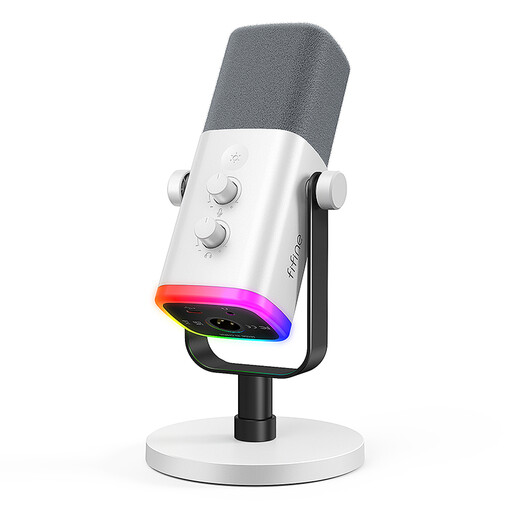
These two FIFINE dynamic microphones offer USB and XLR connection options for close voice recording. Compare how each would fit your booth and recording chain, then make a test recording before settling on a setup for full chapters.
 No image available
FIFINE K688CT USB/XLR Dynamic Microphone Kit with Boom Arm
Consider this kit if a boom arm will fit your booth and you want the choice of a computer or XLR mixer connection for narration.
The product name lists a mute button, headphone jack and gain knob. Check the arm’s mounting fit and confirm which controls work with your intended connection.
View on Joybuy
 No image available
FIFINE AM8W White XLR/USB Dynamic Microphone
This White variant is an option if you want a dynamic microphone with USB and XLR connections for a close-voice setup.
Its product name lists a gain knob, mute button and monitoring jack. Check the mounting arrangement and how the controls operate with your chosen connection before recording chapters.
View on Joybuy
Questions about audiobook recording
Should I choose a condenser or a dynamic microphone for a small booth?
Choose according to the booth and your recording chain, not microphone type alone. A condenser such as the RØDE NT1 5th Generation offers USB-C and XLR options for an already quiet space; a close-address dynamic model may suit you when its windscreen and vibration-isolation features fit your setup. Test a passage in the actual booth before recording full chapters.
Will a good microphone make my audiobook files meet ACX requirements?
No microphone alone can establish that finished files meet ACX requirements. ACX provides analysis tools for finished audio but says Audio Lab does not detect noise-floor or editing errors, so edit and listen to a representative file as well as analysing it.
Do I need an audio interface to record narration?
You can record directly to a computer with a microphone offering a suitable USB connection, such as the RØDE NT1 5th Generation. An XLR-only model needs compatible recording hardware; the Shure SM7dB’s active preamp specifically requires an interface or mixer supplying +48 V phantom power.
Can I publish an audiobook of any book once I have recording equipment?
No: owning a microphone does not give you the rights to record and distribute someone else’s book. Check the permission or rights arrangement for the particular work. The UK Intellectual Property Office says copyright exceptions apply only in specific situations, so do not assume an exception covers your project.


