Who is this setup for?

Shared-desk narrators managing nearby voices

If neighbouring speech, typing and room sound enter your takes, focus on a recorder that accepts a microphone you can position close to your mouth. Shure’s guidance on cardioid microphones supports aiming the microphone at the main voice source, but placement will not eliminate interruptions.

Solo beginners seeking a standalone recorder

If you want to start a chapter without connecting a computer, straightforward recording controls and a compatible external-microphone input may matter more than extra tracks. Zoom’s H1essential, for example, accepts a lavalier through its mic/line input; you still need to check placement and listen back.

Narrators building a repeatable workflow

If chapters involve several takes, editing and possible microphone changes, consider external-input and computer-interface options alongside the recorder itself. For distribution through ACX, Audible’s ACX Audio Lab provides checks for finished audio, including levels, bitrate and spacing.

What matters when choosing?

Compact recorder and lavalier

Choose when: You record solo and want a compatible microphone close to your mouth with less equipment on the desk.

Trade-off: Lavalier placement needs care to avoid clothing rustle; a 3.5 mm input does not provide the same microphone connections as an XLR/TRS input.

XLR/TRS recorder and cardioid microphone

Choose when: Nearby speech is a recurring problem and you want to position a conventional vocal microphone close to the narrator.

Trade-off: The microphone, cable and stand take setup time and desk space; loud interruptions can still enter a take.

Handheld recorder with built-in microphones

Choose when: The desk is quiet enough for narration and you also want a recorder for general stereo capture.

Trade-off: Built-in microphones cannot be positioned at your mouth independently of the recorder; an external input offers another option if nearby sound dominates.

ConcernWhat to checkWho this matters to
Nearby speech and desk noise Match the recorder’s input to a compatible close microphone, and check for headphone monitoring. If someone speaks beside me, I need my narration to remain prominent in the take. Around 36% of consumers put control of nearby sound first.
Reliable, simple takes Check the recording controls, headphone connection and whether 32-bit-float capture suits your workflow. During a long chapter, I want to avoid losing a take to a level-setting mistake or awkward controls. For roughly 29% of consumers, take reliability and simplicity come first.
Editing and microphone options Check external-input type, computer-interface compatibility and the recording files required by your distributor. If I will edit several chapters or change microphones later, I need a setup that fits that process. About 21% of consumers prioritise workflow flexibility.
Portability Check size, power and how files move off the recorder without adding equipment you would rather not carry. When I clear the shared desk after each session, I want equipment that is easy to put away. Portability is the primary need for around 14% of consumers.

Mistakes to avoid

  • Expecting noise reduction to replace microphone placement

    A noise-control feature does not establish that a recorder will keep neighbouring speech out of an audiobook take. The position and direction of the microphone still matter.

    If you can test the setup, record a paragraph while normal desk activity continues. If the built-in microphones capture too much of it, consider a compatible close external microphone.

  • Assuming 32-bit float produces a finished chapter

    32-bit-float capture helps with recording-level errors; it does not remove voices, mouth noise or the need to edit. Audible’s ACX Audio Lab checks finished audio against submission measures that include levels, bitrate and spacing.

    Listen through headphones, edit the take and check the finished file against your intended distributor’s requirements.

    Allow time to review and edit takes, and space to retain the recording files you need.

  • Choosing a pocket recorder for sensitivity alone

    Capturing a distant voice is useful for some recordings, but it does not show that nearby colleagues will be less audible in narration.

    Compare external-microphone connections and close-placement options before making compact size the deciding factor.

  • Leaving a recorder running around colleagues

    Other people’s conversations may enter the recording. The Information Commissioner’s Office describes audio recording in organisational surveillance as particularly intrusive and sets out lawfulness requirements for surveillance within its guidance.

    Aim to record your planned narration, avoid retaining colleagues’ conversations where possible and follow workplace policy. If the recording is employer-directed or intended to monitor others, seek advice on the applicable privacy requirements before proceeding.

Relevant brands for reference

Zoom

Zoom’s H1essential and H4essential illustrate two recorder connections: a compact model with a 3.5 mm mic/line input for a compatible lavalier, and a model with two XLR/TRS inputs for external microphones.

  • Zoom lists 32-bit-float recording for both models; the H4essential also offers four-track recording.
  • Neither 32-bit-float capture nor an external input, on its own, prevents shared-desk sound from entering a take.

Tascam

Tascam’s DR-07X is a handheld stereo recorder with adjustable built-in microphones, a mini-jack external input and USB audio-interface operation.

  • The external input gives a narrator another microphone option if the built-in pair is poorly placed for a shared desk.
  • Do not assume the built-in microphones will reject conversation nearby; assess a take in the recording position.

Sony

Sony’s ICD-UX570 represents a compact voice recorder with direct USB transfer and microSD expansion.

  • Its small format suits a recorder that needs to be carried or put away between sessions.
  • Convenient voice capture does not, by itself, establish control over another person speaking at the desk.

Joybuy product choices

This wearable wireless microphone kit is a compact option to consider for solo narration with the microphone placed close to you. Check its recording-file workflow and monitoring options against the way you plan to produce chapters.
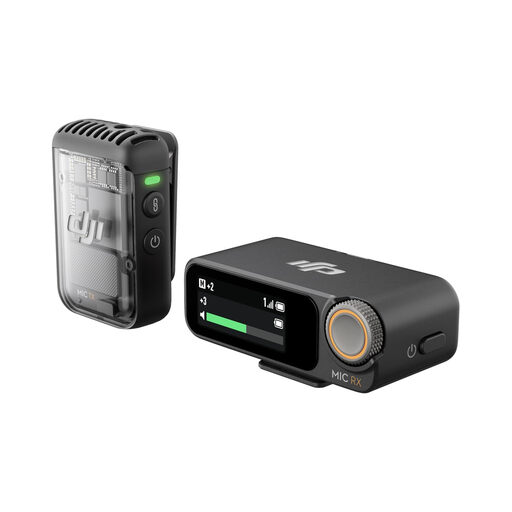
DJI Mic 2 wireless microphone kit with one transmitter and one receiver

DJI Mic 2 wireless microphone kit (1 TX + 1 RX)

Consider the wearable transmitter if you want to place a microphone close to your mouth without occupying the desk with a handheld recorder. The kit is listed with 32-bit-float recording and one transmitter plus one receiver; that recording feature does not establish that nearby speech will be removed.

Before buying for full chapters, check the internal recording format, how you will transfer files and whether you can monitor the take with headphones. Listen to a test paragraph in the intended shared-desk position.

View on Joybuy

Common questions

Are built-in recorder microphones enough for narration at a shared desk?

They may be workable when the desk is quiet, but an external microphone positioned close to your mouth gives you another way to manage nearby sound. Shure’s cardioid microphone guidance notes that more distant placement picks up more ambient sound; test the actual desk position before committing to full chapters.

Will 32-bit-float recording remove colleagues’ voices or keyboard noise?

No. It helps with recording-level errors, not separation from other sounds in the room. Microphone placement, direction and pausing during interruptions still matter.

How should I check a setup before recording a whole chapter?

Record a normal paragraph at your intended speaking distance and listen through headphones for nearby voices, desk vibration, plosives and clothing rustle. If you distribute through ACX, check the edited result against Audible’s ACX Audio Lab submission measures, including levels, bitrate and spacing.

What if colleagues could be heard in my recording?

Keep the recording focused on your narration and avoid retaining other people’s conversations where possible. For employer-directed recording or organisational monitoring, check workplace policy and the applicable privacy requirements before recording colleagues: the Information Commissioner’s Office says audio surveillance can be intrusive and sets out lawfulness requirements in its organisational guidance.

How should I dispose of an old recorder in the UK?

Use an appropriate electrical-equipment recycling route rather than putting the recorder in ordinary household waste. GOV.UK describes the UK’s waste electrical and electronic equipment framework as intended to support recovery, reuse and recycling; check your local authority’s collection options.