Who each approach suits

The deciding question is where you need to check the child: from another room, from outside the home, or both.

Carers who check from outside the home

If a live feed or alerts while away are essential, look at app access alongside account sharing and security-update support. The National Cyber Security Centre identifies baby monitors among smart cameras that can use home Wi-Fi for remote viewing.

Households focused on in-home viewing

A dedicated parent display makes sense when checks mainly happen elsewhere in the home and routine internet-based video access is not needed. Check the connection type and range for the rooms where you will use it.

Carers who need local and remote access

A hybrid monitor may suit everyday use on a parent display and occasional app viewing while away. Check which functions remain available in local mode and how access can be granted or removed for other carers.

What matters when choosing

Wi-Fi video

Consider it: When video or alerts outside the home are essential.

Trade-off: Remote access relies on the home connection and a controlled app account.

Local-only video

Consider it: When a parent display for checks at home meets your needs.

Trade-off: A local connection does not provide an off-site app view.

Audio

Consider it: When hearing sound from elsewhere at home is sufficient.

Trade-off: It cannot provide a visual check.

Hybrid display and app

Consider it: When you want a local parent display as well as app access while away.

Trade-off: You need to check separately what the display and app can do when Wi-Fi is off.

Concern What to check Who this matters to
Access away from home Check for app-based live viewing and alerts, then confirm what remains available if Wi-Fi or internet access is lost. When I am away, I need an authorised view or alerts rather than a display that works only nearby. About 36% of consumers might make off-site access their primary concern.
Privacy and account control Check the exact model’s security-update period, password controls and steps for removing another user’s access. If I mainly check from home, I would rather keep routine viewing local and control any account that can open the feed. Privacy and local control might come first for about 29% of consumers.
Shared access and coverage Confirm guest permissions and the number of supported cameras; check split-screen support if you need simultaneous views. When carers take turns or more than one room needs a camera, I need manageable access and coverage. About 21% of consumers might put that need first.
Simple in-home checks Decide whether sound alone is enough; for a local video model, check its stated range and parent-unit operation. If I only need to hear what is happening from another room, video and app features may go unused. Simple in-home listening or viewing might be the main need for about 14% of consumers.

Buying pitfalls

  • Treating alerts as a safety safeguard

    A monitor is an observation tool, not a substitute for supervision. The Lullaby Trust says there is no research showing that monitors help prevent SIDS.

    Choose the sound or viewing functions you need without treating product alerts as medical or safer-sleep protection.

  • Assuming privacy mode leaves every feature working

    Switching off internet viewing can also affect remote alerts or connected functions. The National Cyber Security Centre notes that disabling remote viewing may prevent movement alerts or smart-home operation.

    Check separately what works on the parent display, in the app and without an internet connection.

  • Assuming one support period covers a whole brand

    Published security-update periods are model-specific. Nanit states at least two years from purchase for its specified Pro models N301, N311 and N322; Philips lists two years from purchase for SCD881/05.

    Find the statement for the exact model you intend to buy, and check its password and user-access controls.

  • Overlooking subscriptions and changes to app services

    Nanit says some Insights features require a subscription. VTech’s notice for its BM6000 shows another possible distinction: its local monitor continues to operate, while its app and related remote services no longer function.

    Confirm which desired features work without a plan and what the monitor can still do locally if an app service changes.

Brands to consider for these monitor types

Nanit

App-based video monitoring with remote viewing and optional Insights features.

  • Nanit’s UK statement specifies user-defined passwords and at least two years of security updates from purchase for Pro models N301, N311 and N322.
  • Some Insights features require a subscription. Confirm the model identifier and which functions remain available without one.

eufy

A hybrid display-and-app approach on the E21 for households that want both local and remote viewing.

  • eufy says the E21 works with or without Wi-Fi and has a Wi-Fi-off local-connection mode.
  • Check the E21’s model-specific UK security-update period and the account controls for shared access before choosing it.

Philips Avent

Dedicated parent-unit monitors, with separate connected models that add app-related controls.

  • Philips describes SCD881/05 as a paired 2.4 GHz local monitor and lists a two-year support period for that model.
  • Philips describes privacy and administrator or guest controls for specified connected models; do not assume those app controls apply to SCD881/05.

Babysense

Non-Wi-Fi parent-unit video systems for viewing within the home.

  • Babysense lists the V43 as a two-camera split-screen system supporting up to four cameras.
  • Its stated range of up to 300 m is an open-space figure, not a promise of coverage through walls.

Owlet

App-based video monitoring on the Dream Sight model.

  • Owlet advertises 2K video and cry, motion and sound alerts for Dream Sight.
  • Check the exact UK security-update support period, account permissions and any optional feature requirements for the model you choose.

A local-display option on Joybuy

This local video monitor is for checks elsewhere at home using a parent display, rather than app viewing while away.
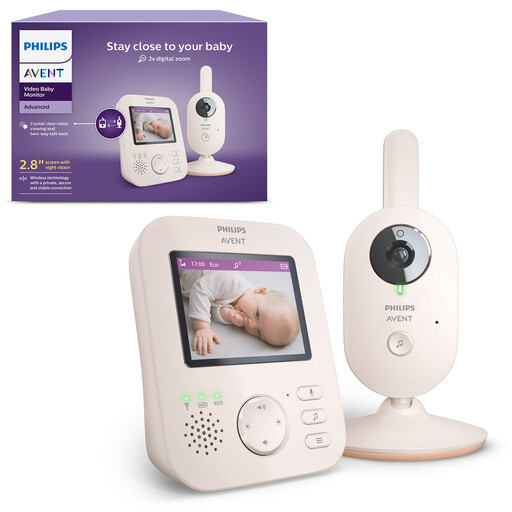
Philips Avent Advanced Video Baby Monitor SCD881/05 in Coral Cream

Philips Avent Advanced Video Baby Monitor SCD881/05 – Coral Cream

For in-home viewing on a dedicated parent unit when you do not need an off-site app feed. The SCD881/05 uses a paired 2.4 GHz connection; Philips lists two years of UK security-update support from purchase for this model. It is not a route to away-from-home viewing. Check the range for your home layout and confirm plug compatibility and whether a suitable adapter is included: the listing describes a UK 2-pin plug requiring an adapter for three-pin sockets.

View on Joybuy

Frequently asked questions

What should I check before enabling remote viewing?

Use a strong, unique account password, install available updates and review who can open the feed. The National Cyber Security Centre advises turning off internet viewing when it is not needed, but notes that doing so may also stop movement alerts or smart-home functions.

Will a connected baby monitor work without Wi-Fi?

Some models retain a local viewing route, but the functions differ. Philips says specified connected monitors can use their dedicated display without Wi-Fi internet, while eufy says its E21 can use a local connection with Wi-Fi switched off. Check the exact model’s display, app, alert and recording behaviour separately.

How can several carers share access to a monitor?

Use the model’s invitation or guest-access controls where available, and check how to revoke access rather than relying on a shared password. Philips describes one administrator and restricted guest permissions on specified connected models; those controls should not be assumed for its local-only SCD881/05.

Where can I check security-update support?

Look for the manufacturer’s statement for the exact model and note when its stated period starts. Nanit’s UK statement specifies at least two years from purchase for Pro models N301, N311 and N322; Philips lists two years from purchase for SCD881/05. Neither period establishes the support duration of another model.

Can a baby monitor replace supervision?

No. The Lullaby Trust says a monitor cannot replace a parent or carer’s supervision and that there is no research showing monitors help prevent SIDS. Choose one for the observation functions you need, not as medical or safer-sleep protection.