For monitoring a sleeping child elsewhere at home, choose local audio if hearing is enough, or local video with a parent display if you also want a camera view. Wi-Fi and app access make more sense when viewing from a phone away from the local parent unit matters to you; they also bring account-security, connection and update-support checks. A monitor is an aid, not a substitute for supervision.
Who is each route for?
Carers who mainly need to listen
If you need to hear a sleeping child from another part of the home and do not need a camera feed or off-site access, a local audio monitor is worth considering. Check that its usable range and parent-unit battery suit where you will carry it.
Families who want an in-home camera view
A non-Wi-Fi video monitor with a dedicated parent display offers a camera view without relying on household internet for the local link. Check signal coverage through your home and how long the parent unit lasts between charges.
Carers who need phone access
If viewing beyond a parent unit’s local range matters, consider an app-connected monitor. Check the exact model’s stated security-update period, account protections and what happens to the features you need when Wi-Fi or internet access is interrupted.
What should you check before choosing?
Local audio
Choose when: Hearing your child elsewhere at home is enough.
Trade-off: There is no camera view, and the parent unit must stay within usable local range.
Local video
Choose when: You want a camera view on a dedicated display without depending on broadband for the local link.
Trade-off: Viewing remains tied to the parent unit’s power and local signal; non-Wi-Fi models do not provide off-site app viewing.
Wi-Fi and app access
Choose when: Viewing on a phone beyond the local parent unit’s range is useful to you.
Trade-off: Remote viewing adds network, account and security-update dependencies. A model with a parent display may also offer an in-home viewing route.
| Priority | What to check | Your needs |
|---|
| Viewing location |
Decide whether sound is enough or you need video. Check whether viewing must reach a local parent unit or a phone away from it. |
I mainly check from another room, or I need to see the feed beyond the parent unit’s range. |
| Home coverage |
Compare the manufacturer’s stated indoor range and conditions, then check reception where you plan to use the unit. Walls, floors and interference can reduce local coverage. |
Will the signal reach the rooms or garden where I expect to carry the parent unit? |
| Connected access |
For an app-connected model, check password options, available two-step verification and whether remote viewing can be switched off. The National Cyber Security Centre notes that switching it off may also affect remote alerts or smart-home functions. |
I want phone access, but I also want control over who can reach the camera feed. |
| Update support |
For a connected model, find the manufacturer’s stated minimum period for important security updates for the exact UK version. Check how app and firmware updates are installed. |
If I use an internet-connected camera, I want to know how long its security updates are promised from purchase. |
| Setup and use |
Check parent-unit battery needs, power connections and the exact manual’s camera and cord-placement instructions. Choose audio or video for the information you need, not for a claimed medical outcome. |
I need a practical way to hear or view the room while keeping equipment out of the child’s reach. |
What is easy to overlook?
-
Treating Wi-Fi as an automatic upgrade
Remote app viewing adds a router, internet connection and account to the viewing arrangement. Those dependencies matter less if you only monitor from elsewhere at home.
Decide where you will view the feed first. If you choose a connected model, check its exact security-update support period before buying.
-
Expecting a monitor to provide a health or safety outcome
The Lullaby Trust says there is no research showing that baby monitors help prevent SIDS. A sound or video feed cannot replace supervision.
Choose the monitoring function you need and follow safer-sleep guidance independently of the device.
-
Relying on the advertised maximum range
A stated maximum does not tell you whether a local signal will reach through the walls and floors of your home.
Check the manufacturer’s range conditions and test the monitor in the places you plan to use it. Check for low-battery and out-of-range warnings where available.
-
Overlooking connected-device settings and support
The National Cyber Security Centre warns that poorly secured smart cameras can expose feeds or images to unauthorised users. Connected features also depend on continuing software support.
Use a strong, unique password, enable two-step verification if offered and install available updates. Keep the exact model’s support-period information for reference.
Relevant brand ranges
These ranges illustrate different monitoring arrangements; check the specifications of the exact model and package you are considering.
LeapFrog Baby Care
Its UK range includes audio, local-video and Wi-Fi monitors, including models with both a parent display and app access.
- LeapFrog lists a 7-inch 720p parent display and 1080p remote viewing for the LF4917HD. Its UK guide states a minimum security-update support period of four years from purchase.
- That support promise is model-specific and does not establish how remote viewing behaves during an internet outage.
VTech
Its UK range includes local audio and video monitors with dedicated parent units.
- VTech lists DECT transmission, a stated 300 m range and up to 14 hours of active monitoring for its BM1000 audio monitor.
- The BM1000 has no camera feed, and its stated range does not guarantee reception through a particular home.
Momcozy
Its baby-monitor range includes non-Wi-Fi video and connected viewing options.
- Momcozy describes the BM01 as a non-Wi-Fi 1080p video monitor with a 5-inch parent display.
- The BM01 is a local-monitoring option, not a route to off-site app viewing. Check its signal coverage in your home.
Babysense
Its non-Wi-Fi video range is relevant if you are considering multiple cameras and a dedicated display.
- Babysense describes the MaxView PRO as offering two cameras, split-screen viewing and pan/tilt controls.
- Check the exact UK package, mains adaptor and warranty before choosing a configuration.
Joybuy monitor options
These models cover a Wi-Fi monitor with a parent display and local-video options for at-home viewing; they are not an audio-monitor selection.
 No image available
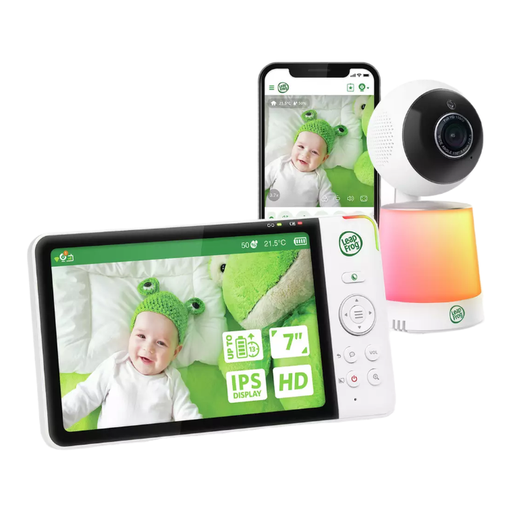
LeapFrog LF4917HD Smart Monitor, 7-inch, white
Consider this model if you want a parent display at home as well as app-based remote viewing. LeapFrog lists a 7-inch 720p display and 1080p remote view; its UK guide states a minimum security-update support period of four years from purchase. Check the app’s account protections and which viewing functions remain available if your internet connection fails.
View on Joybuy
 No image available
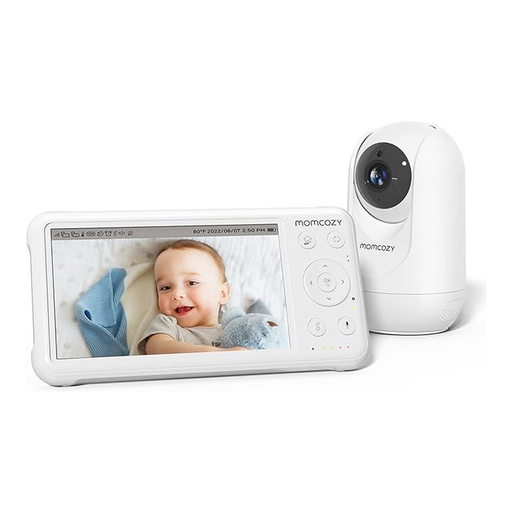
Momcozy BM01 1080p video monitor with wall mount
This non-Wi-Fi model suits an in-home camera view without off-site app access. Momcozy describes a 5-inch parent display; the product name also specifies infrared night vision and two-way talk. Check reception in your usual viewing locations rather than relying on the stated 960 ft range alone.
View on Joybuy
 No image available
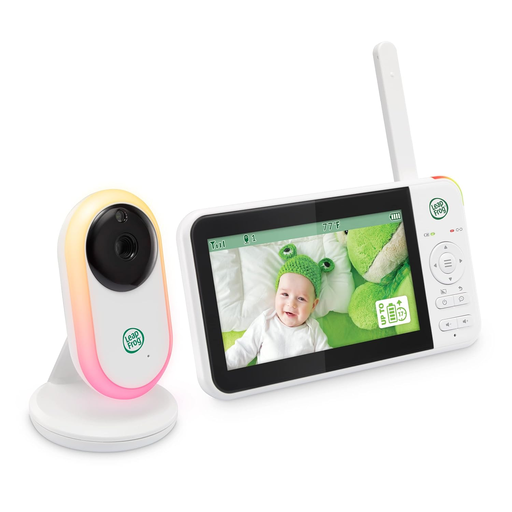
LeapFrog LF2415 video monitor, 5-inch, white
The 5-inch parent display makes this a model to consider for viewing from elsewhere at home. Check the exact connection method, signal coverage and parent-unit battery against your home layout, particularly if you also need phone access away from the display.
View on Joybuy
Common questions
Can a baby monitor prevent SIDS or replace supervision?
No. The Lullaby Trust says there is no research showing that baby monitors help prevent SIDS, and a monitor cannot replace a parent or carer’s supervision. Follow safer-sleep guidance whether or not you use a monitor.
What security details matter for a Wi-Fi baby monitor?
Check the exact model’s stated minimum period for important security updates, how to report a security issue, its password setup and whether two-step verification is available. These checks matter because app access adds an account and network path to the camera feed.
Can I turn off remote viewing on a connected monitor?
Check the exact model’s settings. The National Cyber Security Centre advises disabling internet remote viewing when it is unnecessary, but notes that doing so may also stop remote alerts or smart-home functions. If you do not need off-site access, a local parent-display monitor is another option.
Will a local monitor work during a broadband outage?
A monitor that transmits directly between its baby unit and parent unit does not need broadband for that local link. It still needs power, sufficient battery charge and a usable signal in your home; check a connected model’s instructions separately for what happens to app viewing during an outage.


