Choose backup storage according to what you need to recover from: an external hard drive provides a local copy, a portable SSD suits files you carry between devices, a NAS can serve several devices at home, and cloud backup provides an off-site route to recovery. Keep another copy away from the same device or location when those could be lost together. File sync helps you access current files, but its deletion and version-history rules determine whether it can recover an earlier copy.
Who needs which approach?
People with files across several devices
If photos, study materials or work files sit on both phones and computers, check which devices are covered and how you would restore a deleted or older file. Apple Support distinguishes iCloud syncing from iCloud Backup, while Microsoft Support documents time-limited OneDrive recovery for eligible subscribers.
People with growing home archives
A large photo and document collection calls for enough capacity for the next backup as well as today’s files. A local drive can hold one copy, but the National Cyber Security Centre advises keeping important backup data in a separate safe location; plan where another copy will live.
People carrying active projects
If you regularly move photo, video or work files, a portable SSD may suit the journey between devices. Check the ports and cables you will actually use, and protect a carried drive against loss; Samsung’s quoted T7 Shield transfer speeds depend on a compatible connection.
What matters when choosing?
For a local copy, compare a hard drive’s capacity with an SSD’s portability and connection requirements; a NAS can provide central household storage if you are prepared to configure it. Dedicated cloud backup offers an off-site destination, while files kept in cloud sync still need a recovery arrangement that covers deletion, older versions and account changes.
| Concern |
What to check |
Who this matters to |
| Recoverability |
Check that a separate copy can be restored after device loss, and whether earlier or deleted versions remain available long enough for you to notice a problem. |
If my computer fails or I delete a study file, I need a copy I can still open rather than merely a current synced version. Around 40% of consumers put recoverability first. |
| Capacity and continuity |
Allow for library growth; for cloud storage, check the allowance and what happens to uploads or access when a plan changes. |
As my photo library grows, I need room for future copies without an account limit interrupting them. Capacity and continuity come first for around 30% of consumers. |
| Portability and device access |
Confirm device and operating-system support; for a portable SSD, check the host port and cable needed for its stated transfer speed. |
When I work across a phone and computer or carry current projects, I need a way to reach and copy those files on the devices I use. Around 30% of consumers prioritise portability or multi-device access. |
Backup mistakes to avoid
-
Treating a synced folder as a separate backup
Sync can carry a deletion or change across devices. Apple Support distinguishes synced iCloud data from iCloud Backup, and Microsoft Support says permanently deleted OneDrive Recycle Bin files cannot be recovered through its rollback feature.
Keep a separate copy of irreplaceable files, and try restoring an older version before relying on a service’s recovery window.
-
Keeping the only backup beside the original
A drive kept with a computer may be affected by the same theft, damage or household incident. The National Cyber Security Centre describes a backup as important data copied to a separate safe location.
Use the drive as one layer, maintain another copy elsewhere, and check that you can restore files from it.
-
Expecting an SSD’s quoted speed on every device
Samsung says the T7 Shield’s maximum quoted read and write speeds require a USB 3.2 Gen 2 host and cable with UASP enabled. A different connection may not meet those conditions.
Check your computer or phone’s port, connection mode and cable against the conditions for the SSD you intend to use.
-
Leaving retention checks until after a deletion
Backblaze says its default version history is 30 days, with longer settings available. Microsoft Support says an over-quota account cannot upload, edit or sync new files. Neither an old version nor a new backup should be assumed available indefinitely.
Check the selected retention setting and practise a restore; make another copy before changing or cancelling a storage service.
Relevant brands and services
Samsung
The T7 Shield is a portable SSD line to consider when carrying an active local copy.
- Samsung quotes up to 1,050 MB/s read and 1,000 MB/s write for the referenced 1 TB model, conditional on USB 3.2 Gen 2, a suitable cable and UASP.
- Samsung’s IP65 and drop claims come from controlled tests; the drive still needs another copy of important files.
Synology
A NAS option for households prepared to manage central local storage and a separate backup destination.
- Synology’s Hyper Backup documentation lists attached storage, another NAS, file servers and cloud services among its destinations.
- Confirm support for the chosen NAS and backup application; a NAS at home does not itself provide off-site protection.
IDrive
A dedicated cloud-backup service for files held across personal devices.
- IDrive says its UK Personal plans can schedule backups from multiple PCs, Macs, iPhones, iPads and Android devices.
- If choosing its optional private encryption key, understand how you will retain the information needed to restore files; check the plan’s device coverage and restore terms.
Backblaze
A cloud-backup service whose version-history setting is an important part of the recovery decision.
- Backblaze documents a default 30-day version history and longer 1-year or Forever settings.
- Choose and check the setting you need: a deleted or changed version outside the applicable window may no longer be recoverable.
Apple
An integrated sync and device-backup route for people using iPhone, iPad and Mac.
- Apple Support explains that iCloud syncing and iCloud Backup protect different sets of data; synced content is not duplicated in the device backup.
- Check how you would recover synced photos or files separately. Apple says UK users who have not already enabled Advanced Data Protection can no longer turn it on.
Microsoft
A sync and folder-storage route for people using OneDrive across their devices.
- Microsoft Support says eligible Microsoft 365 subscribers can use full OneDrive rollback for actions within the past 30 days.
- Permanently deleted Recycle Bin files cannot be recovered through that feature, and exceeding an account’s storage allowance prevents new uploads, edits and sync.
Joybuy storage choices
These drives provide local storage for personal copies, while the diskless NAS is an option for central household storage. Choose a separate destination as well if you need to recover after losing access to the place where the device is kept.
 Image unavailable
Samsung T7 Shield portable SSD, 1 TB, blue
A local copy to consider when carrying work files or photos between devices.
The named variant has 1 TB capacity and a USB 3.2 Gen 2 connection. Check your device and cable against Samsung’s conditions for its quoted transfer speeds; keep another copy if the drive could be lost or damaged.
View on Joybuy
 Image unavailable
Western Digital My Passport portable hard drive, 2 TB, black
A 2 TB local-drive option for keeping copies of a growing collection of files and photos.
If you use a Mac, confirm the read-and-write setup required for your macOS version before buying. Plan a second destination for files you need to recover after a problem affecting the drive’s location.
View on Joybuy
 Image unavailable
SanDisk portable SSD, 2 TB
A portable local-copy option if your current projects and photo files need 2 TB of storage.
Check the file system and connection against the devices you use. If drive encryption or scheduled backups matter to you, confirm how you would set them up and restore the files.
View on Joybuy
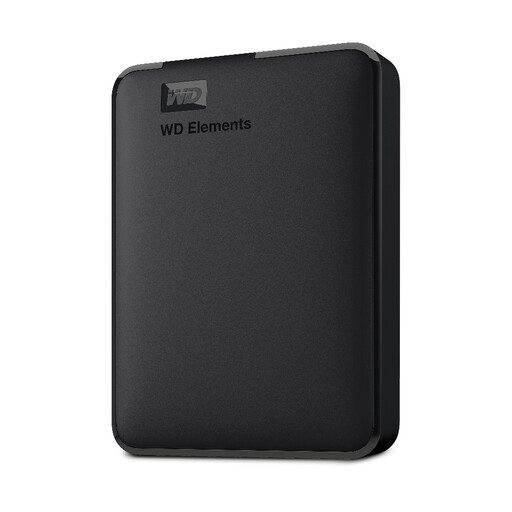 Image unavailable
Western Digital Elements portable hard drive, 1 TB
A 1 TB local-drive option for copies of personal documents and photos.
Before using it with a Mac or another operating system, check the required format and whether reformatting would affect files already on the drive. Confirm the backup and restore method you intend to use.
View on Joybuy
 Image unavailable
Synology DS225+ two-bay diskless NAS
A central local-storage option for a household prepared to choose drives and configure its backup routine.
This unit is diskless, so confirm compatible drives and the contents needed for your setup. Check which backup software and restore workflow the DS225+ supports, and arrange a separate off-site copy if a home incident is part of the risk you need to cover.
View on Joybuy
Frequently asked questions
Is cloud sync the same as backup?
No. Sync keeps files current across devices, whereas a backup must leave you with a recoverable copy. Apple Support says content already synced to iCloud is not duplicated in iCloud Backup; check deletion recovery and version history, and keep a separate copy where those limits do not meet your needs.
How can I check that a backup will restore?
Restore a small selection of files to another folder or device and make sure they open. If recovering mistakes matters, also try an older or deleted version within the service’s stated retention window rather than checking only the latest copy.
Should I encrypt a portable backup drive?
If a drive holding personal information could be lost or stolen, consider encryption that works with your devices and keep its recovery information separately. The Information Commissioner’s Office says encryption is particularly effective against unauthorised access when a storage device is lost or stolen; losing the means to unlock a drive can also prevent your own recovery.
What should I check before cancelling cloud storage?
Make another recoverable copy first, then check the provider’s allowance, file-access rules and backup-retention terms for the account state you will move to. Microsoft Support says accounts above their applicable allowance cannot upload, edit or sync new files, so do not rely on continued syncing as your exit plan.


