Who this guide is for

Households protecting irreplaceable files

If family photos and important documents live on your main computer, you may want a recoverable copy kept separately rather than simply more storage space. The National Cyber Security Centre explains that a backup can restore data when the original is inaccessible.

Privacy-first document keepers

If you keep a manageable collection of sensitive household records, consider how a removable copy is protected and how you will regain access if credentials are needed. This need is reflected in a personal record-keeping discussion on the MoneySavingExpert Forum and Kingston's keypad-drive specifications.

Mixed-device photo keepers

If you move files between computers and phones, check connector, file-system and encryption compatibility separately. Apple Support and Files by Google set out device-specific storage requirements; a matching connector alone does not confirm that a drive will work with every device.

What to consider when choosing

Concern What to check when buying Who this matters to
Recoverable copies Check which folders the backup workflow includes, and practise restoring a document and photo. Keep a copy separate from the main device and consider a separate location. If losing access to the original would put important records or family photos at risk, I want a copy I can actually restore. Around 29% of consumers put recoverable copies first.
Capacity and ongoing cost Check the size of the folders you intend to protect, the drive’s exact capacity and room for additions. For cloud storage, check the account allowance and subscription conditions. If my photo and document collection is growing, I want enough room without overlooking recurring account conditions. Around 24% of consumers make capacity and ongoing cost their main concern.
Privacy and recovery access Confirm that encryption applies to the backup destination itself. Keep any required PIN, password or recovery key somewhere separate and accessible. If a removable copy contains sensitive household records, I want to limit access without locking myself out. Around 18% of consumers prioritise privacy alongside recovery access.
Device compatibility Check the file system and backup workflow for each computer, then check mobile-device, adapter and encryption-unlocking requirements separately. If I need to open or restore files across my own mix of computers and phones, I want the full workflow to work on those devices. Around 18% of consumers put cross-device access first.
Transfer and carrying Check the host connection, included cables and any stated protection conditions. Advertised sequential speeds do not guarantee the same results with every computer or file collection. If I regularly move sizeable collections or carry a local copy between places, convenient transfers matter to my routine. Around 11% of consumers prioritise transfer convenience and portability.

Backup storage pitfalls

  • Moving the only copy to an external drive and calling it a backup

    A backup is a separate copy, not simply the same files in a different place. A drive kept in the same home may be affected by the same incident as the computer.

    Keep another independent copy and consider separating it from both the main device and the household location. NI Cyber Security Centre guidance recommends at least three copies on two devices, with one kept offline in another location.

    Maintaining independent copies may require another device or a separate storage location.

  • Assuming computer encryption automatically protects a USB backup

    Microsoft states that automatic Device encryption leaves external USB drives unencrypted. Manual BitLocker Drive Encryption is not available on Windows Home.

    Check encryption on the destination itself, confirm how it can be unlocked on another device, and keep recovery credentials separately. Microsoft Support cannot retrieve or recreate a lost BitLocker recovery key.

    Your Windows edition and recovery devices may call for a different encryption workflow or a hardware-encrypted drive.

  • Counting synchronised or online-only files as an independent local copy

    Microsoft explains that OneDrive online-only files occupy no local drive space, and deleting files in OneDrive can remove them from both the computer and cloud.

    Check which files are actually stored locally and keep a separate copy outside the synchronised working folder.

    A genuinely local copy requires storage capacity and a deliberate backup routine.

  • Reformatting a populated drive before preserving its contents

    Changing a drive’s format can remove its existing data, and the format suited to exchanging files is not necessarily the one preferred by backup software.

    Copy needed files to another verified location first, choose a format for the intended workflow and test it before using the drive for important backups.

Relevant brands to consider

Seagate

Seagate’s Expansion portable HDD line is relevant for straightforward external storage for documents, photos and other files.

  • Seagate describes Windows and Mac compatibility and drag-and-drop storage; the UK 2 TB example is USB-powered.
  • These features do not establish automatic folder protection or long-term failure rates. Set up a separate backup workflow.

Samsung

The Portable SSD T7 Shield line may suit frequent transfers or carrying a compact local copy.

  • Samsung’s UK specifications for the 1 TB MU-PE1T0S/EU include USB 3.2 Gen 2, password protection and an IP65 rating based on controlled internal testing.
  • Samsung’s UK page excludes liquid and dust damage from the warranty. Manufacturer speed ratings are not measured household backup results.

Kingston

IronKey KP200 keypad drives are relevant for a defined collection of sensitive household documents.

  • Kingston specifies keypad unlocking and XTS-AES 256-bit hardware encryption for the KP200 series.
  • OS-independent unlocking does not establish compatibility with every phone, file system or adapter. Check the exact variant and retain another accessible copy.

Microsoft

Microsoft’s OneDrive and Windows File History may form different parts of a household backup arrangement.

  • Microsoft documents File History backups to an external drive or network location, alongside OneDrive restoration features.
  • Personal OneDrive deleted-file restoration is subject to a 30-day window in Microsoft’s guidance, and subscription expiry can affect storage allowances. Handle synchronised and online-only files deliberately when making a separate local copy.

Joybuy storage options

These options focus on portable SSDs and an external hard drive for a household’s local copies of records and photos. Choose by capacity, device connections, backup workflow and how you plan to carry or store the drive.

Samsung Portable SSD T7 2 TB, USB Type-C, blue

Samsung Portable SSD T7 2 TB, blue

A portable local-storage option for a household collection that you may also move between devices.

2 TB capacity; USB Type-C; USB 3.2 Gen 2. The product description lists USB-C-to-C and USB-C-to-A cables and optional AES 256-bit hardware encryption. It is not waterproof or dustproof.

Joybuy

Samsung Portable SSD T7 1 TB, USB Type-C, blue

Samsung Portable SSD T7 1 TB, blue

A portable local-storage option if the collection you need to protect fits the selected capacity.

1 TB capacity; USB Type-C; USB 3.2 Gen 2. The product description lists USB-C-to-C and USB-C-to-A cables and optional AES 256-bit hardware encryption. It is not waterproof or dustproof.

Joybuy
Samsung T7 Shield MU-PE1T0S 1 TB portable SSD, black

Samsung T7 Shield MU-PE1T0S 1 TB, black

A portable SSD option for a local copy that you may carry between locations; check that its capacity suits your collection.

1 TB capacity; USB Type-C; USB 3.2 Gen 2. The product description says Samsung software can enable AES-256-bit hardware encryption and lists PC, Mac and Android compatibility. Its stated water exposure is temporary; do not submerge it.

Joybuy

SanDisk Portable SSD 2 TB

SanDisk Portable SSD 2 TB

A portable local-storage option for photos, documents and other files when a 2 TB capacity suits your needs.

2 TB capacity; the product description states read speeds up to 800 MB/s and up to 2-metre drop protection. It also describes a compact, lightweight design and a rubber hook for carrying.

Joybuy
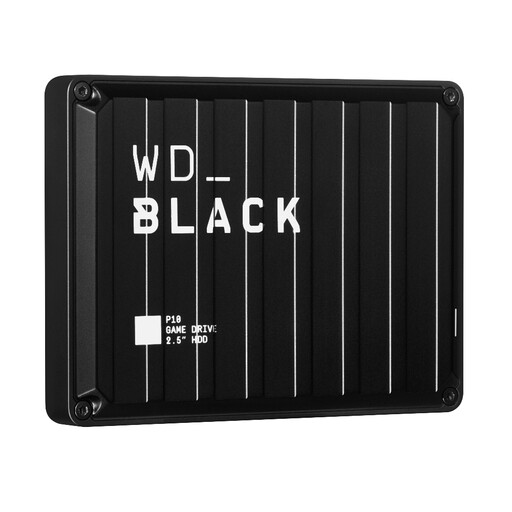
Western Digital WD_BLACK P10 Game Drive 4 TB, black

Western Digital WD_BLACK P10 Game Drive 4 TB

An external hard drive option for a larger local collection, if its capacity and portable-drive format suit your backup routine.

4 TB capacity; mechanical HDD; USB-connected and powered through USB, according to the product description. Avoid jolting or strong vibration while it is operating because it contains spinning disks.

Joybuy

Frequently asked questions

Does Windows encryption automatically protect an external backup drive?

Do not assume that it does. Microsoft states that automatic Device encryption leaves external USB drives unencrypted, while manual BitLocker Drive Encryption is not available on Windows Home. Check the destination drive itself and keep recovery credentials accessible separately.

Can one format work for both Windows file exchange and Mac Time Machine?

These are different workflows. Apple’s UK Disk Utility guide identifies ExFAT as Windows-compatible, while Apple’s Time Machine guidance prefers APFS or APFS Encrypted for backup destinations. Preserve the files elsewhere before reformatting, as changing the format removes existing data.

Can I connect an encrypted drive directly to my phone?

A compatible connector is only one requirement. Apple’s iPhone guidance specifies a single data partition and supported file systems; Files by Google’s USB-storage guidance applies to Android 7.0 and later. A keypad-unlocked drive avoids OS-specific unlocking software, but that does not confirm compatibility with every phone, adapter or file system, so test your exact setup.

How can I make a Windows backup routine less dependent on remembering to copy files?

Configure a backup workflow such as File History, which Microsoft documents as making regular backups to an external drive or network location. Check which libraries and folders are included, then restore representative files to another folder to test the routine.

What should I keep separately to unlock an encrypted backup later?

Keep the required recovery credentials somewhere accessible independently of the encrypted drive. For BitLocker, retain the recovery key: Microsoft Support cannot retrieve or recreate a lost one. For a keypad drive, follow the exact model’s PIN instructions and test unlocking after disconnecting it.