What to check before choosing backup storage
Start with the files you need to recover, then check how the copy is retained and whether you can restore it using your current or replacement device.
| Concern |
What to check when buying |
Who this matters to |
| Recovery after deletion or device loss |
Files included; deleted-file and version-retention rules; restoration on a replacement device; test a restore. |
I need an older copy to be recoverable after deletion or device loss, not just visible in a synced folder. About 36% of consumers put recovery after deletion or device loss first. |
| Capacity for files and backup history |
Measure the files to protect and check whether the device or plan has room for future files and retained versions. |
If my photo collection or computer backup is growing, I need room for the files and any versions I want to keep. Around 29% of consumers prioritise capacity for files and backup history. |
| Device compatibility and restoration |
Check operating-system support, ports and cables, backup software, included data and restoration on the expected replacement device. |
I need a method that works with my devices and connections and lets me restore the files I selected. Approximately 21% of consumers put compatibility and practical restoration first. |
| Privacy and control of sensitive copies |
Check cloud access and sharing settings, available encryption, and whether recovery credentials will remain accessible. |
When a backup contains sensitive files, I want to control who can access it without locking myself out. About 14% of consumers make privacy and control their primary concern. |
Joybuy products for local file backups
These Joybuy choices cover external storage and removable USB drives for keeping local copies of important files. A local drive alone does not create an off-site copy, so consider where a separate copy will be kept.
 No image available
Samsung MU-PE1T0S 1 TB Portable SSD
Consider it for a portable local copy when your device has a compatible connection.
1 TB capacity; USB Type-C; USB 3.2 Gen 2.
A single local drive does not provide a separately located copy.
Joybuy
 No image available
Western Digital My Book 22 TB External Desktop Hard Drive
Consider it for a large local file collection if a desktop drive suits your setup.
22 TB capacity; USB 3.0; password protection and hardware encryption; listed for PC and Mac.
A single local drive does not provide a separately located copy.
Joybuy
 No image available
Western Digital Elements 4 TB Portable Hard Drive
Consider it for a sizeable portable local copy of photos, videos and documents.
4 TB capacity; USB 3.0.
Reformatting may be required for Mac or other operating systems. The drive is not waterproof or dustproof, and a single local drive does not provide a separately located copy.
Joybuy
 No image available
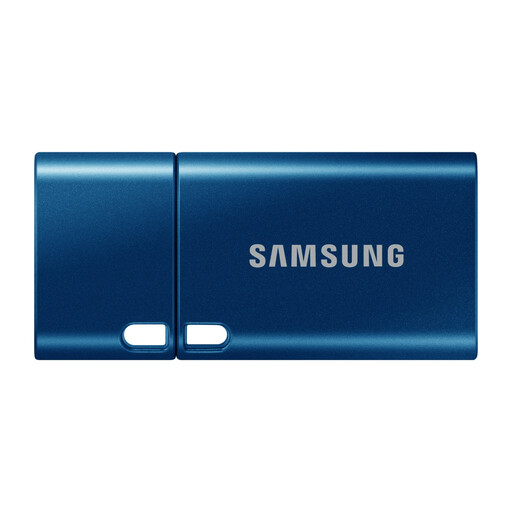
Samsung MUF-512DA 512 GB USB Flash Drive
Consider it for a removable copy of selected files on a device with a compatible USB Type-C port.
512 GB capacity; USB Type-C; USB 3.2 Gen 1.
A single removable drive does not provide a separately located copy.
Joybuy
 No image available
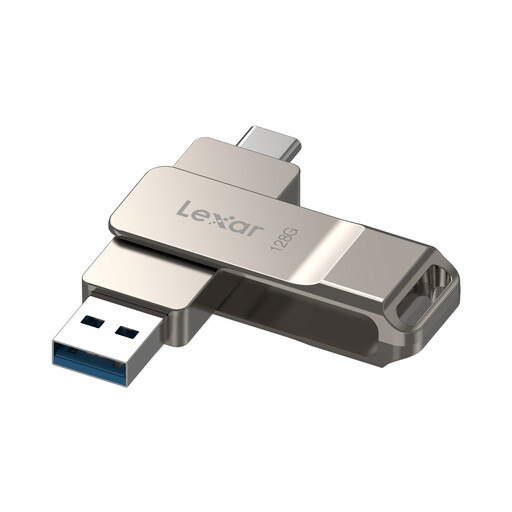
Lexar D40E 128 GB Dual USB Flash Drive
Consider it for carrying selected files between devices with compatible USB-A or USB Type-C ports.
128 GB capacity; USB Type-A and Type-C connectors; USB 3.2 Gen 1.
Android use requires a device that supports USB OTG. A single removable drive does not provide a separately located copy.
Joybuy
Backup storage FAQs
If files synchronise to the cloud, are they protected against accidental deletion?
Not indefinitely by default. Microsoft says personal OneDrive accounts can restore deleted files or folders within the last 30 days, while Google Drive says files remain in Trash for 30 days. Check the service’s rules and keep another copy if you need recovery outside those periods.
How do I set up and check an external-drive backup on a Mac?
Apple says Time Machine can automatically back up a Mac to an external storage device. Check that the device and connection are compatible; Apple recommends a backup disk with at least twice the Mac’s storage capacity. Restore a sample file to check that the setup works.
What should I check about a drive’s warranty and help if it is faulty?
Check the terms for the exact drive and the remedies that apply to your purchase. A manufacturer’s warranty is not a promise to recover lost files, and it is separate from statutory remedies for faulty goods.
Does UK data-protection law require someone backing up purely personal household files to encrypt every drive?
The Information Commissioner’s Office says the UK GDPR does not apply to processing carried out by individuals purely for personal or household activities. That condition may not apply when files are handled professionally or commercially. The ICO also says the UK GDPR does not specifically require encryption of all personal information.
Will a cloud-backup service retain files from an external drive while it stays unplugged?
Check the service and the selected retention setting. Backblaze says that, under its default 30-day version history, backed-up data from an external hard drive disconnected for more than 30 days may be removed. That condition applies to Backblaze, not all cloud providers.


