Sensitive-document keepers
If you are digitising bank, insurance, identity or property papers, prioritise controlled access and a way to recover your files if a password, device or account becomes unavailable.


For household records and photos that would be difficult to replace, use separate local and off-site copies where practical rather than relying on one drive or account. Choose a small encrypted USB drive for a limited document set or a larger external drive for a growing photo library, then check how you would restore files, recover access and retrieve older versions.
If you are digitising bank, insurance, identity or property papers, prioritise controlled access and a way to recover your files if a password, device or account becomes unavailable.
An expanding library calls for enough local capacity and a connection that suits your devices. Keep another recoverable copy rather than making one portable drive your entire archive.
If you need files on several devices or want to undo an accidental overwrite, check cloud version history, its retention window and the steps for recovering your account.
Start with the failure you most need to recover from, then choose a local medium and decide how to maintain a separate off-site copy. For each concern below, the percentage refers to consumers who would make it their primary priority when choosing backup storage for household files.
| Concern | What to check | Who this matters to |
|---|---|---|
| Recovery from separate copies | Check that a second copy is independently accessible and that you can restore a sample folder. The National Cyber Security Centre advises keeping important offline backups. | If one device is lost or files are damaged, I need another copy I can actually open. Around 31% of consumers would put recovery across separate copies first. |
| Security and access | Check encryption and password setup for the exact device, plus where account or encryption recovery information will be kept. | For sensitive household papers, I want to restrict access without locking myself out. Protecting and recovering access would come first for around 25% of consumers. |
| Capacity and copying | Allow room for the current photo and video library to grow; check the drive capacity and your computer's connection type. | As my photo and video library grows, a small document drive may no longer fit it. Around 19% of consumers would prioritise capacity and practical copying. |
| Older versions and access | Check which file types have version history, how long versions remain available, what happens to deleted files and how to recover the account. | If I overwrite a file or switch devices, I need to reach an earlier usable copy. Version rollback and multi-device access would be the main concern for around 25% of consumers. |
A connected drive may be reachable from a compromised computer, while one device cannot protect files if that device is lost or fails. The National Cyber Security Centre advises keeping important offline backups.
Keep another independently recoverable copy in a separate location. Where it suits your routine, disconnect the local drive after backing up and test that you can restore files from it.
Earlier versions are available only under the chosen service's retention rules; syncing a current file does not, by itself, preserve every previous state.
Check the version window and restore steps for your service and plan. Make a separate archive copy if you need to retain an older version beyond that window.
Encryption can protect stored files, but losing the means to unlock them can also prevent your own access. Apple warns that losing a configured recovery key can permanently lock an account; Kingston documents lockout and erase behaviour for its IronKey Vault Privacy 50.
Understand the exact device or service's recovery process before relying on it, and store recovery information separately from what it unlocks.
A quoted maximum transfer speed depends on the host and connection. Samsung says its T7 Shield requires compatible USB 3.2 Gen 2 and UASP equipment to reach its stated maximum speeds.
Check the exact drive interface, your computer's port and the cable you intend to use before treating a speed claim as relevant to your setup.
The T7 Shield is a portable SSD option for a local archive that may be carried between locations.
The Vault Privacy 50 range addresses small, sensitive document sets where encrypted USB storage and password roles matter.
OneDrive is a cloud route for accessing household files across devices and restoring earlier file versions.
iCloud integrates backups, photos and documents with an Apple Account for households using Apple devices.
These drives offer local copies for household documents or larger file libraries. The encrypted USB model is aimed at a smaller document set; whichever local device you choose, maintain a separate recoverable copy if the files would be difficult to replace.
 No image available
Consider this portable local drive for a household file archive that needs 2 TB of space.
USB Type-C, USB 3.2 Gen 2. Check how you will protect sensitive files and keep a separate recoverable copy.
 No image available
This 1 TB portable drive is a local-copy option for documents and photos.
USB Type-C, USB 3.2 Gen 2x2. Check your device's connection and arrange a separate recoverable copy.
 No image available
This portable 1 TB SSD can hold a local copy of household files and photos.
USB 3.2 Gen 2. Before using it for sensitive records, check the exact model's encryption and password setup; keep another recoverable copy.
 No image available
The stated 4TB capacity makes this a local-storage option for a larger household file library.
USB 3.0. Check device compatibility and how sensitive files will be protected, then maintain a separate recoverable copy.
 No image available
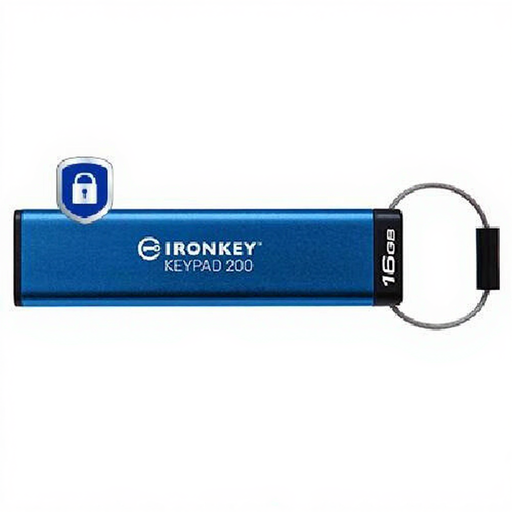
Consider this encrypted USB drive for a limited set of sensitive documents rather than a growing photo or video library.
The product name specifies 16GB and AES-256 encryption. Check the Keypad 200's PIN and recovery rules, and keep another recoverable copy.
Restore a small folder to a different location and open the recovered documents, photos and other important file types. The National Cyber Security Centre advises testing backups; repeat the test after changing your device, backup software or account settings.
Not unless the service lets you recover the files and earlier versions you need after deletion, overwriting or corruption. Check its restore steps and retention window, and keep an independent copy of records that would be difficult to replace.
Keep them somewhere secure and separate from the device or account they unlock. Microsoft advises printing its account recovery code; Apple warns against keeping an Apple Account recovery key only in services that you could lose access to with that account.
Check storage limits, renewal terms, inactivity and suspension rules, and how you would export your files. GOV.UK warns that suspension or cancellation of a cloud account could remove access to stored data, so maintain another copy you can reach independently.