Who needs backup power?
The right battery depends on which non-medical device you need to keep usable, not simply on the largest capacity figure.
Phone-first households
If calls, messages and outage information are the priority, keep a charged power bank and the correct phone cable to hand. Citizens Advice advises households in England to check which devices will work without mains electricity and to charge backup batteries.
People relying on home internet
A battery may help power compatible networking equipment for a limited period. Check the router and any separate modem or optical network terminal before buying; powering equipment in the home cannot ensure that the wider broadband service stays available.
USB-C laptop users
A higher-output power bank is worth considering only if the laptop supports USB-C charging and its charging requirements match the bank’s output, cable and supported charging mode. It provides a limited reserve, not a promised period of laptop use.
What matters when choosing?
Decide which device matters most during a power cut, then match the battery’s connections and output to that device.
USB power bank
Consider it when: Your main task is charging a phone or another compatible USB device.
Trade-off: A smaller pack is easier to carry, while a larger capacity offers more charging reserve without guaranteeing a particular number of charges.
Higher-output USB-C power bank
Consider it when: A laptop accepts USB-C charging at an output the bank and cable support.
Trade-off: A headline wattage does not establish the charging rate your particular laptop will achieve.
Battery backup for networking equipment
Consider it when: You need to power compatible home networking devices rather than carry a pocket-sized charger.
Trade-off: Runtime and any switchover behaviour depend on the connected equipment and the battery’s supported setup.
| Concern |
What to check |
Who this matters to |
| Phone communication |
Match the phone connector and cable to the power bank’s port and stated output. Compare capacity without treating it as a guaranteed number of charges. |
If I need my phone for calls and outage updates, I want charging available even when the sockets are off. About 50% of consumers put phone communication first. |
| Home-internet continuity |
Check each router, modem or optical network terminal’s input, wattage and plug against the backup unit’s compatible connections and continuous rated output. |
If home internet matters during a cut, I need to account for every device in my networking setup, while recognising that the service outside my home may also fail. Keeping that connection powered is the primary concern for about 30% of consumers. |
| Laptop or multiple USB devices |
Confirm USB-C charging support, required wattage, cable capability and how output is shared when several devices are connected. |
If I need a laptop for limited work or communication time, or must charge several USB devices, a phone-focused bank might not meet those requirements. About 20% of consumers prioritise this charging need. |
Brands to consider
These brands illustrate different types of backup power; check the exact model rather than extending one product’s specifications across a whole range.
Anker
USB power banks for phones and tablets, with selected higher-output models aimed at compatible USB-C laptops.
- Anker specifies 25,000mAh/90Wh capacity, 100W USB-C output and 165W total output for its 25K/165W model.
- Those figures belong to that model, not every Anker bank. Check the laptop, cable and supported charging protocol before expecting a particular output.
EcoFlow
Portable power stations with AC output to consider for compatible low-power equipment alongside USB charging.
- EcoFlow lists its RIVER 3 with 245Wh capacity and 300W rated output.
- Its stated UPS switchover time is a manufacturer claim, not a guarantee of runtime or uninterrupted service for a particular networking setup.
APC by Schneider Electric
A dedicated uninterruptible power supply (UPS) range to examine when battery-backed operation of compatible electronics is the priority.
- APC provides product selectors and battery-replacement information to help identify an appropriate model.
- Check the chosen unit’s sockets, output, supported load and battery arrangement; brand choice alone cannot establish router compatibility or runtime.
Joybuy product options
These options cover USB power banks for personal devices and a portable power station to consider for compatible equipment with different power connections. Match the exact device requirements before choosing.
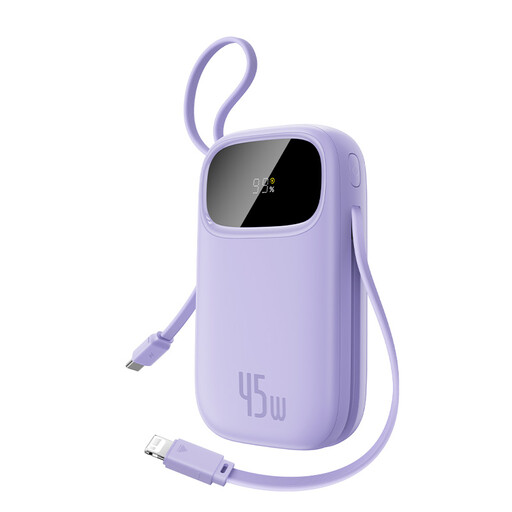 Image unavailable
Baseus EnerFill FC31 Qpow 3 10,000mAh 45W USB-C+iP, Nebula Purple
Consider this power bank when you want a phone-charging reserve with built-in USB-C and iP cables, provided they match your devices.
The listed capacity is 10,000mAh and the stated output is 45W. Check the output available for your intended connection and device before relying on that figure for charging.
View on Joybuy
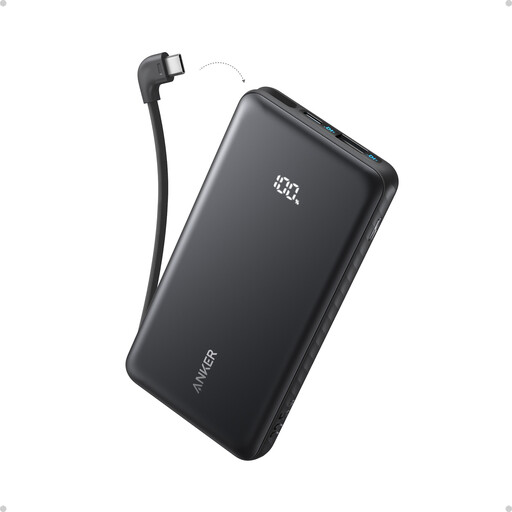 Image unavailable
Anker Zolo 10,000mAh 22.5W Power Bank with USB-C Cable
The built-in USB-C cable may be useful when keeping a compatible phone charged is the main outage need.
The title specifies 10,000mAh capacity and 22.5W output. Check your device’s charging requirements; the stated output does not promise that every phone will charge at that rate.
View on Joybuy
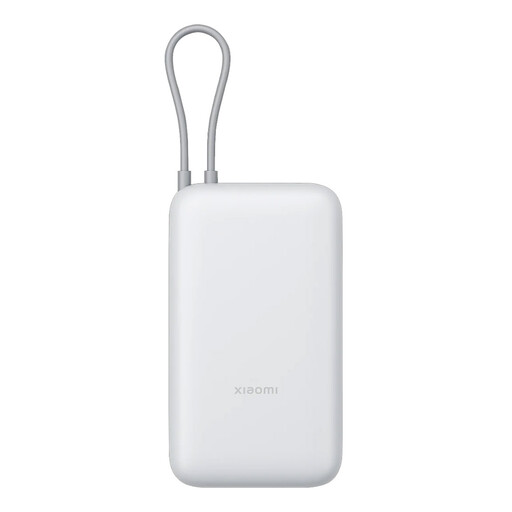 Image unavailable
Xiaomi 20,000mAh Power Bank with Integrated Cable, GL Light Gray
Consider this option if you want an integrated cable and a listed 20,000mAh capacity for compatible personal devices.
Before choosing it for a laptop or a particular phone, confirm the output and charging profile needed by that device and the capability of the connection you plan to use.
View on Joybuy
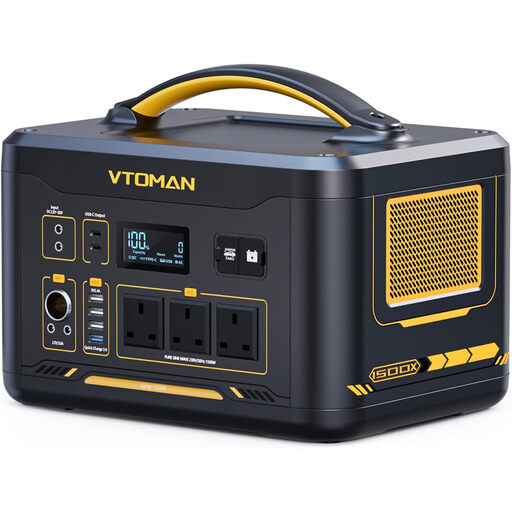 Image unavailable
VTOMAN Jump1500X 828Wh Power Station, 1500W AC, 100W USB-C
This portable power station is an option to assess when compatible equipment needs an AC connection as well as USB-C charging.
Its title lists 828Wh capacity, 1500W AC output and 100W USB-C output. It also describes expansion to 2376Wh; check the compatible expansion requirements separately. For a router or other mains device, verify its input, plug and power draw before use—capacity alone does not establish runtime.
View on Joybuy
Common questions
Can a power bank keep my phone usable during a power cut?
It can provide charging if the bank has charge remaining and its output, connection and cable suit your phone. Capacity affects the available reserve, but the number of full charges depends on the phone and how it is used.
Will a battery backup keep my home broadband online?
Not necessarily: the router and any separate modem or optical network terminal need compatible power, and the service beyond your home must also remain available. Check each device’s input and any supported UPS arrangement, then test the non-medical setup you intend to use.
Can I use one of these products for medical or accessibility-critical equipment?
Do not treat a general consumer battery as a substitute for a dedicated plan for that equipment. The Energy Networks Association says the Priority Services Register does not guarantee continuous supply; discuss the equipment’s needs with its provider, the relevant healthcare professional and your network operator. In Northern Ireland, NIE Networks also provides a Customer Care Register for people relying on electrically powered healthcare equipment.
How should I charge and look after a power bank?
Follow its manufacturer’s charging and storage instructions, keep it away from heat and liquids, and stop using it if it appears damaged or becomes excessively hot. Electrical Safety First advises against leaving battery packs charging overnight or while nobody is home.
What should I do with an old power bank?
Take it to a suitable battery or electrical-waste collection point rather than putting it in household rubbish. GOV.UK advises using an appropriate recycling route for rechargeable batteries and electrical products; follow the collection point’s instructions for the particular pack.


