Choose an account-based cloud backup if your priority is an ongoing copy that you can restore on a replacement device; check what data it includes and what the restore process requires. An external drive suits a direct migration copy or local archive, while NAS suits a household prepared to manage shared storage and back it up elsewhere. USB drives and memory cards are useful for selected files on compatible devices, but copying files alone does not establish a complete device backup.
Who needs which kind of copy?
People moving to a replacement phone or computer
Decide whether you need only your files or also device data such as settings. Apple Support and Microsoft Support describe different backup and file-transfer processes, so check how you will restore what matters on the new device.
People protecting photos and documents over time
A one-off transfer will not capture later changes. The National Cyber Security Centre advises keeping a copy of important data in a separate safe location in case a device is lost, damaged or no longer accessible.
Households with files on several devices
Shared storage may be worth considering if you can maintain it and arrange another backup destination. Synology describes scheduled backups and version retention for its compatible NAS software; these require setup rather than happening simply because files are stored on a NAS.
What matters when choosing storage?
Start by deciding whether you need a continuing recovery point, a one-off migration copy or both. Then check that the chosen route can capture the particular files and device data you want to recover.
| Concern |
What to check |
Who this matters to |
| Ongoing recovery |
Check what the backup includes, when it last succeeded and how to restore it to a replacement device. |
If my phone or computer becomes unavailable, I want a recent copy without remembering to attach a drive. Around 36% of consumers put ongoing recovery first. |
| Moving a large archive |
Check the size of the files to move, available drive capacity and the connections on both computers. |
When changing computers, I want to move a large collection of photos and documents directly and check the copied files before clearing the old device. For around 29% of consumers, that migration copy is the primary need. |
| Portable, compatible media |
Check the device port or card slot, any required adapter and whether the intended app can copy the files. |
I need to carry selected files between devices, but the storage must connect to each one and work with the files I use. Portability and compatibility come first for around 21% of consumers. |
| Shared storage and versions |
Check the NAS backup destinations, restore process and maintenance you would need to manage. |
Several people use our devices, so I want shared files and earlier backup versions without relying on the NAS as the only copy. Around 14% of consumers prioritise that managed setup. |
Mistakes to avoid
-
Treating a file transfer as a full device backup
A copied folder may help you move files, but it does not by itself show that apps, settings or other device data can be restored.
List what you need to keep, inspect the backup contents and open representative copied files or test the restore process before erasing the original device.
-
Buying removable storage before checking the connection
Apple Support says connecting external storage to an iPhone may require a compatible connector or adapter. The app and storage format also affect the intended transfer.
Check the exact port, adapter, app workflow and file format for the device you plan to use.
A compatible adapter or card reader may also be needed.
-
Assuming an SSD will reach its quoted speed on every device
Samsung conditions the maximum speeds quoted for its T7 Shield on USB 3.2 Gen 2, UASP and compatible host hardware; those figures do not establish a transfer time for every connection.
Compare the requirements for the exact SSD model with your device port and cable before relying on its headline speed.
-
Keeping the only valuable copy on a NAS
Shared NAS storage is still one location. Synology describes separate backup destinations for compatible NAS systems, including external devices and other network or cloud destinations.
If you use NAS, arrange another destination for important files and periodically check that you can restore from it.
Brands and product lines to consider
Samsung
Its T7 Shield line is a compact external-SSD option for local file transfers.
- Samsung lists 1 TB, 2 TB and 4 TB T7 Shield versions and quotes maximum read and write speeds for the line.
- Those maximum speeds require compatible USB 3.2 Gen 2 and UASP hardware. Samsung says its controlled-test liquid, dust and drop claims do not mean that resulting damage is covered by the warranty.
Seagate
Its Backup Plus Portable hard-drive line is relevant to computer-based local archives and scheduled copies.
- Seagate describes capacities up to 5 TB and daily, weekly or monthly scheduling through its software.
- Seagate says reformatting may be required for Time Machine. Check the formatting and software workflow for your operating system.
Synology
Its compatible NAS systems and Hyper Backup software offer a route to managed household storage.
- Synology describes scheduled backups, version retention and several possible destinations for NAS data.
- The setup needs a compatible NAS, ongoing administration and a plan for a separate backup destination.
Joybuy options for local copies
These external drives, USB storage and memory card options are for local archives or selected file transfers. Choose the format only after deciding what you need to copy and checking that your device can use it.
 No image available
Western Digital My Passport Ultra for Mac 5TB, Silver
Consider this portable hard drive for a large local copy when its Mac-focused format suits your devices.
Capacity: 5TB. Confirm the file format and any Windows driver requirements before planning to use it across operating systems.
View on Joybuy
 No image available
Samsung Portable SSD T7 2 TB, Blue
Consider this external SSD for a portable local migration copy between compatible devices.
Its title specifies USB Type-C and USB 3.2 Gen 2. Check the host connection and your backup workflow if you need more than a manual file copy.
View on Joybuy
 No image available
Western Digital Elements Port. 4TB, Black
Consider this portable hard drive when you need space for a local photo or document archive.
Its title specifies USB3.0. Check the connection, operating-system formatting and how you will make later backup copies.
View on Joybuy
 No image available
MOVESPEED YSUSP05-512GSR 512GB USB Flash Drive, Silver
Consider this flash drive for carrying selected files between devices that support its connections.
The title specifies a dual interface with USB 3.2 Gen 1 and Type-C, and a read speed of up to 570MB/s. Check the intended device port and file-transfer app.
View on Joybuy
 No image available
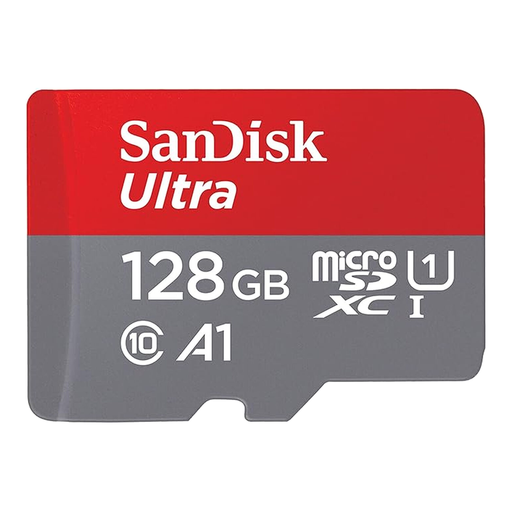
SANDISK Ultra microSDXC 128GB with SD Adapter
Consider this card for selected files if the device supports microSDXC storage and your intended transfer workflow.
The 128GB card comes with an SD adapter. Check card-slot compatibility and which files your device can copy to removable storage.
View on Joybuy
Common questions
Do I need both a migration copy and an ongoing backup?
You need both if you want to move your current files and keep creating recovery points afterwards. A migration copy serves the device change; an ongoing backup covers later changes. The National Cyber Security Centre identifies both new devices and subsequent loss or damage among reasons to keep a separate copy of important data.
Can I transfer iPhone files with a USB drive or SD card?
Yes, if the storage, connector and app are compatible with your iPhone. Apple Support describes copying files through supported apps such as Files and notes that an adapter may be needed. Check what you can copy: this process should not be treated as a complete iPhone device backup.
Will an external SSD reach its advertised transfer speed?
Not necessarily; the result depends on the exact drive and its connection to your device. For example, Samsung says the maximum speeds quoted for its T7 Shield require USB 3.2 Gen 2, UASP and compatible host hardware. Check the requirements for the SSD model you are considering rather than applying another model’s figures to it.


