If the basement is a persistent Wi-Fi weak spot, start with a mesh system whose node can maintain a usable connection to the main unit; an Ethernet link between units is worth considering where it can be installed. A single router may be sufficient if it can be placed favourably or the gaming device can connect by Ethernet. In either case, the broadband service, building layout and gaming device can limit download speed regardless of the router’s headline rating.
Who is this for?
Gamers with a basement weak spot
If downloads become unreliable downstairs, the decision is whether better node placement or an Ethernet connection will address the route through the building. BT Help also recommends checking device location when Wi-Fi is weak.
Consumers who can use Ethernet
If a cable can reach the gaming PC or console, check the device’s Ethernet capability and the router’s WAN and LAN connections before choosing ports for faster wired networking.
Households sharing the connection
If game updates run alongside streaming, calls and other devices, consider coverage and compatible devices as well as wireless capacity. A higher combined Wi-Fi rating alone does not establish how a download will perform in the basement.
What matters when choosing?
Choose the connection route into the basement before comparing Wi-Fi ratings or multi-gig ports. A mesh node needs a usable link to the main unit, while a single router needs either favourable placement or a practical Ethernet route to the gaming device.
Mesh Wi-Fi system
Choose when: Wi-Fi from the main router is unreliable in the basement and a node can be positioned where it maintains a connection.
Bear in mind: More units require placement planning; a node cannot resolve a poor connection to the main unit simply by being placed in the weak spot.
Single router
Choose when: The router can sit where its signal reaches the basement reliably, or the gaming device can connect by Ethernet.
Bear in mind: A higher wireless rating does not remove the floors or walls between the router and the room.
| Concern |
What to check |
Who this matters to |
| Basement coverage |
Check the signal at the intended node location and whether Ethernet can reach the basement or a mesh node. |
If the connection fades downstairs, I need a dependable path to the gaming device more than a higher speed printed on the box. Around 42% of consumers put coverage and stability first. |
| Wired download capacity |
Compare the broadband service with the WAN, LAN and gaming-device Ethernet ports; multi-gig ports matter only when the connected path can use them. |
When I can run a cable to my PC or console, I want to know which link could hold back a large update. About 33% of consumers prioritise that wired path. |
| Shared-home capacity |
Check whether competing devices and the gaming device can use the bands and features you are considering. |
If updates run while others stream or take calls, I need the household connection to work for those activities too. Roughly 25% of consumers make shared-home capacity their primary concern. |
Buying pitfalls
-
Reading the combined Wi-Fi rating as one device’s download speed
A rating such as BE9300 combines wireless capability across bands. The broadband service, connection ports, gaming device and route through the building can each limit an update.
Check the broadband connection and the complete wired or wireless path before deciding whether faster ports or a different Wi-Fi standard would help.
-
Putting a mesh node in the weakest part of the basement
A node still needs a usable connection to the main unit. Floors and walls can interfere with that connection as well as with the gaming device’s signal.
Check the planned node position before installation, or consider Ethernet between units where a cable is practical.
-
Replacing the ISP router before checking the connection method
A replacement must work with the particular broadband service and its required WAN connection or configuration. BT Business says a third-party router must be compatible with its service.
Ask the ISP what connection and setup the replacement needs, and keep the supplied router available for fault diagnosis.
Changing equipment can also take setup time.
Relevant brands to consider
TP-Link
Its Archer BE550 router and Deco BE65 mesh system illustrate the choice between starting with one router and placing multiple units around the home.
- TP-Link lists one 2.5 Gbps WAN port, four 2.5 Gbps LAN ports and EasyMesh support for the Archer BE550. It describes combined wired and wireless backhaul for the Deco BE65.
- Neither specification establishes the signal or download speed in a particular basement; placement and connected equipment still matter.
ASUS
The RT-BE86U is a reference for consumers considering wired connections and configurable router operating modes.
- ASUS lists a 10G WAN/LAN port, a 2.5G WAN/LAN port, three 2.5G LAN ports and AiMesh support for the RT-BE86U.
- This dual-band model uses 2.4 GHz and 5 GHz, not a 6 GHz client band; its faster ports do not increase the broadband service’s speed.
NETGEAR
The Orbi 770 two-pack is a reference for a multi-node setup serving the basement and other rooms.
- NETGEAR lists tri-band Wi-Fi 7, 2.5 Gig connectivity and an optional 2.5 Gig wired backhaul for the Orbi 770 two-pack.
- Check the route between units and the number of nodes needed rather than treating the stated coverage area as a result for your home.
Joybuy product choices
These choices include four three-pack mesh systems for placing a unit nearer a basement, followed by a single router for a setup with a workable Wi-Fi path or Ethernet connection. Check node placement and your broadband connection before choosing between those approaches.
 No image available
NETGEAR Orbi 370 RBE373 Wi-Fi 7 mesh system, 3-pack
Consider this three-pack if placing units along the route to the basement is more practical than relying on one router.
The product name specifies dual-band BE3600 Wi-Fi 7 and 2.5 Gbps Ethernet. Check the connections available on each unit and whether your planned link between units can be wired.
View on Joybuy
 No image available
TP-Link Deco BE22 BE3600 Wi-Fi 7 mesh system, 3-pack
This three-pack is relevant if the basement needs a unit nearer the gaming device, provided that unit can maintain a usable connection to the others.
Check the exact Ethernet-port speed before planning a multi-gig wired connection, and confirm the backhaul arrangement you intend to use.
View on Joybuy
 No image available
TP-Link Deco BE65 BE9300 tri-band Wi-Fi 7 mesh system, 3-pack
Consider this three-pack when a basement-adjacent node and coverage elsewhere in the home are both part of the plan.
TP-Link describes combined wired and wireless backhaul for the Deco BE65. Check the connections on the units in this pack if you intend to wire a node or gaming device, and choose a node position with a usable link.
View on Joybuy
 No image available
TP-Link Deco BE25 Wi-Fi 7 mesh system, 3-pack
The three-pack gives you multiple units to position between the main connection and the basement room.
Before planning Ethernet to a node or gaming device, check the unit’s port layout and supported backhaul connections. A basement node also needs a usable route to the other units.
View on Joybuy
 No image available
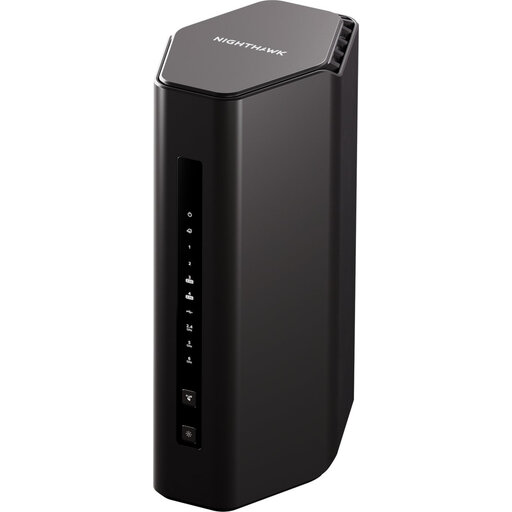
5PT NIGHTHAWK RS300 Wi-Fi 7 BE9300 router
A single router is worth considering if it can be positioned for a reliable basement connection or the gaming device can be wired to it.
Check the WAN and LAN port layout against your broadband equipment and gaming device, and confirm ISP compatibility before replacing an existing router.
View on Joybuy
Common questions
Should I choose a single router or mesh for a basement gaming room?
Choose mesh when the basement has persistently weak Wi-Fi and you can give a node a usable connection to the main unit. A single router may be sufficient if it can be placed favourably or the gaming device can use Ethernet; a larger Wi-Fi rating alone will not remove a poor route through floors and walls.
Will Wi-Fi 7 make updates download faster than my broadband service?
No: the broadband service remains a limit on an internet game download. A router’s combined wireless rating is not a single-device download speed, so check the connected ports, gaming device and basement signal before choosing faster networking hardware.
Can I replace my broadband provider’s router?
You can consider a replacement if it supports your provider’s connection method and required setup. BT Business says third-party equipment must be compatible with its service; ask your own provider about the WAN connection and any configuration needed before buying.
What if a new router does not improve basement downloads?
Compare the broadband connection with the connection to the gaming device before changing more equipment. Where practical, test by Ethernet and check Wi-Fi nearer the main router and at a proposed mesh-node location; BT Help also recommends changing device location when diagnosing weak Wi-Fi.


