Choose a basic 4G phone if calls, texts and physical keys matter more than apps; choose a simplified smartphone if you also need apps, photos or video calls. Whichever route you take, try the controls and check that the exact handset supports calling on your intended network. Ofcom says UK operators will switch off 2G by 2033 at the latest, and some may do so earlier.
Who each type of phone suits
People who mainly call and text
If touchscreen menus or cramped keys make everyday communication difficult, start with a basic phone whose physical keys, text entry and menu you can try. Which? distinguishes call-and-text-focused basic phones from simpler smartphones with app access.
People who still need apps
If WhatsApp, photos or video calls are essential, consider a simplified smartphone rather than assuming a basic phone will run those services. Check the exact apps and whether its touchscreen controls feel manageable; Which? identifies large controls and simpler navigation as features of this phone type.
People who need clearer calls and alerts
Compare adjustable call volume, visual or vibrating alerts and any stated hearing-aid compatibility. If direct audio streaming matters, RNID advises checking compatibility between the particular phone and hearing device.
What matters when choosing
Basic 4G phone
Consider it when: Calls, texts and tactile keys are the main requirements.
Trade-off: A call-and-text-focused handset may not run the apps or video-calling services you need.
Simplified smartphone
Consider it when: Apps and photos matter, but an ordinary smartphone interface feels too complex.
Trade-off: Larger, clearer on-screen choices still require touchscreen use and setup.
Keypad-and-touchscreen hybrid
Consider it when: Physical number keys are important alongside selected messaging apps; Emporia describes the TOUCHsmart.2 as combining a keypad and touchscreen.
Trade-off: The user must be comfortable with both ways of operating the phone, and app availability needs checking by model.
| Concern | What to check | Who this matters to |
|---|
| Keys and navigation |
Try key spacing, feedback, menu steps and text entry; for a flip phone, try opening it and answering a call. |
When touchscreen navigation makes a simple call frustrating, physical keys and a manageable menu come first. Around 31% of consumers would put tactile, straightforward operation first. |
| Apps and messaging |
List the required apps, then check support on the exact handset and whether its controls are manageable. |
If family conversations depend on an app or video calls, a calls-and-texts-only phone will not meet that need. App access would be the first concern for around 25% of consumers. |
| Calls and alerts |
Check call-volume controls and alert options; confirm compatibility with a particular hearing device if needed. |
Missing a ring or struggling to follow a call can matter more than extra phone functions. Clearer calls or noticeable alerts would lead the choice for around 19% of consumers. |
| Display and charging |
Try reading messages at a comfortable text size and check the exact model’s charging method and box contents. |
Small text or a difficult charging connector can make everyday use harder. Readability or manageable charging would come first for around 25% of consumers. |
Mistakes to avoid
-
Relying on a 2G-only phone for long-term use
Ofcom says UK operators will withdraw 2G by 2033 at the latest, with some planning to do so earlier. A 2G-only phone will no longer work on its host network after that withdrawal.
For a new everyday phone intended for continued use, choose at least a 4G-capable model and check the operator’s plans.
-
Assuming a 4G label guarantees 4G calls
4G Calling, also called VoLTE, depends on the handset, provider, settings and coverage. EE advises checking compatibility when buying a phone from another retailer.
Ask the intended provider about the exact model and check how to enable 4G Calling where required.
-
Choosing by screen size alone
A readable screen does not replace tactile keys for someone who needs them; equally, a keypad phone may not provide essential apps.
Decide which calling, texting and app tasks the user must complete, then try the relevant keypad, touchscreen and menu.
-
Assuming charging accessories are included
A charging method that is awkward for the user can make the handset difficult to keep ready for everyday calls.
Check the exact box contents and whether a compatible cradle or mains adaptor is available for the model.
Doro says a mains charging adaptor is not included with the Leva E10, so that model may require a separate compatible adaptor.
Brands to consider for simpler phones
Doro
Doro offers Leva feature phones for calls and texts and Aurora Android smartphones for people who also need apps.
- Doro lists features such as high-contrast keys, readable displays and charging options across selected models.
- Check features, supplied charging equipment and 4G Calling compatibility on the exact handset; they vary by model and provider.
Emporia
Emporia offers feature phones and simplified smartphones, including models that combine physical and touch controls.
- Emporia describes the TOUCHsmart.2 as having a full keypad, touchscreen and selected messaging shortcuts.
- Confirm that its apps and both control methods suit the user, and ask the intended UK provider about support for the exact model.
HMD
HMD offers a call-and-text-focused flip-phone option for people who do not need a simplified smartphone interface.
- HMD describes the 2660 Flip as a 4G phone with a large screen and buttons.
- Check app requirements and provider-specific calling support rather than treating its 4G specification as a network guarantee.
Joybuy phones for this decision
These phones offer call-and-message-focused options with different controls. Check each model against the user’s app needs, ease of use and intended mobile provider before choosing.
 No image available
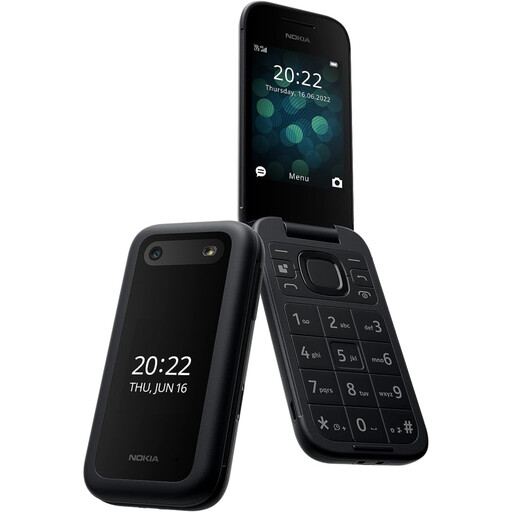
Nokia 2660 TA-1469
Consider this model if physical controls could make everyday calls and texts easier; try its keys and menus to judge the fit.
Confirm the exact handset’s 4G Calling support with your provider, and check compatibility with a particular hearing aid if that matters to you.
View on Joybuy
 No image available
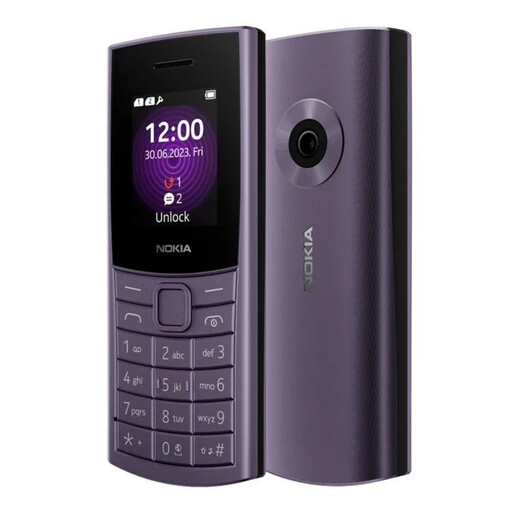
Nokia 110 4G TA-1543 DS Purple
For calls and texts with a physical keypad, check whether its controls and display are comfortable for the intended user.
The model name identifies a 4G variant; confirm 4G Calling support with your provider and check which charging accessories are supplied.
View on Joybuy
 No image available
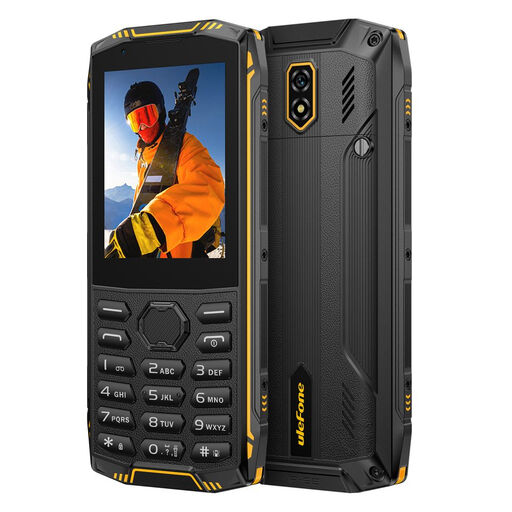
Ulefone Armor Mini 5 Rugged Feature Phone, 1GB+8GB, 2.8-inch Touch Display, 4G LTE, No Charger
If you want physical controls alongside touch interaction, check that both methods suit the user and that any required messaging app works on this model.
The product name specifies 1GB+8GB, a 2.8-inch touch display and 4G LTE. No charger is included; check what compatible charging equipment you need, and confirm calling support with your provider.
View on Joybuy
Common questions
Is a 2G-only phone suitable for everyday use in the UK?
It may work while its host network still provides 2G, but it will not remain usable there after withdrawal. Ofcom says UK operators will switch off 2G by 2033 at the latest, and some may act earlier; choose at least 4G capability for a new phone intended for continued use.
Does 4G support mean calls will work on my network?
No. Check the exact phone’s 4G Calling or VoLTE support with your intended provider as well as local coverage. EE says compatible equipment is required and advises checking phones bought from other retailers.
Should I check coverage before choosing a phone?
Yes. Ofcom’s mobile coverage checker compares providers by postcode; check the places where the phone will be used, especially at home.
Will a hearing-aid-compatible phone stream calls to any hearing aid?
Not necessarily. Hearing-aid compatibility and direct audio streaming are separate checks. RNID says streaming requires compatible equipment, so confirm the particular phone and hearing device combination.
What charging equipment should I check before ordering?
Check the exact model’s box contents, charging connector and any cradle compatibility. Doro says a mains charging adaptor is not included with its Leva E10, so do not assume one accompanies every phone.


