Choose a controller that fits the platform you use for basketball games: DualSense for PS5, Xbox Wireless Controller for Xbox or supported Windows PC play, and Switch 2 Pro Controller for Switch 2. In a bright room, address screen glare through the display setup; then weigh controller connections, power and adjustable controls against how you play.
Who this is for
Players committed to one platform
If most of your basketball games are on one console, start with a controller intended for that console. For NBA 2K26, 2K lists PS5, Xbox Series X|S, Switch 2 and Steam PC among the available platforms; match the controller to the version you play.
Players using a TV or monitor in a bright room
If daylight or room lighting makes the action hard to see, assess the screen position and settings separately from the controller. Choose the controller for platform fit, a comfortable hold and a connection that suits your seating position.
Players who adjust their controls
If you regularly change button assignments or stick settings, look at which adjustments work on your platform and in your game. A preferred wired or wireless connection may also shape the choice.
What matters when choosing
Confirm the game platform before comparing controls. Screen visibility needs attention at the display, while customisation and connection choices depend on how you intend to play.
| Concern |
What to check |
Who this matters to |
| Platform and game fit |
Check the exact console generation or PC operating system, then confirm the game recognises the controller. |
If I mainly play on one system, I need a controller that works with that version of the game. Around 42% of consumers would make platform fit their primary concern. |
| Bright-room setup and comfort |
Assess screen glare separately; for the controller, consider its grip and whether a cable would reach your seat. |
When strong light makes the screen difficult to view, I want to fix that without mistaking a controller feature for a display fix, while keeping a comfortable hold. Roughly 33% of consumers would put this combination first. |
| Adjustable controls and connection |
Check where remapping or profiles work and whether your device supports the connection you prefer. |
If I frequently tailor inputs for basketball games, I want controls I can adjust and a connection that suits my setup. About 25% of consumers would prioritise those options. |
Mistakes to avoid
-
Assuming Bluetooth means full compatibility
A Bluetooth connection does not establish that every feature works on every console, computer or game. PlayStation, for example, describes feature conditions for DualSense use on PC.
Check the exact controller model against your device and the game you plan to play.
-
Using controller upgrades to address screen glare
Remapping and haptic features change controller inputs or feedback, not how clearly you can see a sunlit display.
Assess the screen position and settings before choosing extra controller features for their own uses.
-
Overlooking how the controller is powered
Microsoft describes AA batteries and a rechargeable battery-pack option for the Xbox Wireless Controller; rechargeable AA cells do not charge inside it.
Decide whether replaceable batteries, rechargeable cells with an external charger, a compatible pack or wired play suits your routine.
-
Choosing customisation you will not use
Extra buttons, profiles and adjustable inputs are useful selection criteria only if you intend to configure them for your games.
Identify the controls you want to change before choosing a controller primarily for its adjustment options.
Relevant controller brands for reference
PlayStation
A PS5-focused choice, with standard DualSense controls or the more adjustable DualSense Edge.
- PlayStation lists haptic feedback and adaptive triggers for DualSense in supported games; DualSense Edge adds remapping and stick and dead-zone settings.
- On PC, feature availability depends on the game and connection. PlayStation says haptic feedback requires USB and a supported game.
Xbox
A controller range relevant to Xbox consoles and supported Windows PC and mobile setups.
- Microsoft lists button mapping, textured grips and Bluetooth among the standard Xbox Wireless Controller features.
- For that standard controller, choose a power arrangement with its AA batteries or rechargeable battery-pack option in mind.
Nintendo
A Switch 2-focused option for playing basketball games on that console.
- Nintendo lists mappable GL/GR buttons and an audio jack for the Switch 2 Pro Controller.
- Its Switch 2 focus should not be taken as confirmation of support on another platform.
8BitDo
A configurable-controller option for supported computer and mobile operating systems.
- 8BitDo describes custom profiles and wired or 2.4 GHz operation for its Ultimate 2 Wireless Controller.
- Check the listed operating-system compatibility for the exact model rather than assuming Xbox, PlayStation or Switch console support.
Joybuy controller choices
These choices cover Xbox or Windows PC play, a wired Windows PC option and Switch 2 play. Match any controller to your game and platform; none is a substitute for addressing screen glare.
 Image unavailable
Microsoft Xbox Elite Wireless Controller Series 2 (Xbox One, Xbox Series X|S, PC)
Consider this variant if you play on Xbox or Windows PC and want to assess adjustable inputs for basketball games. Confirm recognition in your chosen game and check which settings work on your device.
View on Joybuy
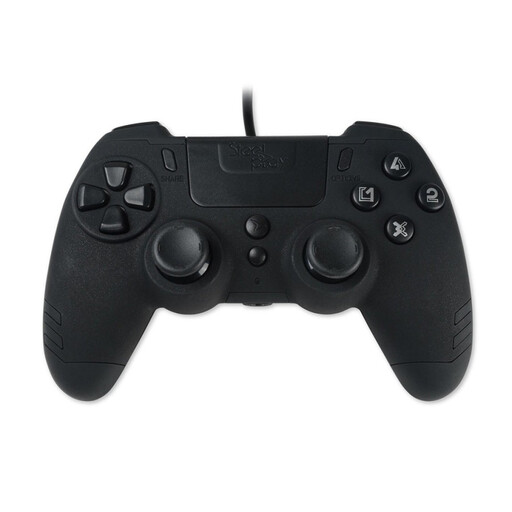 Image unavailable
LEXIP SteelPlay Slim Pack Wired Controller — Ebony Black
A wired option to consider for Windows PC basketball games if a cable suits your seating position. Check game recognition and the cable reach before choosing it.
View on Joybuy
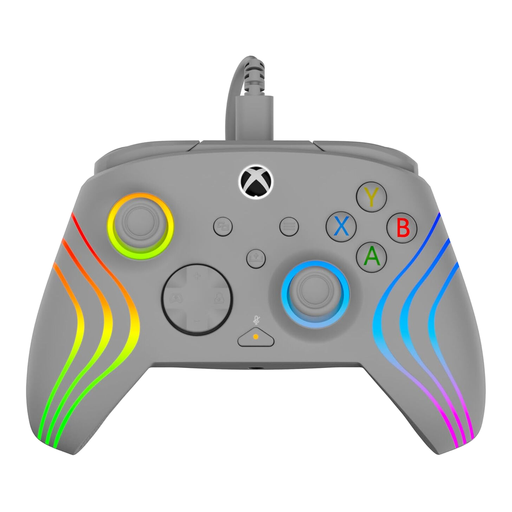 Image unavailable
Turtle Beach Afterglow Wave Wired Controller for Xbox — Grey
Consider this wired Xbox-oriented option if you prefer playing from a fixed seat. Check support for your Xbox or Windows PC setup, game recognition and cable reach.
View on Joybuy
 Image unavailable
Nintendo Switch 2 Pro Controller — Black
A Switch 2 choice if you want a full-size controller for basketball games. Nintendo lists mappable GL/GR buttons, an audio jack and a supplied USB charging cable for this model; confirm the controls you want to use in your game.
View on Joybuy
 Image unavailable
Hyperkin DuchesS Wired Controller — White (Xbox Series X|S, Xbox One, Windows 10/11)
A wired option for the Xbox and Windows versions named in this variant. Check recognition in your basketball game and whether a cable suits your seating position.
View on Joybuy
Common questions
Do I need a special controller for basketball games in a bright room?
No bright-room-specific controller feature is needed to address screen glare. Choose for your game platform and preferred controls, and assess the screen position and settings if light makes the game difficult to see.
Which controller should I consider for NBA 2K26 on PC?
Start with a controller that supports your PC and offers the dual-analogue gamepad layout recommended by 2K for NBA 2K26 on PC. Microsoft lists Windows support for Xbox Wireless Controller, PlayStation describes DualSense connections to supported Windows PCs, and 8BitDo lists Windows compatibility for Ultimate 2 Wireless; check game support and the features you intend to use.
Can DualSense connect wirelessly to a PC?
Yes, PlayStation says DualSense can connect to supported Windows PCs by Bluetooth or USB Type-C cable. Features still depend on the game and connection: PlayStation says haptic feedback on PC requires USB and a supported game.
How is the standard Xbox Wireless Controller powered?
Microsoft says it can use AA batteries or a rechargeable battery pack. If you choose rechargeable AA cells, you will need to charge them outside the controller.


