Xbox or PC player in a dark room
You want lighting that helps you locate the controller or particular controls, and you can accommodate a cable if the illuminated model you choose is wired.


Choose a controller that works with your device and basketball game before considering its lighting. For Xbox or Windows players, a wired RGB controller may make parts of the controls easier to find in a dark room, but the areas that light up vary by model. For PS5 or Switch, start with a controller intended for that platform; your game, connection preferences and seating distance will shape the final choice.
You want lighting that helps you locate the controller or particular controls, and you can accommodate a cable if the illuminated model you choose is wired.
You need a controller for your existing Xbox, PS5, Switch, PC or mobile device. Confirm that your basketball game accepts controller input before treating lighting as a deciding feature.
You care about connection options, charging or cable reach, and a layout you are comfortable using across your supported devices. Those practical needs may matter more to you than RGB lighting.
Check your device and basketball game first. Once you have a compatible option, compare where its lighting appears and whether its connection suits your usual playing position.
| Concern | What to check | Who this matters to |
|---|---|---|
| Control visibility | Look for the exact lighting coverage: buttons, D-pad and sticks, or just decorative areas. RGB alone does not establish which labels you can see. | When I play with the room lights low, I want to find the controls without mistaking a lit faceplate for lit buttons. Around 46% of consumers put control visibility first. |
| Device and game compatibility | Confirm support for your console or operating system, connection method and basketball game. Check game support separately for optional controller features. | If my game will not accept the controller on my device, its lighting is beside the point. For around 27% of consumers, compatibility is the primary concern. |
| Connection and sessions | Check whether a wired cable reaches your seat safely or whether the wireless model’s charging and device-switching arrangements suit you. | From my usual seat, I need a connection that will not force an awkward cable route or interrupt play for charging. Connection and session convenience comes first for around 27% of consumers. |
A light bar, faceplate or RGB zone may make the controller visible without lighting the button labels you need to find.
Check the exact model’s stated coverage of its ABXY buttons, D-pad and sticks rather than relying on the word RGB.
A controller’s lighting cannot compensate for a mismatch with your device or basketball game. Some additional features also depend on the game and connection.
Check the platform, game and connection requirements first; compare lighting and button layout among the options that remain.
Cable reach and room layout affect whether a wired controller is practical. Turtle Beach lists a 3 m/10 ft cable for the Afterglow Ignite, but that length still needs to suit your seat.
Measure the route from your device to where you play, and keep cables away from walking paths. If you prefer wireless, check the connection and charging arrangements for your device.
A wired setup may mean changing your seating position or cable route; wireless play requires attention to charging.
Its Afterglow Ignite is a wired, officially Xbox-licensed route for Xbox Series X|S, Xbox One and Windows 10/11 players considering controller lighting.
The wired T7 Pro is relevant to Xbox and Windows players who want lighting across several control areas.
The Xbox Wireless Controller is a platform-first option for Xbox consoles, Windows PC, Android and iOS.
DualSense is a route for PS5 and for supported games on PC, Mac and mobile devices.
The Nintendo Switch Pro Controller is a full-size controller for Switch players.
These Turtle Beach controllers are wired choices for Xbox play, with PC use also relevant to the Afterglow Ignite. If seeing individual buttons is essential, check the lighting placement on the exact model before choosing either one.
 No image available
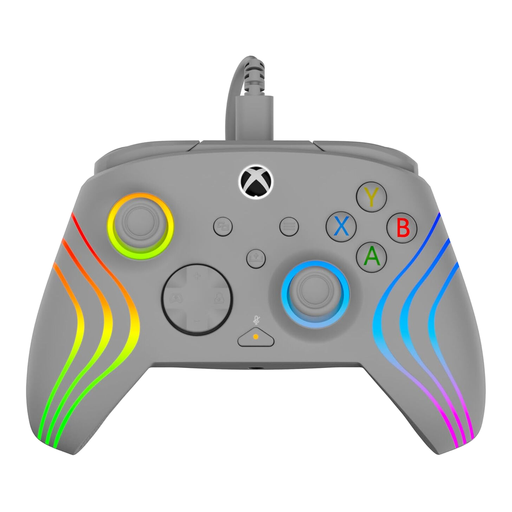
Consider this Xbox and PC model if visible controller lighting matters and a wired connection suits your seat. Turtle Beach describes seven RGB zones for the Afterglow Ignite; check whether the Time Machine variant lights the particular controls you need and whether its cable reaches safely.
 No image available
Consider this wired Xbox model if its connection suits your playing position. Before relying on it for dark-room play, check which controls its lighting reaches and confirm support for your basketball game.
It can help you see the areas it illuminates, but the coverage depends on the model. GameSir says the T7 Pro lights its ABXY buttons and D-pad as well as other areas; Turtle Beach describes RGB zones on the Afterglow Ignite. Neither lighting description establishes better shot timing or accuracy.
Yes. Start with your device and basketball game, then compare lighting among compatible controllers. Microsoft lists Xbox, Windows PC, Android and iOS support for the Xbox Wireless Controller; Nintendo’s Pro Controller is a Switch controller, while DualSense features vary by supported device, game and connection.
Sony supports Bluetooth connections to compatible devices and games, but you should confirm your basketball game accepts DualSense input. Adaptive triggers need game support, and haptic feedback on PC requires USB; Sony says haptic feedback is unavailable on Mac and mobile.
Measure the cable route from your console or PC to your seat, allowing for a path that will not be pulled taut or crossed underfoot. Turtle Beach states that the Afterglow Ignite has a 3 m/10 ft cable; compare that length with your room rather than relying on the straight-line distance.