Choose the controller around the device, basketball game and connection you will actually use. A wired controller can suit a desk within cable reach, while a compatible wireless controller gives you more freedom of placement; remappable inputs and adjustable controls are worth considering only if you expect to use them.
Who this is for
Desk-based PC basketball players
If you play mainly at one home-office desk, check that both Windows and your particular basketball game support the controller. The Steam listing for NBA 2K27, for example, describes its controller support as partial.
Console and PC players
If you want to use one controller with a Windows PC and another device, compare its documented connections on each. Microsoft documents Windows, Xbox and mobile-device use for the Xbox Wireless Controller; PlayStation documents Windows PC connections for DualSense by USB-C or Bluetooth.
Players who customise controls
If you regularly change button layouts or trigger settings, look at which adjustments you would actually use. Microsoft's Elite Series 2 and Razer's Wolverine V3 Tournament Edition are examples with additional controls, but their options differ.
What matters when choosing
Check the game and device first, then decide how the controller will connect to your desk setup. Treat extra controls and longer-term flexibility as separate decisions.
| Concern | What to check | Who this matters to |
|---|
| Game and device compatibility |
Check the exact basketball game's controller-support information and the controller's stated PC or console compatibility. |
If my main game does not recognise the controller properly, its other features will not help me play. Around 40% of consumers put dependable game and device compatibility first. |
| Connection at the desk |
Check cable reach, available USB ports and whether the PC supports the controller's documented wireless method. |
I want to sit where I normally play without a cable getting in the way or a wireless connection interrupting a session. Desk-friendly connection is the primary need for around 30% of consumers. |
| Control customisation |
Check which buttons and triggers can be adjusted, and whether the required configuration method works on your device. |
If I repeatedly use a particular button layout, I want controls I can set up for it. Around 20% of consumers chiefly value customisation. |
| Long-term flexibility |
Check support for other devices you plan to use, the power arrangement and stick specifications for the exact model. |
I want the same controller to remain useful if I change devices, while considering how I will power and maintain it. Around 10% of consumers make longer-term flexibility their first concern. |
Buying pitfalls
-
Assuming a PC connection guarantees every game feature
A controller can connect to Windows without every command or special function working in a particular game. Steam labels NBA 2K27 as having partial controller support, while PlayStation says DualSense adaptive triggers depend on game support and PC haptic feedback requires USB.
Read the support information for your exact basketball title and check any controller-specific feature conditions before ordering.
-
Choosing wireless without checking the PC connection
Wireless methods differ by model. Microsoft documents Bluetooth and Xbox Wireless for its standard controller, while 8BitDo specifies a 2.4 GHz receiver or cable for Windows use with the Ultimate 2C Wireless.
Check your PC's Bluetooth capability, free USB ports and seating position against the connection method of the exact controller.
Depending on the model and your setup, you may also need to manage batteries or charging, or provide compatible connection hardware.
-
Buying adjustment options you will not use
Microsoft lists adjustable sticks and trigger locks for the Elite Series 2; Razer lists remappable buttons for the wired Wolverine V3 Tournament Edition. Neither set of extras replaces the need for game compatibility and a workable connection.
Before choosing a customisable controller, identify the button or trigger changes you expect to make regularly.
-
Treating Hall Effect sticks as a lifetime guarantee
GameSir and 8BitDo describe magnetic stick designs on particular models. That specification alone does not establish how long an individual controller will remain free of stick problems.
Compare the exact model's connection, support and retailer terms alongside its stick design.
Controller brands to consider
Xbox
Microsoft documents Windows PC and Xbox use for its standard wireless controller, making the connection options worth checking if you play on both.
- The standard Xbox Wireless Controller supports Bluetooth and Xbox Wireless, according to Microsoft.
- The Elite Series 2 adds adjustable controls and interchangeable parts that matter most if you plan to configure them.
PlayStation
DualSense is an option to consider if you already use a PS5 and want to connect its controller to a Windows PC.
- PlayStation documents USB-C and Bluetooth connections for Windows PC.
- Adaptive triggers need game support, PC haptic feedback requires USB, and the standard controller package does not include a USB cable.
8BitDo
The Ultimate 2C Wireless offers a Windows connection by 2.4 GHz receiver or cable, according to 8BitDo.
- 8BitDo specifies a supplied USB-A receiver and Hall Effect sticks and triggers for this model.
- Check for a free USB-A port; the brand's battery-duration figure is based on ideal laboratory conditions.
GameSir
GameSir describes the G7 SE as a wired Xbox and PC controller for a setup within cable reach.
- The brand specifies Hall Effect sticks and triggers and configurable back buttons for the G7 SE.
- Its wired connection limits where you can sit relative to the device.
Razer
The wired Wolverine V3 Tournament Edition is relevant if you intend to configure extra controls for PC or Xbox play.
- Razer lists six remappable buttons and configurable trigger travel for this model.
- The extra setup is of less use if you prefer a standard layout, and the controller requires a wired connection.
Joybuy controller options
These controllers cover wired desk play, wireless use and models with additional controls. Check the support information for your exact basketball game separately from each controller's stated device compatibility.
 No image available
Turtle Beach Rematch Advanced Wired Controller, Blue Kitsune
Consider this Xbox and PC wired controller for a desk where a cable can reach your seat. Check the cable arrangement and your game's controller support before buying.
 No image available
Microsoft Xbox Elite Wireless Controller Series 2
Consider this model if you will regularly configure its controls for PC or Xbox play. Microsoft specifies adjustable-tension sticks, trigger locks and interchangeable parts for the Elite Series 2; confirm your game's support and plan for charging.
 No image available
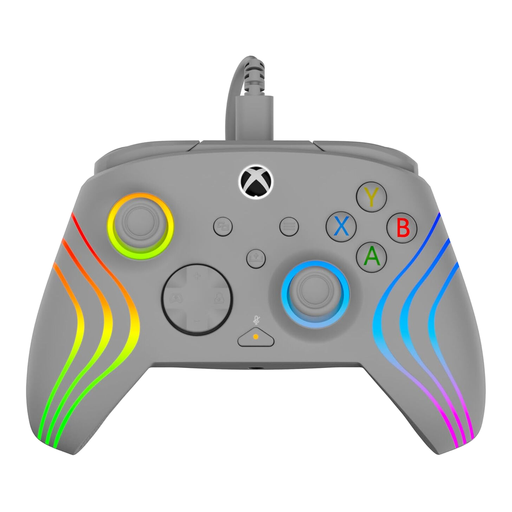
Turtle Beach Afterglow Wave Wired Controller for Xbox, grey
Its wired design suits a fixed setup if the cable reaches comfortably. If you plan to play on a PC, confirm compatibility for your Windows setup and basketball game.
 No image available
Turtle Beach PDP Victrix Pro BFG Wireless Controller for Xbox and Windows 10/11, black
Consider this wireless Xbox and Windows 10/11 controller if you want freedom of placement at the desk. Confirm the connection method you intend to use, your game's support and how you will manage charging.
 No image available
Xbox Wireless Controller, Robot White
Consider the standard Xbox controller if you also want to play on a Windows PC. Microsoft documents Bluetooth and Xbox Wireless support for this model; check your PC's connection capability, the power arrangement and your game's support.
Common questions
Will any controller work with a basketball game on my PC?
No: check the exact game's controller-support information as well as the controller's Windows compatibility. Steam labels NBA 2K27 as having partial controller support, and Steam says gamepad-specific commands require a game that supports gamepads.
Should I choose wired, Bluetooth or a 2.4 GHz receiver for my desk?
Choose according to cable reach and the connection methods documented for your PC and controller. Wired use avoids battery management when your seat is within reach; Bluetooth requires compatible devices, while a model using a 2.4 GHz receiver needs an appropriate free USB port.
Will DualSense haptics and adaptive triggers work in every PC basketball game?
No. PlayStation says adaptive triggers require game support, and PC haptic feedback requires both game support and a USB connection. Check the particular game before choosing DualSense for those features.
What should I try if a controller connects but does not work properly on PC?
Start by checking the game's controller support and the connection itself. If testing over USB, Microsoft Xbox Support advises using a cable that carries data; you can also try another suitable port and check the controller maker's applicable setup guidance.


