Who is this for?

Membership administrators working away from sockets

If you set up at visits, events or temporary workstations, decide how long the extra screen must run and whether it can draw power from your laptop. Independent screen power may matter more to you than the lightest carrying load.

Laptop-based spreadsheet organisers

If you compare member lists and details on a second display, a compatible USB-C monitor can provide workspace without its own battery. Plan for the power it takes from your laptop, or check a compatible external-power arrangement.

People handling personal records on the move

If the records contain personal information, think about screen positioning and locking as well as the device holding the files. The Information Commissioner’s Office advises enabling storage encryption on laptops, smartphones and tablets that store personal information.

What matters when choosing?

Monitor with a built-in battery

Choose when: The screen needs to operate without taking its power from the laptop. ASUS specifies a built-in battery for the ZenScreen Go MB16AWP.

Trade-off: Battery operation still has a session limit: ASUS states up to 3.5 hours for that model under specified conditions and lists its net weight as 1.09 kg.

Laptop-powered USB-C monitor

Choose when: Your laptop can provide the required video and power for the working session. Lenovo describes one-cable laptop-powered operation for the ThinkVision M15.

Trade-off: The screen draws on the host’s available power away from mains, and a USB-C socket alone does not establish video compatibility.

Concern What to check Who this matters to
Unplugged screen time Check for a built-in battery, then compare the stated runtime and its conditions with your longest session. If I cannot rely on a socket or spare laptop power, I need the screen to last through the records session. Around 40% of consumers would put independent screen runtime first.
USB-C and host power Confirm the laptop’s video output, the monitor’s power requirements and the cable or charging arrangement you intend to use. When I use my laptop to run the extra display, I need the connection to work without ending the session early. Compatibility and shared battery time would come first for around 30% of consumers.
Record workspace and handling Check screen dimensions and orientation for your lists, carrying weight and the security arrangements for the device storing the records. I need to read long lists at a temporary workstation while handling any personal information appropriately. Around 30% of consumers would prioritise this workspace and record-handling need.

Buying pitfalls

  • Assuming portable means battery-powered

    A screen can be easy to move yet still need power from a laptop. LG explicitly says its +view 16MR70 has no built-in battery; Lenovo and HP describe laptop-powered operation for the ThinkVision M15 and E14 G4.

    Decide whether independent screen power is essential before comparing models. If laptop power is acceptable, assess the combined unplugged working time.

  • Judging USB-C compatibility by the connector alone

    USB-C ports do not all provide display output. ASUS says plug-and-play portable-monitor use requires video functionality on the computer’s port, while LG specifies DisplayPort Alt Mode and USB Power Delivery above 7.5 W for the 16MR70.

    Check the exact laptop and monitor specifications, including video output, power and the cable needed for your planned connection.

  • Treating stated battery life as guaranteed session time

    ASUS states up to 3.5 hours for the ZenScreen Go MB16AWP under specified wireless-use conditions and describes approximately 3.5 hours for wired HDMI use. Those figures should not be treated as an all-day runtime.

    Compare the claim and its conditions with your longest session, leaving room for changes in settings and battery condition.

    A session that exceeds usable runtime may require a charging break or another compatible power source.

  • Securing the screen but overlooking the stored records

    The monitor adds viewing space, but the laptop, tablet or other device holding personal information needs appropriate protection. Information Commissioner’s Office guidance advises storage encryption on laptops, smartphones and tablets that store such information.

    Follow your organisation’s handling policy, use an appropriate screen lock and check encryption on the device that stores the records.

Brands to consider for these monitor types

ASUS

The ZenScreen Go MB16AWP is an example to consider when independent screen power or wireless mirroring matters.

  • ASUS specifies a 7800 mAh built-in battery, WiFi, Miracast and AirPlay mirroring, and portrait support for the MB16AWP.
  • Its stated runtime is up to 3.5 hours under specified conditions, and ASUS lists a 1.09 kg net weight.

Lenovo

The ThinkVision M15 is a 15.6-inch FHD option for a laptop-based second screen.

  • Lenovo says the M15 can run through one USB-C connection to a laptop and offers power pass-through through a second USB-C port.
  • Away from mains, plan around laptop battery life or a compatible external USB-C power arrangement.

HP

The E14 G4 is a 14-inch FHD laptop-powered option for a smaller carrying load.

  • HP specifies a 640 g weight, a 400-nit anti-glare screen and one-USB-C-cable operation powered from the laptop.
  • Its laptop-powered arrangement calls for host battery planning when working away from mains.

LG

The +view 16MR70 offers a 16-inch, 2560 × 1600, 16:10 display for people seeking more space for lists and spreadsheets.

  • LG specifies two USB-C ports and the taller 16:10 screen format for this model.
  • LG says the 16MR70 has no built-in battery, is for laptops only and needs DisplayPort Alt Mode and USB Power Delivery above 7.5 W from the connected device.

Joybuy product choices

These choices include portable second screens for laptop-based record work and monitors whose product names specify a built-in battery. Match the power arrangement, connection and carrying requirements to where you will work.

ASUS ZenScreen Go MB16AHP FHD portable monitor

ASUS ZenScreen Go MB16AHP FHD

For record work away from mains, confirm this variant’s power arrangement and usable session time before relying on it.

The product name specifies FHD resolution. Check that your source device supports the connection you intend to use.

View on Joybuy

ASUS ZenScreen MB166CR FHD portable monitor

ASUS ZenScreen MB166CR FHD

For a laptop-based records setup, check the laptop’s video output and how the monitor will be powered for the whole session.

The product name specifies FHD resolution; confirm the intended cable and port requirements before buying.

View on Joybuy

UPERFECT 14-inch 60Hz touchscreen portable monitor with adjustable stand

UPERFECT 14-inch 60Hz Touchscreen Portable Monitor with 180° Stand

Consider the touch controls if they suit how you work through records at a temporary workstation.

The product name specifies a 14-inch, 60Hz touchscreen and an adjustable 180° stand. Check host video compatibility and the required power arrangement.

View on Joybuy
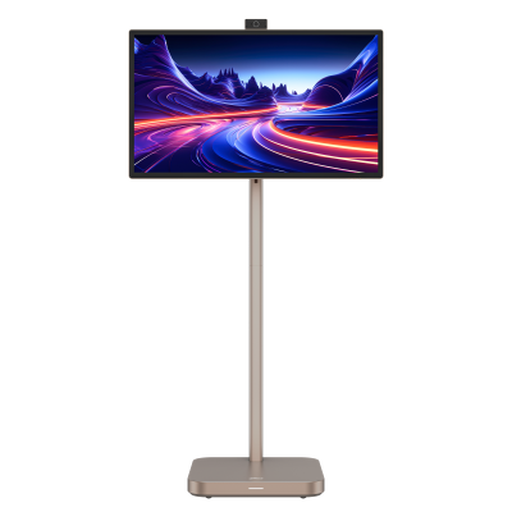
Dahua Explorer 31.5-inch 4K smart monitor with built-in battery

Dahua Explorer 31.5-inch 4K Smart Monitor, Android 11, 8GB+128GB, Built-in Battery

For a temporary workstation where you can accommodate a 31.5-inch screen, check its carrying weight and setup space before choosing it for frequent moves.

The product name specifies 4K UHD, Android 11 and a built-in battery with up to 4 hours of claimed battery life. Check the runtime conditions, charging arrangement and source-device connection.

View on Joybuy

Common questions

Do I need a monitor with its own battery away from mains power?

Only if the screen must operate without taking power from your laptop or another compatible supply. A laptop-powered USB-C monitor can work away from mains when the laptop provides the required video and power for the full session. For comparison, ASUS states that the battery-equipped ZenScreen Go MB16AWP has up to 3.5 hours of runtime under specified conditions.

Will any USB-C laptop work with a USB-C portable monitor?

No: the connector alone does not confirm display output. ASUS explains that plug-and-play portable-monitor use requires video functionality on the computer’s USB-C port, such as DisplayPort Alt Mode. Check the exact laptop port, monitor requirements and cable before buying.

What screen features help with long membership lists?

Check whether the display’s size, orientation and stand suit the lists you work with and the space available at your temporary workstation. ASUS specifies portrait support for the ZenScreen Go MB16AWP, while HP specifies a 400-nit anti-glare screen for the E14 G4; neither specification guarantees readability in every setting.

What should I secure when viewing personal membership records away from the office?

Secure the device that stores the records, as well as managing who can see the screen. For personal information, the Information Commissioner’s Office says organisations must use appropriate technical and organisational security measures and advises storage encryption on laptops, smartphones and tablets that hold it. Follow your organisation’s policy and check current ICO guidance.

Can the LG +view 16MR70 run away from a charger?

Yes, if a compatible connected laptop has enough battery power to run it for the session. LG says the 16MR70 has no built-in battery, is for laptops only and requires DisplayPort Alt Mode plus USB Power Delivery above 7.5 W from the connected device.