Choose a projector that fits the bedroom before settling on a resolution or brightness figure. A cinema-oriented model with optical placement controls is worth considering if you can darken the room and position it at the required distance; a short-throw model addresses limited lens-to-wall distance. For adventure films, check the exact model’s image size, HDR support, fan noise and audio connections, especially if you also watch with the lights on.
Who is this for?
Night-time film viewers
If you can dim the bedroom, dark scenes, shadow detail and fast action may matter more to you than a brightness figure chosen for daytime use. PCMag UK describes home-theatre projectors as intended for theatre-dark conditions.
Viewers with limited placement space
A bed, desk or other furniture may restrict the distance between the lens and the projection wall. The deciding question is whether a particular projector can produce your intended image size from the position you can actually use.
Viewers who want a simpler setup
If you plan to use a streaming device or existing speakers, check how both will connect before choosing a projector. Built-in features can reduce the equipment needed, but the connections must suit your devices.
What matters when choosing?
Start with the available lens-to-wall distance and the light level during films. Those constraints help determine which projector layout is feasible before you compare picture formats and everyday connections.
Conventional-throw home-cinema projector
Consider it: When you can darken the bedroom and position the lens at the distance required for your chosen image size.
Allow for: Enough clear placement space and a stable shelf or suitable mount; optical adjustment still varies by model.
Short-throw projector
Consider it: When furniture or room depth prevents a conventional-throw model from reaching the position it needs.
Allow for: A model-specific image-size check and ventilation space. Short throw resolves a distance constraint, not the effects of room light on dark scenes.
| Concern | What to check | Who it matters to |
|---|
| Dark-scene detail |
Check the exact model’s image specifications and whether you can darken the bedroom at viewing time. Treat a stated contrast ratio as model-specific, not a cross-brand result. |
I mainly watch films at night and want to follow action through darker scenes without relying on a brightness figure alone. Around 31% of consumers put dark-scene viewing first. |
| Placement and image size |
Measure from the planned lens position to the wall or screen, then check the manufacturer’s image-size data for that distance. |
Furniture limits where I can put the projector, so the picture must fit from a usable position. Placement is the primary concern for around 31% of consumers. |
| Streaming and sound |
Check the connection needed for your streaming source and the exact model’s speaker and audio-output options. |
I want to start a film without rearranging several devices, and my sound equipment needs a compatible connection. Around 23% of consumers prioritise this setup need. |
| Room light |
Identify when you will watch and compare brightness figures only with their stated measurement units and intended image size in mind. |
I cannot always block daylight or switch off the lights, so I need to assess the image under those conditions. For around 15% of consumers, mixed-light use comes first. |
Buying pitfalls
-
Ordering before measuring the projection distance
A short-throw ratio, zoom and lens shift address different placement problems. BenQ specifies a 0.8 short-throw ratio for the TK705STi, while ViewSonic publishes model-specific throw-distance data for the PX748-4K; neither figure tells you the image size in your bedroom without the planned lens position.
Measure that position to the wall or screen and check the exact model’s projection-size information before ordering.
A position that does not work may require a different stand, mount or screen.
-
Comparing brightness figures as though they use one scale
Epson describes white and colour light output for the EH-TW7100, BenQ uses ANSI lumens for the TK705STi, and XGIMI uses ISO lumens for the HORIZON S Max. The numbers alone are not a like-for-like picture comparison.
Check the measurement wording for each model and consider how much light will reach your wall or screen during the darker scenes you want to watch.
-
Leaving the soundtrack until after installation
Speakers and connection options differ by model. Epson lists built-in speakers and Bluetooth for the EH-TW7100, but those features do not establish whether it will connect to your chosen sound equipment in the way you intend.
Decide whether you will use the projector’s speakers or an external device, then check the exact audio connections and compatibility.
An external sound setup may also require cables or an adapter.
Brands to consider for bedroom projection
These examples illustrate different placement and feature choices; specifications apply to the named models, not every projector from each brand.
Epson
Epson’s home-cinema range includes models for a more deliberate, dark-room film setup.
- Epson United Kingdom specifies lens shift, optical zoom, built-in speakers and Bluetooth for the EH-TW7100.
- Check that model’s projection data against your available distance; its placement features should not be assumed for other Epson models.
BenQ
BenQ offers a short-throw option relevant when bedroom furniture restricts lens placement.
- BenQ UK specifies a 0.8 short-throw ratio for the TK705STi.
- Check the image size at your measured distance and leave suitable ventilation space; short throw does not remove the need to manage room light.
ViewSonic
ViewSonic’s PX748-4K is a reference point for viewers weighing film use alongside other viewing conditions.
- ViewSonic United Kingdom specifies 4K, HDR/HLG support, 1.3x optical zoom and throw-distance data for the PX748-4K.
- Check the intended image size, placement and stated operating noise for your setup rather than relying on one specification.
XGIMI
XGIMI’s HORIZON S Max presents an integrated stand as a placement option for buyers considering a freestanding setup.
- XGIMI UK describes a built-in flexible stand and states 4K capability for the HORIZON S Max.
- Its stated brightness uses ISO lumens; do not compare that number directly with an ANSI-lumen figure without considering the measurement basis.
Joybuy projectors for this setup
These projectors offer different ways to arrange bedroom film viewing, from built-in streaming to a carry-case bundle or a separate streaming source. For any of them, confirm the image size at your measured lens-to-wall distance before choosing.
 No image available
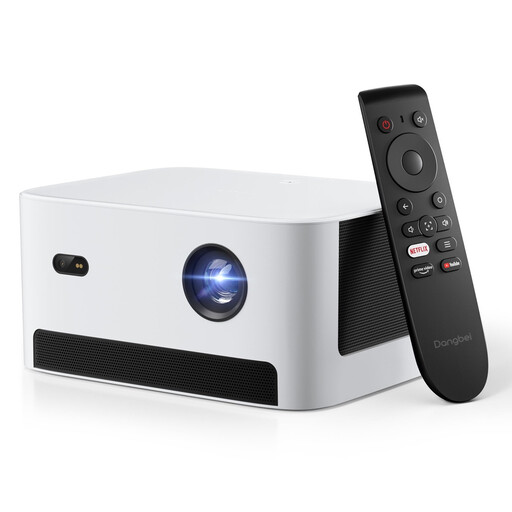
Dangbei Neo DLP Projector, 1080P Full HD
Consider this model if built-in streaming would simplify your bedroom film setup. Its title specifies Netflix, 1080P Full HD, 540 ISO lumens, autofocus and keystone correction.
Check the image size at your available distance and darken the room when shadow detail matters.
View on Joybuy
 No image available
Magcubic HY350Max Projector, Native 1080P
Consider the HY350Max if flexible positioning and built-in smart functions matter to your setup. Its title specifies Android 14, 900 ANSI lumens, rotation and automatic keystone correction; it describes 8K as supported, not native resolution.
Confirm your intended image size at the available distance, and check the exact model’s HDR support if that is important for your films.
View on Joybuy
 No image available
Soundcore Nebula Mars 3 Air + Carry Case Bundle
The carry-case bundle is relevant if you expect to move the projector between viewing positions. Check the projection size at your bedroom’s available distance and whether your planned power arrangement will cover a full film.
View on Joybuy
 No image available
Wimius K1 Projector, FHD 1080P
Consider the K1 if you plan to connect a separate streaming source: its title names FireStick compatibility and specifies 1200 ANSI lumens, keystone correction and 4K support rather than native 4K resolution.
Check its image size at your intended position and confirm the connections needed for your source and speakers.
View on Joybuy
 No image available
View XBJ A5Pro Smart Projector, Grey
Consider the A5Pro if built-in smart functions and automatic setup controls suit your bedroom arrangement. Its title specifies native 1080P, 4K support, an Android system, autofocus, keystone correction and Wi-Fi 6.
Check the exact variant’s brightness specification and the image size it can produce from your planned position.
View on Joybuy
Common questions
Should I prioritise brightness or a cinema-oriented projector for bedroom films?
If you usually watch after dark and can block window light, start with feasible placement and the image characteristics you want for darker scenes. PCMag UK distinguishes home-theatre projectors intended for theatre-dark conditions from home-entertainment use; if you also watch in daylight, assess the exact model’s brightness wording and your intended image size.
Is short throw automatically better in a small bedroom?
No: short throw is useful when lens-to-wall distance is the constraint. BenQ UK specifies a 0.8 short-throw ratio for the TK705STi, but you still need the model’s projection-size data to establish whether it fits your measured position.
Will I need separate speakers?
Not necessarily; the answer depends on the projector’s speakers and how you want to hear the soundtrack. Epson United Kingdom lists built-in speakers and Bluetooth for the EH-TW7100. If you intend to use a soundbar or other speakers, check the connections and compatibility of both devices before ordering.
What should I check on a connected projector before buying?
Check the exact model’s manual and manufacturer support information for the streaming functions, power requirements, warranty and connected-device updates that matter to your setup. Epson United Kingdom makes a UK product-security compliance statement for the EH-TW7000 specifically; it should not be taken as a statement about another model.


