Viewers with some bedroom light
If curtains cannot fully block daylight or you need a lamp on, assess brightness together with your intended image size rather than choosing by advertised maximum image size.


Choose a brighter Full HD home projector if you cannot fully darken the bedroom and have enough distance to position it; choose a portable, angle-adjustable model if bedside or ceiling viewing matters more and you can keep the room dim. Before the final, check the image size your space allows, how you will receive the live broadcast and whether you are covered by a UK TV Licence.
If curtains cannot fully block daylight or you need a lamp on, assess brightness together with your intended image size rather than choosing by advertised maximum image size.
If the projector must sit beside the bed or point at the ceiling, its available position and angle adjustment may matter more to you than a conventional front-facing setup.
You need a broadcaster account and a compatible app or HDMI-connected source, not just a projector. TV Licensing says watching a live event on a streaming service in the UK requires TV Licence coverage.
Start with the light you can control and the place the projector can sit. Those constraints determine whether a conventional home model, a portable bedside model or a short-throw setup is worth considering.
Consider it when: Some bedroom light is unavoidable and you have a suitable position at the required distance from the wall.
Trade-off: Placement is less flexible than with a bedside-oriented model, and drawing the curtains still matters. Epson lists 3,000-lumen white and colour light output for its CO-FH02; that rating does not guarantee the same result at every image size or light level.
Consider it when: You need to aim from a bedside position, project onto a wall or ceiling, or put the unit away afterwards.
Trade-off: A dim room becomes more important. BenQ lists its bedside-oriented GV50P at 500 lumens and a fixed 1.2 throw ratio, so its position and intended image size still need checking.
Consider it when: Furniture or room length prevents a conventional projector from sitting far enough from the wall.
Trade-off: A shorter placement distance does not resolve uneven wall surfaces or furniture clearance. Check the exact model’s required position before choosing this route.
| Concern | What to check | Who this matters to |
|---|---|---|
| Picture visibility | Check controllable light, intended image size, stated brightness and native resolution together. | If I cannot fully darken the bedroom, I want the pitch and on-screen graphics to remain visible at my chosen image size. Around 33% of consumers would put picture visibility first. |
| Placement and alignment | Measure lens-to-wall distance and check the model’s throw ratio and available angle adjustment. | When the bed and furniture leave only one practical position, I need to know whether I can aim the image from there. For around 27% of consumers, workable placement is the primary concern. |
| Live-match access | Confirm the broadcaster, account, compatible app or HDMI source, internet connection and UK TV Licence coverage. | I do not want to discover at kick-off that my chosen app or source device cannot show the live match. Getting the broadcast onto the projector would come first for around 27% of consumers. |
| Sound and disturbance | Check stated fan noise, speaker and audio-connection options for the intended position. | For a late match, I need to hear the commentary without the setup disturbing others nearby. Around 13% of consumers would make sound and disturbance their first concern. |
A larger image needs to be judged against the light in the room; it will not necessarily look clearer than a smaller one. ProjectorCentral advises considering screen size alongside the brightness needed.
Measure the usable wall and projector-to-wall distance, then decide how much light you can block during the match.
An unsuitable wall or difficult-to-control daylight may also mean using a screen or blackout curtain.
A built-in smart system or HDMI input is only a way to display a source; access to the broadcaster is separate. TV Licensing says live events watched on a streaming service in the UK require TV Licence coverage.
Try the broadcaster account, internet connection and complete app or HDMI setup before the final, and check your TV Licence coverage.
You may need access to the broadcaster’s service or a compatible HDMI streaming device.
A rotatable bedside projector may solve a positioning problem without producing the image you want in an illuminated bedroom. BenQ specifies 500 lumens for its GV50P portable model; assess that rating against your actual lighting and image size.
If you cannot sufficiently darken the room, consider a conventional home projector that fits your available throw distance.
The available furniture position may not produce the intended image size, while fan noise or the built-in speaker may be noticeable near the bed.
Check throw requirements, stated operating noise and audio connections for the exact model and position you intend to use.
That position may call for a stand, a longer HDMI cable or separate audio equipment.
Epson’s UK home-projector range includes conventional Full HD models and more compact home-entertainment options.
BenQ offers both conventional home projection and portable models designed for bedside positioning.
XBJ has a portable wall-and-ceiling projector listed on Joybuy that may interest viewers who can keep the bedroom dim.
These Joybuy choices focus on portable projectors that can be positioned for bedroom wall or ceiling viewing. Compare their stated native resolution, light output and adjustment features against your room; the right live-broadcast connection still needs checking separately.
 Image unavailable
Consider it if you want flexible positioning for a bedroom wall image. The listing names native 1080p, 900 ANSI lumens, 180° rotation, automatic keystone adjustment and HDMI compatibility.
Check the image size in your actual room lighting and confirm that your broadcaster works through the intended app or HDMI source.
 Image unavailable
Consider it for wall or ceiling viewing in a bedroom you can keep dim. The Joybuy listing describes native 1080p, 500 ANSI lumens, 360° rotation, automatic keystone adjustment and HDMI.
Check your projection distance, intended image size and live-stream source before the match.
 Image unavailable
Consider it when a small, rotatable projector is easier to place beside the bed. Its title specifies native 720p, 1080p input support, a 180° rotating stand and automatic keystone adjustment.
Native 720p is distinct from 1080p input support. Check whether that resolution suits your image size and how you will connect the live broadcast.
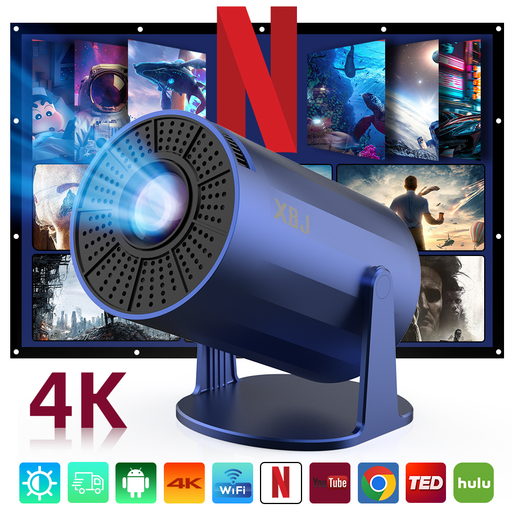 Image unavailable
Consider it if flexible wall or ceiling aiming is your main placement need and you can darken the bedroom. Its title lists 200 ANSI lumens, a rotatable design and automatic keystone adjustment.
The advertised 1080p and 4K-decoding terms do not establish native 1080p resolution. Confirm native resolution, your intended image size and a compatible live-stream connection; the listing also notes restrictions on wireless mirroring of some streaming services.
Yes, in the UK you need TV Licence coverage to watch a live programme or event on a streaming service, regardless of whether you use a projector or another display, according to TV Licensing. Check that your viewing is covered before the match.
Only if the exact broadcaster service, account and live-stream app work on that projector’s platform. Check those before match day; a compatible device connected by HDMI is a separate route if the built-in app is unsuitable.
Choose a size that fits the usable wall, viewing position, projection distance and lighting rather than the largest advertised diagonal. ProjectorCentral advises considering image size alongside the brightness needed; test the layout you intend to use.
It can suit a bedroom you can keep dim when bedside or ceiling positioning is the priority. If light is harder to control, assess a brighter conventional model that fits the available distance; manufacturer light-output ratings alone do not establish how either will look at your chosen image size.