Who is this for?

Bedside viewers with limited space

If you watch from bed, check whether a projector can make the image you want from a bedside position and aim it at the wall or ceiling. BenQ describes its GV50 as designed for bedside ceiling projection, but the available distance still matters.

Viewers who cannot fully darken the room

Daytime viewing or lamps left on make room light an important part of the choice. Compare brightness figures with their measurement descriptions and plan where a conventional projector could sit.

Streaming-first viewers

If your gardening programmes come from a particular service, check support on the exact projector model or plan for a compatible HDMI-connected device. Netflix advises checking projector compatibility rather than assuming its app works on every smart model.

What matters when choosing?

Portable bedside projector

Consider it: When you watch from bed and need to move the projector or aim it at a ceiling; BenQ describes the GV50’s adjustable base for this use.

Allow for: Image visibility under your room lighting and the exact model’s streaming and sound arrangements.

Conventional Full HD projector

Consider it: When room light is difficult to control and you have a suitable position facing a wall or screen. Epson states that its EH-TW840 delivers 4,000 lumens of both white and Colour Light Output.

Allow for: A less flexible bedside arrangement and a possible need for an external streaming device.

Permanent 4K-oriented setup

Consider it: When you want a more permanent position and can accommodate the required projection distance. Epson lists 4K PRO-UHD, lens shift and optical zoom for its EH-TW7000.

Allow for: More placement planning; its image specification does not establish support for your chosen streaming app.

ConcernWhat to checkWho this matters to
Placement and aiming Measure lens-to-wall distance against the exact model’s throw specification. Check ceiling aiming separately if you will watch lying down. I need the image to fit from the bedside position I can actually use, without rearranging the room each evening. Around 31% of consumers put placement first.
Programme access Confirm your service on the exact model in the UK, or check both its HDMI input and your intended playback device. If my gardening shows are on a particular service, I need a workable way to play them, not just a smart interface. Streaming access is the main concern for around 25% of consumers.
Image in room light Decide how much light you can exclude, then read the brightness figure with its stated measurement basis and intended image size. When I watch before dark or leave a lamp on, I need to see the picture clearly enough to follow the programme. Around 19% of consumers chiefly prioritise visibility in room light.
Bedtime comfort Check aiming controls, audio options, the power arrangement and the exact model’s published noise specification. I want to settle in without repeated adjustments or sound that disturbs someone nearby. Ease of bedtime use comes first for around 25% of consumers.

Mistakes to avoid

  • Choosing a screen size before measuring the room

    Image width depends on both the projector’s throw ratio and its lens-to-wall distance. BenQ’s installation guidance defines throw ratio as distance divided by image width, so a desired screen size alone cannot tell you whether a model will fit.

    Measure from the proposed lens position to the wall and use the exact model’s throw specification or distance calculator. Make a separate placement check for ceiling viewing.

  • Assuming a smart projector has every streaming app

    Netflix says its projector app works on brands partnered for compatibility. An advertised smart interface does not by itself confirm that your preferred service will work on the exact model in the UK.

    Check model-specific app support before buying. If you plan to use another playback device, confirm that the projector has a suitable HDMI input and that the device supports the service.

    An external route may require a compatible streaming stick, computer or adapter.

  • Comparing brightness numbers without their measurement basis

    Epson states both white and Colour Light Output for the EH-TW840. Figures described in different ways do not, by themselves, establish how two projectors will look at your chosen image size and room-light level.

    Read each figure with its stated measurement method and consider whether you can darken the bedroom during viewing.

  • Overlooking support and disposal

    App support and security updates matter to a connected projector over time. At end of life, Recycle Now advises recycling electrical items rather than sending them to landfill.

    Ask about the exact smart model’s security-update commitment and check your local electrical recycling or retailer take-back route when you no longer need the projector.

Brands to consider for these setups

BenQ

BenQ presents the GV50 as a portable, 1080p, 500-lumen laser projector with Google TV and an adjustable base intended for bedside ceiling viewing.

  • BenQ describes wall-to-ceiling adjustment, screen rotation and a sleep timer on the GV50.
  • Those manufacturer descriptions do not establish image visibility, app support or noise levels for your room; check the exact model against your setup.

Epson

Epson’s EH-TW840 is a conventional Full HD model, while its EH-TW7000 offers a 4K PRO-UHD home-cinema specification for a more planned installation.

  • Epson states 4,000 lumens of both white and Colour Light Output and two HDMI ports for the EH-TW840; it lists lens shift, zoom and Bluetooth soundbar connection for the EH-TW7000.
  • Those specifications do not establish that either model can aim conveniently from your bedside position. Check the projection distance and playback arrangement.

Optoma

Optoma’s UHD38x is a conventional 4K UHD model to consider if the bedroom allows its stated projection distance.

  • Optoma’s UHD38x technical document lists 4,000 lumens, two HDMI 2.0 inputs and a 1.5:1–1.66:1 throw ratio.
  • Its stated throw ratio needs checking against your lens-to-wall distance. Optoma lists 26 dB typical and 28 dB maximum noise for the UHD38x specifically, not for every Optoma projector.

Joybuy projectors for bedroom viewing

These portable projectors are relevant if flexible bedroom placement is your starting point. Check each model’s image size at your available distance and how it will play your chosen programmes; the conventional, more permanent setups discussed above call for a different placement assessment.

Lite Entertainment Magcubic HY300 Pro projector in grey

Lite Entertainment Magcubic HY300 Pro, grey

Consider its rotating stand if you need to change the projection direction from a bedroom position; check the resulting image size where it will stand.

The title states native 720p, 1080p input support, Android 14, automatic keystone correction and a 180° rotating stand. Support for 1080p input does not make the image natively 1080p. Confirm your chosen streaming service and the noise level for bedtime use.

View on Joybuy

Magcubic HY350Max portable projector

Magcubic HY350Max projector

Its stated rotation may suit an adjustable bedroom position, but confirm the image size from the distance available beside your bed.

The title specifies native 1080p, 8K input support, Android 14, automatic keystone correction and 180° rotation. Input support does not describe native display resolution. Check exact-model app access and fan noise before relying on it for bedtime viewing.

View on Joybuy
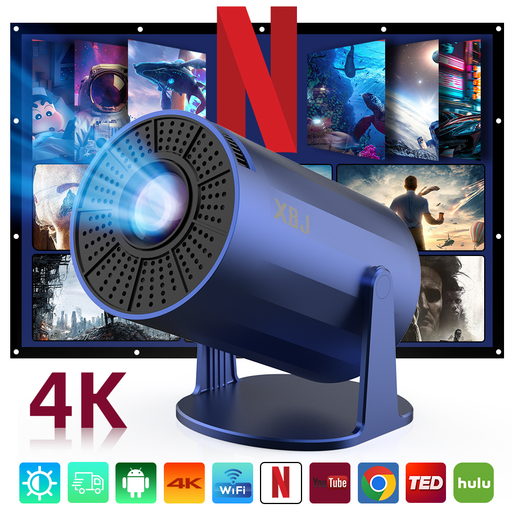
XBJ portable blue projector

XBJ portable blue projector, upgraded version

Consider the rotating-base design if you intend to aim the image towards a bedroom wall or ceiling, but check the exact unit’s aiming range: its descriptions give conflicting angles.

The title lists Android 11, automatic keystone correction, Bluetooth 5.2 and 4K decoding. The description says the projector has no battery and notes restrictions on wireless mirroring of streaming services; confirm a suitable playback device and power arrangement.

View on Joybuy

XBJ 360° portable projector

XBJ 360° portable projector

Its stated wall and ceiling aiming options are relevant if the projector needs to move around your bedroom. Confirm that your available distance produces the image size you want.

The title specifies Full HD 1080p, 360° rotation, automatic keystone correction and HDMI connectivity. Check your preferred service’s playback route and the projector’s noise level for use near the bed.

View on Joybuy

TCL C1 smart projector in grey

TCL C1 smart projector, grey

This compact option may suit a bedroom shelf if its projection distance and aiming range work for your chosen wall; check both before buying for ceiling viewing.

The title states 1080p Full HD and 4K input support. Check the exact model’s UK streaming-service support and noise level rather than relying on the smart-projector label alone.

View on Joybuy

Frequently asked questions

How can I tell whether the image will fit my bedroom?

Measure from the intended lens position to the wall, then compare that distance with the exact model’s throw ratio or screen-size-at-distance specification. BenQ defines throw ratio as throw distance divided by image width; a promised maximum screen size does not tell you what will fit at your bedside.

Will a smart projector automatically play Netflix?

No. Netflix says its app works on projector brands partnered for compatibility, so check the exact model and your region. If it is not supported, Netflix advises using a compatible computer, streaming stick or mobile device connected through HDMI or a suitable video adapter.

Should I look for CE or UKCA marking?

For a projector placed on the market in Great Britain, GOV.UK guidance says CE marking continues to be recognised alongside or in place of UKCA marking where the relevant product requirements are met. Northern Ireland follows different processes; check which marking route applies to your particular purchase rather than treating the Great Britain guidance as a UK-wide rule.

How long will a smart projector receive security updates?

Check the manufacturer’s stated security-update period for the exact model. GOV.UK says the consumer-connectable product-security regime took effect on 29 April 2024 for covered products, but that does not establish how long any particular projector will receive app or feature updates.

What should I do with an unwanted projector?

Recycle it as an electrical item rather than putting it in ordinary rubbish. Recycle Now advises using an appropriate recycling centre, collection point or retailer route; check which options are available locally.