For astronomy programmes watched mainly in a dim bedroom, start by comparing 4K OLED TVs: Samsung and Sony describe OLED's individually controlled pixels as suited to deep blacks and dark-scene detail. If the room is often bright, compare a Mini LED model too; for any LCD alternative, assess the exact screen rather than assuming its display label predicts dark-scene performance. Whichever route you take, check viewing distance, programme and app compatibility, and private-audio options on the individual model.
Who is this for?
Night-time astronomy viewers
If you usually watch with the lights low, separation between stars and dark backgrounds may matter most. OLED is a route to investigate for this use, as Sony and Samsung describe it as suited to deep blacks and dark-scene detail.
Day-and-night bedroom viewers
If you also watch with curtains open or lamps on, compare brightness as well as dark-scene contrast. Samsung positions Mini LED as a brightness-focused alternative to OLED.
Close-range, quiet viewers
If you watch from bed or share the room, screen placement and private listening deserve attention alongside picture quality. Measure your viewing position and check the exact TV's headphone or Bluetooth audio options.
What matters when choosing?
Choose for the bedroom's usual lighting first, then rule out screens that will not fit your viewing position. Check the services, picture formats and audio connections you actually plan to use before settling on a model.
| Concern |
What to check |
Who this matters to |
| Dark-scene detail |
Compare the exact TV's display technology and, where possible, dark scenes under your usual room lighting. |
When I watch with the lights down, I want stars to remain distinct against dark skies; roughly 36% of consumers put dark-scene detail first. |
| Size and placement |
Measure eye-to-screen distance, available width and stand depth. Sony's 4K guidance gives a minimum distance of 1.5 times the screen's height. |
If the TV faces my bed, I need a screen I can view comfortably that also fits its cabinet or mount; around 29% of consumers prioritise bedroom fit. |
| Streaming and HDR |
Confirm the exact model's required apps and HDR formats, then check the programme's available format. |
I do not want to choose a TV for an HDR format only to find that my usual programme source cannot use it; about 21% of consumers put access and format compatibility first. |
| Private listening |
Check headphone or Bluetooth audio support on the exact model and compatibility with your audio device. |
Late-night viewing needs to work without disturbing someone else in the bedroom; roughly 14% of consumers make private listening their primary concern. |
Buying pitfalls
-
Choosing by display label alone
OLED and Mini LED address different lighting priorities, but neither label establishes how a particular TV will handle your programmes or room conditions.
Use room brightness to narrow the technology choice, then check the individual model's picture features and connections.
-
Picking a diagonal before measuring the bedroom
Viewing distance is only part of the fit: the TV and its stand must also work with the available furniture or mounting position.
Measure from your normal position in bed and check the chosen model's full dimensions, including its stand.
If the stand or mounting position does not fit, you may need to change the furniture or mount.
-
Assuming every smart TV has the same apps and audio options
HDR formats, streaming apps and Bluetooth audio vary by model. A feature listed for one TV does not establish support on another.
Check the exact model for your service, the programme format you intend to watch and the headphones you intend to use.
If a required app or audio connection is absent, using a separate compatible device or adapter may be necessary.
-
Overlooking the TV Licence rules
In the UK, TV Licensing says you must be covered by a TV Licence to download or watch BBC iPlayer, or to watch live TV through a streaming service. The device used does not remove that requirement.
Check that your household is covered before using BBC iPlayer or watching live television.
Brands to consider for this decision
LG
LG's UK OLED range includes 42-inch options, making it relevant when comparing smaller screens for a dim bedroom.
- LG lists a 42-inch OLED evo AI C6 in its 2026 range.
- Check the precise model's size, apps and audio connections; LG's description of true blacks on its 2025 C5 is a manufacturer claim, not a measurement for every LG TV.
Samsung
Samsung offers OLED and Mini LED lines to compare when bedroom lighting changes between daytime and night-time viewing.
- Samsung's UK comparison guide describes OLED in terms of deep blacks and Mini LED in terms of brightness and HDR.
- Those descriptions do not establish identical picture performance across models; compare the specifications and viewing conditions of the sets you are considering.
Panasonic
Panasonic has a 42-inch OLED option to examine where bedroom space is limited.
- Panasonic lists its 42-inch Z90B as a 4K OLED TV supporting HDR10+, HDR10, HLG and Dolby Vision IQ.
- Confirm the apps and audio features you require on the exact model rather than extending one Panasonic TV's specifications to another.
Sony
Sony is relevant when comparing OLED with backlit alternatives and checking screen size against viewing distance.
- Sony positions its OLED sets for dark-scene detail and gives viewing-distance guidance for 4K TVs.
- Sizes and features differ by series, so confirm the specifications of the individual TV.
Joybuy TVs to compare
These TVs offer different screen sizes for the bedroom decision, from 42- and 43-inch options to an 83-inch model that needs particular attention to space and viewing distance. Compare each exact model for dark scenes, streaming and private listening rather than treating this selection as a comparison of every display type.
 No image available
Sony BRAVIA A90 XR42A90K 42-inch 4K OLED TV
Consider this OLED model for a dim bedroom, provided its 42-inch screen fits your viewing distance and placement.
Sony lists the XR-42A90K as a 3,840 × 2,160 OLED TV. Confirm your required streaming apps and private-audio connection on this exact model.
View on Joybuy
 No image available
Samsung S85F QE83S85FAE 83-inch 4K TV
Consider this much larger screen only after measuring both the bed-to-screen distance and the space available for installation.
The product name specifies an 83-inch 4K smart TV. Check the exact model's streaming services and whether its audio connections work with your headphones.
View on Joybuy
 No image available
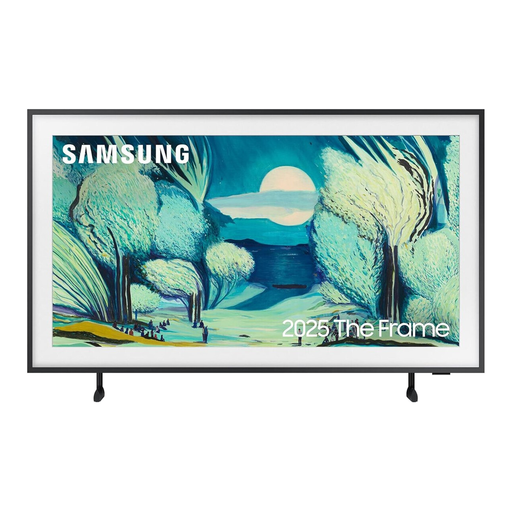
Samsung The Frame QE43LS03FAU 43-inch 4K TV
This 43-inch option is worth sizing against a closer bed-facing position, but assess dark astronomy scenes on the exact screen rather than assuming it behaves like an OLED or Mini LED model.
Confirm the streaming apps you use and whether its audio options suit your headphones.
View on Joybuy
 No image available
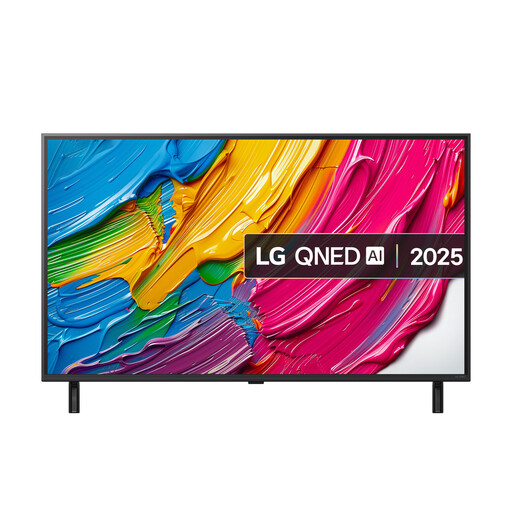
LG QNED80 43QNED80A6A 43-inch 4K TV
Compare this 43-inch QNED model for bedroom fit, while judging its dark-scene picture on its own terms rather than treating it as an OLED choice.
The product name specifies 4K resolution and webOS. Check the exact model for your streaming apps and compatible private-audio options.
View on Joybuy
Frequently asked questions
Do I need a TV Licence for astronomy programmes on BBC iPlayer?
Yes. TV Licensing says that, in the UK, you must be covered by a TV Licence to download or watch BBC iPlayer, including on-demand programmes, regardless of the device you use.
What if I watch a live programme through another streaming service?
TV Licensing says you need a TV Licence to watch live TV through a streaming service in the UK. Check whether the programme you plan to watch is being shown live rather than assuming the service or device changes that requirement.
How do I choose a TV size for watching from bed?
Measure from your normal eye position to the planned screen position, then check the TV and stand dimensions against the available space. Sony's guidance for 4K TVs suggests a minimum viewing distance of 1.5 times the screen's height; use that as a starting point alongside your own comfort.
Can I use wireless headphones for late-night viewing?
Yes, if the individual TV supports audio to your compatible headphones. Panasonic says its MZ800 series can pair with Bluetooth-enabled audio devices, but you should check the connection and intended sound behaviour on whichever model you choose.
What else should I check before ordering?
Check whether your preferred streaming service needs a subscription, whether your planned viewing requires a TV Licence, and whether delivery and installation will work in the bedroom. Review the seller's warranty and returns terms for the particular TV rather than assuming they match another retailer's terms.


