For historical dramas watched mainly in a dim bedroom, start with a compact OLED if dark-scene contrast and a 42–48-inch screen are your priorities. Consider Mini LED if daylight or lamp reflections are a regular issue, or if you want a 50–55-inch screen; whichever you choose, check the picture modes and the set’s fit in your room rather than deciding by display type alone.
Who is this for?
After-dark drama viewers
If candlelit interiors, dark costumes and shadow detail are central to your viewing, compare dark scenes in a subdued picture mode rather than judging TVs by a bright shop display. The UHD Alliance says Filmmaker Mode disables processing such as motion smoothing; LG describes OLED contrast on its 48-inch C6, though its picture claims are the brand’s own.
Viewers with daylight or bedside lamps
If light regularly reaches the screen, consider reflections as well as dark-scene detail. Hisense specifies anti-reflection treatment for its 55U7QTUK PRO, while Hisense and TCL offer Mini LED lines to assess for mixed-light viewing.
Streaming-first viewers
If most dramas come from catch-up or streaming apps, check those apps on the exact TV and the Wi-Fi signal where it will stand. Freeview advises at least 3 Mbps for HD viewing, and TV Licensing says watching or downloading BBC iPlayer requires TV Licence coverage.
What matters when choosing?
Choose a screen that fits the bedroom and its usual lighting, then check how it presents a familiar dark scene with motion processing adjusted to your taste.
Compact OLED
Consider it when: Most viewing is after dark and a 42–48-inch screen suits the available space. OLED’s pixel-level light control is relevant to black backgrounds and candlelit scenes.
Trade-off: A smaller screen may not suit a long bed-to-screen distance, and daytime reflections still need assessing on the exact model.
Mid-size Mini LED
Consider it when: Windows or lamps regularly affect viewing, or a 50–55-inch screen suits the room better. The cited TCL C6K range starts at 50 inches, and Hisense lists anti-reflection treatment on its 55U7QTUK PRO.
Trade-off: Mini LED dims backlight zones rather than individual pixels, so inspect subtitles and bright candlelight against dark surroundings for distracting halos.
| Concern | What to check | Who this matters to |
|---|
| Dark scenes and motion |
Try a familiar dark scene in Filmmaker Mode or a cinema mode, where available. Check shadow detail and whether motion smoothing can be turned off; the UHD Alliance says Filmmaker Mode disables it. |
When candlelit rooms and dark costumes carry the drama, I want to see their detail without movement looking unnaturally smooth. Around 42% of consumers put that viewing experience first. |
| Room light and screen fit |
Measure the screen position and stand space. With your usual lights on, assess reflections and, on Mini LED models, halos around bright details. |
If I watch before dark or leave a bedside lamp on, the screen needs to work in that light and fit the furniture. For around 33% of consumers, that is the primary concern. |
| Streaming and setup |
Confirm your apps on the exact model and test Wi-Fi at the TV position. Freeview advises at least 3 Mbps for HD; check TV Licence coverage before using BBC iPlayer. |
I mainly want to start an episode without app or connection trouble, so straightforward bedroom streaming matters most. It is the first priority for around 25% of consumers. |
Buying pitfalls
-
Leaving the vivid shop preset on
Heavy motion smoothing can give a historical drama an unnaturally smooth appearance. The UHD Alliance says Filmmaker Mode disables motion smoothing, sharpening and noise reduction.
Try Filmmaker Mode or a cinema setting with drama content, then adjust for the light in your bedroom rather than assuming the brightest preset suits every scene.
-
Choosing a size before measuring
A screen may fit the wall but leave too little space for its stand, or feel too large from the viewing position. Size options also differ between TV lines.
Measure the intended position and check the exact variant’s overall dimensions, stand footprint and mounting requirements before choosing a screen size.
-
Overlooking mounting and old-TV removal
Wall mounting calls for a suitable bracket, wall and cable route; replacing a set also leaves an old electrical item to deal with.
Confirm installation and removal arrangements before delivery. Ask the retailer about like-for-like take-back or use an appropriate electrical recycling point.
-
Assuming on-demand viewing needs no TV Licence
TV Licensing says you must be covered by a TV Licence to watch or download BBC iPlayer, including on-demand dramas.
Check coverage before using BBC iPlayer, and separately confirm that the TV supports the viewing services you intend to use.
Brands to consider for these TV options
LG
LG’s OLED range includes a 48-inch C6 option for bedrooms where a smaller screen and dark-room viewing are priorities.
- LG lists the OLED48C6ELB as a 48-inch OLED model and describes its contrast and colour in its own product information.
- Check the exact model’s dimensions, app support and appearance in your usual daytime lighting.
Sony
Sony’s 55-inch BRAVIA 5 is a Mini LED option for a bedroom with room for a larger screen.
- Sony specifies 4K, Google TV and Acoustic Multi Audio, and describes streaming-service calibrated modes for the BRAVIA 5.
- Measure for the 55-inch size; Sony’s description of its picture modes is not an independent comparison with other TVs.
Hisense
Hisense’s 55U7QTUK PRO is a Mini LED option to assess where a 55-inch screen and mixed room lighting suit the bedroom.
- Hisense specifies anti-reflection treatment and Dolby Vision IQ, HDR10+ Adaptive, HDR10 and HLG for this UK model.
- Inspect dark scenes for any distracting zone-dimming effects rather than assuming a feature list determines the result.
TCL
TCL’s C6K QD-Mini LED range is relevant where the bedroom can accommodate at least a 50-inch screen.
- TCL lists C6K sizes from 50 to 98 inches and describes local dimming and high brightness.
- Check specifications for the size you select: TCL’s stated dimming-zone figure for a 65-inch model should not be applied to every size.
Samsung
Samsung’s S90F OLED line offers a 48-inch option for viewers considering a smaller bedroom TV.
- Samsung lists a 48-inch S90F and sizes ranging from 42 to 83 inches in the line.
- Confirm the exact variant’s picture modes, HDR support and fit before comparing it with another model.
Joybuy TVs for bedroom viewing
These TVs include compact OLED options for predominantly dim bedrooms and 55-inch OLED or Mini LED options where a larger screen fits. Check each model against your room lighting, placement and preferred streaming services.
 Image unavailable
Sony 42-inch BRAVIA A90 OLED TV (XR42A90K)
Consider the 42-inch OLED size when bedroom space is limited and you mostly watch dramas after dark.
The product name specifies 4K HDR and Google TV. Check its picture modes and the stand or mounting fit for your room.
Joybuy
 Image unavailable
Hisense 55-inch U7Q Pro Mini LED TV (55U7QTUK Pro)
Consider this 55-inch model if a larger screen fits the bedroom and reflections regularly affect viewing. Hisense specifies anti-reflection treatment for the matching UK model.
The product name specifies 4K HDR and VIDAA OS. Check its picture-mode controls and inspect bright details against a dark scene.
Joybuy
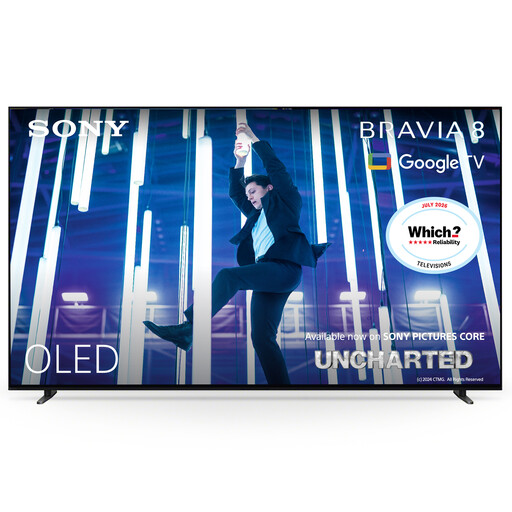 Image unavailable
Sony 55-inch BRAVIA 8 OLED TV (K55XR80BP)
This 55-inch OLED suits consideration when dark-room viewing matters but the available space allows a larger screen.
The product name specifies 4K HDR and Google TV. Check its dimensions, mounting fit and picture modes against your bedroom setup.
Joybuy
 Image unavailable
Sony 48-inch BRAVIA A90 OLED TV (XR48A90K)
Consider the 48-inch OLED size if you mainly watch dramas in a dim room and want more screen area than a 42-inch model.
The product name specifies 4K HDR and Google TV. Confirm the stand footprint, mounting fit and available picture modes before choosing it.
Joybuy
 Image unavailable
Hisense 55-inch E8Q Mini LED TV (55E8QTUK)
Consider this 55-inch Mini LED if the room fits a larger screen and you want to assess local dimming for drama viewing.
The product name specifies 4K HDR and VIDAA OS. Check reflections in your usual room light and inspect bright details in dark scenes.
Purchase link unavailable
Common questions
Should I choose OLED or Mini LED for dramas in a dark bedroom?
Start by assessing OLED if dark-room contrast and a compact screen matter most; assess Mini LED if reflections or a larger screen carry more weight. Compare a familiar dark scene on the exact models, including shadow detail and any halos around bright objects.
Which picture setting suits historical dramas?
Try Filmmaker Mode where available, or start with a cinema-oriented mode. The UHD Alliance says Filmmaker Mode disables motion smoothing, sharpening and noise reduction; adjust the setting if your room lighting calls for a different presentation.
What connection should I check for bedroom streaming?
Check the Wi-Fi signal at the TV’s intended position as well as your connection speed. Freeview advises at least 3 Mbps for HD viewing; a weak signal in the bedroom can still interrupt playback.
Do I need a TV Licence to watch dramas on BBC iPlayer?
Yes. TV Licensing says you must be covered by a TV Licence to watch or download BBC iPlayer on any device, including for on-demand programmes.
What should I do with my old TV?
Arrange electrical recycling rather than putting the old TV in household rubbish. GOV.UK describes appropriate collection points and like-for-like retailer take-back when replacing electrical products; confirm the collection arrangements before delivery.


