
24/7 Customer Support

Free returns

Same-day & Next-day Delivery

Quality Guaranteed

Unlock Your Welcome Offers: FREE Delivery | Up to 80% OFF | Free 30-day JoyPlus trial
Download the APP
Finding the right laptop often feels like a balancing act. You need enough power for demanding tasks, but you don’t want to be weighed down by a bulky machine. You want a screen that’s comfortable for long work sessions, but compact enough to slip into a bag. This is where the 14-inch laptop shines, offering a near-perfect blend of portability and productivity for professionals and creatives across the UK.
As a Joybuy Product Recommendation Officer, my role is to help you navigate the options. This guide cuts through the clutter to focus on what truly matters, highlighting key features to consider and presenting a selection of models that deliver on their promises.
Before diving into specific models, it’s helpful to understand the key technologies shaping the market. Making an informed choice now will ensure your device serves you well for years to come.
One of the most significant advancements in recent years is the rise of the OLED laptop. Unlike traditional LCD/IPS panels that use a backlight, each pixel in an OLED screen produces its own light. This results in true, deep blacks, an almost infinite contrast ratio and exceptionally vibrant colours.
For creative professionals working with photos or video, the colour accuracy of an OLED panel is a major advantage. Even for everyday use, the punchy, vivid image makes everything from watching films to browsing the web more immersive. While high-quality IPS screens are still excellent for general productivity, an OLED display offers a noticeable step up in visual quality.
When you see an Intel Evo laptop certification, it’s a mark of quality assurance. It means the device has been verified by Intel to meet strict standards for performance and user experience. These include instant wake-from-sleep, long real-world battery life, fast charging and responsive performance, even when unplugged. This makes an Evo-certified device a reliable choice for anyone needing an ultraportable laptop UK professionals can depend on.
More recently, Core Ultra laptop processors have arrived, bringing a new focus on efficiency and artificial intelligence (AI). These chips are designed to handle AI-driven tasks—like background blurring in video calls or smart noise cancellation—more efficiently, freeing up the main processor and extending battery life.
A great laptop for professionals needs great connectivity. Look for at least one Thunderbolt 4 port. This versatile connection uses a USB-C connector to provide high-speed data transfer, connect to multiple 4K displays and charge your laptop, all with a single cable. For wireless, Wi-Fi 6E is the current standard for fast, reliable connections in busy environments, with Wi-Fi 7 emerging on the very latest models for even better performance.
Here are our recommendations, selected for their performance, design and overall value for different types of users.
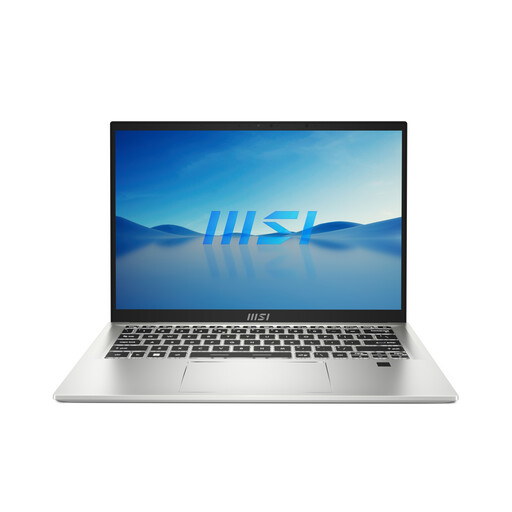
Why It Stands Out: The MSI Prestige 14 Evo is a masterclass in practical design and reliable performance. As an Intel Evo-certified machine, it’s built from the ground up for mobility. It’s exceptionally light at just 1.29 kg and delivers the consistent, responsive experience that busy professionals need without unnecessary frills.
Pros:
Who is it for?: The mobile professional, consultant or student who prioritises reliability, all-day battery life and a no-fuss, lightweight 14 inch laptop for getting work done anywhere.
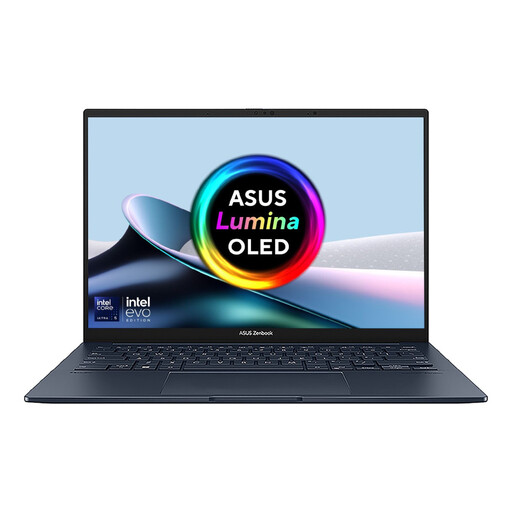
Why It Stands Out: The ASUS Zenbook 14 OLED is all about the screen. Its stunning 14-inch 3K OLED touchscreen with a 120Hz refresh rate delivers an incredibly fluid and vibrant visual experience. Paired with a new Intel Core Ultra 5 processor, it offers a perfect blend of cutting-edge display technology and next-generation performance in a sleek, ultra-portable package.
Pros:
Who is it for?: Content creators, media enthusiasts and professionals who want a superior visual experience for everything from editing photos to watching films, without sacrificing portability.

Why It Stands Out: The ASUS Zenbook DUO redefines what a portable laptop can be. It features two full-size 14-inch 3K OLED touchscreens, effectively giving you a portable dual-monitor setup. With its detachable keyboard and built-in kickstand, it can transform from a traditional laptop into an expanded desktop workspace or a collaborative presentation tool in seconds.
Pros:
Who is it for?: The power user—programmers, financial analysts, video editors and serious multitaskers—who needs maximum screen real estate and top-tier performance on the move.
The models above represent some of the most versatile and powerful 14-inch options available. However, some specialised tasks like high-end 3D rendering or complex scientific modelling may require the dedicated graphics processors found in mobile workstations.
For those who require workstation-grade performance with dedicated graphics, explore our full range of workstation laptop models.
Yes, for many people it is the ideal size. It provides a noticeable improvement in screen space over 13-inch models without the extra bulk and weight of a 15-inch laptop, making it a superb choice for hybrid work and travel.
For 2026, 16GB of RAM is the recommended amount for most users. This provides ample memory for smooth multitasking across professional applications, numerous browser tabs and even light creative work. For heavy video editing or virtual machine use, 32GB may be beneficial.
While image retention was a concern with early OLED technology, modern OLED laptop displays incorporate protective features to minimise the risk. Technologies like pixel shifting, taskbar hiding and screen savers are built-in to maintain screen health. For typical, varied use, it is not a significant issue for most users.