
24/7 全天候客户支持

免费退货

当日/次日达

品质保障

开启新人专享福利: 全场免邮 | 低至 2 折 | 免费试用 30 天 JoyPlus 会员
下载 Joybuy
Working with large digital files, whether for a creative project or professional data transfer, often comes with a familiar set of challenges. Slow transfer speeds can disrupt your workflow, and running out of storage on your primary device is a constant concern. A high-quality 1TB portable SSD offers a solution, providing the speed, capacity and portability needed to keep you productive.
This guide is designed to help you navigate the options. As the Joybuy Product Recommendation Officer, my role is to provide clear, practical advice, helping you find a drive that fits your specific requirements without the marketing hype. We will look at key features to consider and highlight a few standout models that deliver on performance and reliability.
Choosing the right drive goes beyond just capacity. Here are a few key factors to consider to ensure you get a device that truly meets your needs.
The primary advantage of an SSD over a traditional hard drive is speed. This is measured in megabytes per second (MB/s). For tasks like editing 4K video directly from the drive or transferring massive project files, you need a fast external SSD. Look for drives with a USB C portable SSD interface, specifically USB 3.2 Gen 2 (offering speeds around 1,050 MB/s) or the even faster USB 3.2 Gen 2x2 (up to 2,000 MB/s). Always check that your computer or device supports these standards to achieve maximum performance.
If you are working on the go, your storage needs to be tough. A rugged portable SSD with features like drop protection and an IP rating for water and dust resistance provides valuable peace of mind. For sensitive client work or personal data, security is paramount. An encrypted external drive with built-in AES 256-bit hardware encryption ensures your files remain private and secure, even if the drive is lost or stolen.
Ensure the drive you choose is compatible with your ecosystem, whether you use Windows, macOS, Android or a combination. Most modern SSDs come with both USB-C to C and USB-C to A cables for broad compatibility. The physical size and weight are also important for portability. A compact, lightweight drive is easier to carry in a pocket or camera bag, making it a seamless part of your mobile toolkit.
Here are a few recommendations that balance performance, durability and value for different types of users.

Why It Stands Out: The Samsung T9 SSD is built for pure speed. Utilising the USB 3.2 Gen 2x2 interface, it delivers some of the fastest transfer rates available in a portable form factor, making it an exceptional choice for professionals handling time-sensitive, data-heavy tasks.
Pros:
Who is it for?: Professional videographers, photographers and designers who require maximum transfer speeds for their external SSD for video editing and large file transfers. It is ideal for users whose computers support the USB 3.2 Gen 2x2 standard.
View Details for the Samsung T9 1TB SSD
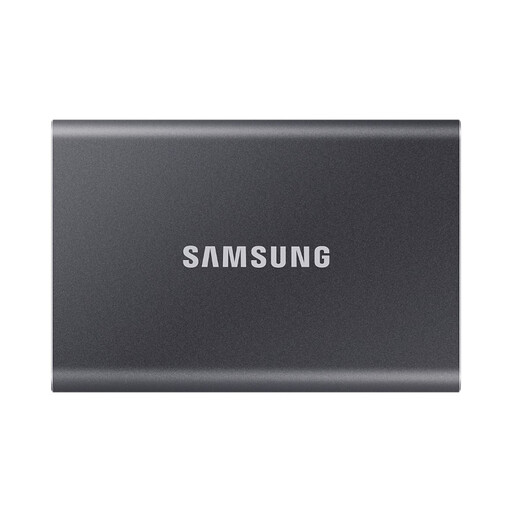
Why It Stands Out: The Samsung T7 offers a superb balance of speed, portability and reliability. Its credit-card-sized metal body is both sleek and durable, while its USB 3.2 Gen 2 performance is more than sufficient for most professional and everyday tasks.
Pros:
Who is it for?: Tech-savvy professionals, students and digital nomads who need a reliable, fast and ultra-portable drive for daily backups, file transfers and working on the move.
View Details for the Samsung T7 1TB SSD
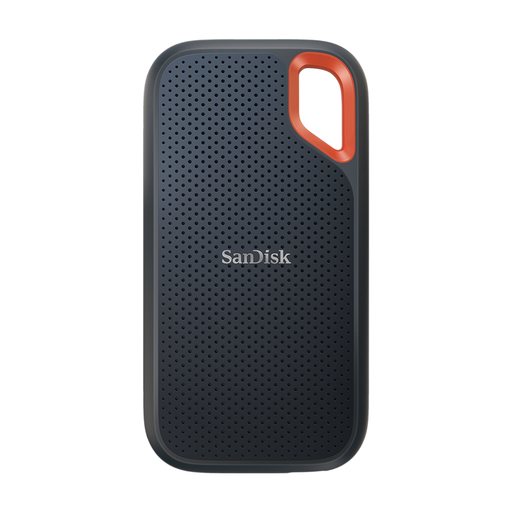
Why It Stands Out: The SanDisk Extreme portable SSD is engineered for creators who work in demanding environments. It combines high-speed performance with a tough, weather-resistant design, ensuring your data is safe whether you are in the studio or out in the field.
Pros:
Who is it for?: Adventure photographers, on-location videographers and any content creator who needs a rugged portable SSD that can handle bumps, drops and exposure to the elements without compromising on speed.
View Details for the SanDisk Extreme 1TB SSD
The drives highlighted here represent some of the strong contenders in the 1TB category. However, the right storage solution is a personal choice based on your specific devices and workflow. If you are looking for drives with different capacities or features tailored for mobile devices, there are many other options to consider.
Explore our full range of phone storage drives and other portable storage solutions to find the perfect match for your needs.
A portable Solid State Drive (SSD) uses flash memory to store data, similar to a USB stick. This means it has no moving parts, making it significantly faster, more durable and more compact than a portable Hard Disk Drive (HDD). HDDs use spinning magnetic platters, which are slower and more susceptible to damage from drops or impacts.
For many creators, 1TB is a great starting point. It can hold several hours of 4K footage, depending on the camera's bitrate and codec. For smaller projects or for use as a "scratch disk" to edit from before archiving, a 1TB portable SSD is often sufficient. For larger, long-form projects, you might consider a 2TB or 4TB model for more breathing room.
To get the advertised speeds, connect the drive to a USB port on your computer that matches or exceeds the drive's specification (e.g., a USB 3.2 Gen 2x2 SSD to a USB 3.2 Gen 2x2 port). Additionally, using the manufacturer's software, such as Samsung Magician, can help you monitor drive health, manage security settings and install firmware updates to maintain optimal performance.