
24/7 Customer Support

Free returns

Same-day & Next-day Delivery

Quality Guaranteed
Download the APP
Categories
As a Joybuy Product Recommendation Officer, my role is to help you navigate the crowded market of high-end electronics. You're searching for a 4K 240Hz OLED gaming monitor, which means you're looking for the pinnacle of display technology. This combination of resolution, speed and contrast was once a distant dream for PC enthusiasts, but in 2026, it's a reality.
However, with several premium models available, choosing the right one can be a challenge. This guide is designed to provide clear, objective information on some of the leading options, helping you understand the key differences and decide which display is the right investment for your gaming rig or creative workstation.
When investing in a top-tier display, a few technical details can make a significant difference. Here are three key points to consider.
Most of the displays in this category use Quantum Dot OLED (QD-OLED) panels. This technology combines the self-lit pixels of traditional OLED—which provide perfect black levels and infinite contrast—with a Quantum Dot layer. The result is often a display that can achieve higher peak brightness and a wider range of vibrant colours compared to earlier OLED technologies. This is particularly noticeable in HDR content, where the added luminance and colour volume create a more impactful and lifelike image.
To unlock the full potential of a high refresh rate 4K monitor, you need the right connection. For PC gamers, DisplayPort 1.4 with Display Stream Compression (DSC) is essential to transmit a 4K signal at 240Hz without compromising on quality. For console players, HDMI 2.1 is a must-have. It's the standard required to run games at 4K 120Hz on the PlayStation 5 and Xbox Series X, making any of these screens a superb gaming monitor for PC and PS5 alike. Always ensure your graphics card and cables support these standards.
OLED displays are susceptible to image retention, or "burn-in," if static images are displayed for extended periods. Manufacturers are well aware of this and have integrated sophisticated features to protect your investment. Look for models with built-in panel care functions like pixel shifting (which subtly moves the image), automatic static logo dimming and dedicated cooling systems (like custom heatsinks). These features work in the background to significantly reduce the risk and ensure the longevity of your professional gaming display.
Here are our recommendations, chosen to highlight different strengths and suit various user needs, from all-in-one entertainment to competitive performance.
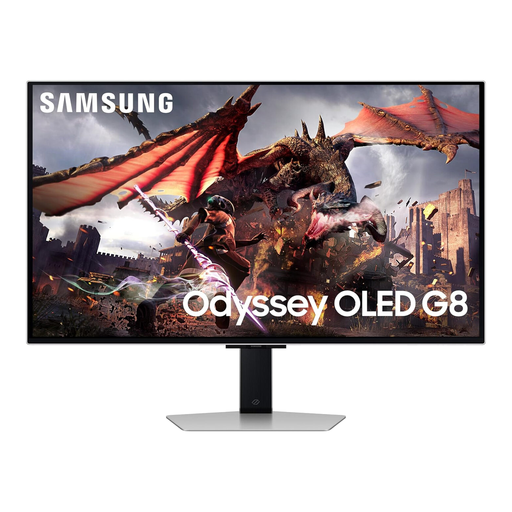
Why It Stands Out The Samsung Odyssey OLED G8 positions itself as more than just a monitor; it's a complete smart entertainment hub. Powered by the same NQ8 AI Gen3 processor found in Samsung's high-end TVs and running Tizen OS, it allows you to access streaming apps and the Samsung Gaming Hub directly, no PC required. Its 32 inch QD-OLED monitor panel is enhanced with OLED Glare Free technology, which effectively minimises distracting reflections. AI-driven features like Active Voice Amplifier Pro and AI Motion Enhancer Pro further refine the gaming and viewing experience.
Pros
Who is it for? This monitor is ideal for users who want a single, versatile display for their high-end PC, consoles and media streaming. If you value the convenience of an all-in-one entertainment solution without sacrificing top-tier gaming performance, the Odyssey G8 is a compelling choice.
View Details for the Samsung Odyssey OLED G8
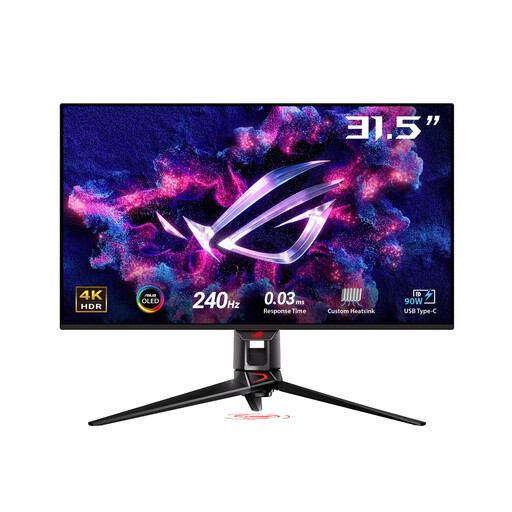
Why It Stands Out ASUS has placed a strong emphasis on performance and panel longevity with the ROG Swift PG32UCDMZ. It features a custom heatsink and graphene film to ensure superior thermal management, directly addressing concerns about OLED burn-in. For professionals, this monitor is a dual-purpose powerhouse. It boasts exceptional colour accuracy, with 99% DCI-P3 coverage and a Delta E < 2 rating, making it a fantastic monitor for content creation. This, combined with its 240Hz refresh rate and 0.03ms response time, means you don't have to compromise between a gaming display and a professional one.
Pros
Who is it for? This display is aimed at the enthusiast who does more than just game. If you are a competitive gamer who also works as a video editor, graphic designer or photographer, the PG32UCDMZ offers the colour precision you need for work and the speed you demand for play.
View Details for the ASUS ROG SWIFT PG32UCDMZ
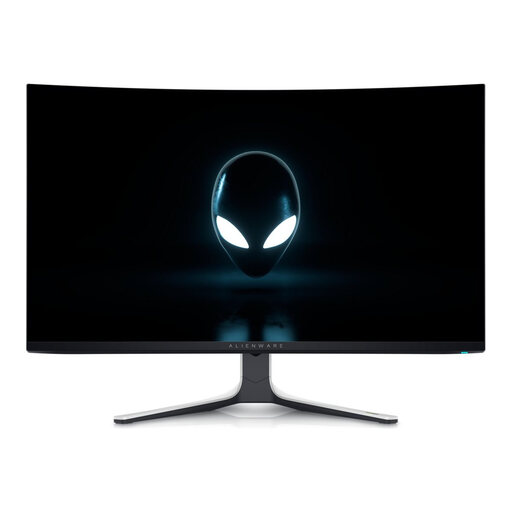
Why It Stands Out The Alienware AW3225QF is the only monitor in this selection to feature a curve. Its gentle 1800R curvature is designed to enhance immersion by subtly wrapping the expansive 32-inch screen around your field of view. True to the Alienware brand, it features a striking design with customisable AlienFX RGB lighting. A key practical feature is the built-in KVM switch, which allows you to control two different PCs with a single keyboard and mouse, seamlessly switching between a work laptop and your gaming rig.
Pros
Who is it for? This monitor is perfect for gamers who prioritise immersion and have a multi-device setup. The curved screen pulls you into the action, while the KVM switch is a highly practical feature for anyone who juggles a gaming PC and a work machine at the same desk.
View Details for the Alienware AW3225QF
While these three models represent the cutting edge of display technology, the world of OLED gaming is constantly expanding. If you're looking for different sizes, resolutions or feature sets, there may be another display that better suits your specific needs and budget.
Explore our full range of high-performance OLED monitor PC models to find the perfect fit for your setup.
Q: Is a 4K 240Hz OLED monitor worth the investment? A: For users with high-end hardware (such as an NVIDIA RTX 40-series or AMD RDNA 3 GPU), it represents the ultimate visual experience. The combination of 4K sharpness, 240Hz fluidity, and the perfect contrast of OLED delivers unparalleled image quality for both competitive and single-player games. If you demand the best and have a system that can power it, it is a worthwhile investment.
Q: Can I use a 4K 240Hz monitor with a PS5 or Xbox Series X? A: Yes, and it's an excellent pairing, though with one caveat. Current-generation consoles support a maximum output of 4K at 120Hz via their HDMI 2.1 ports. You will not achieve 240Hz, but you will still benefit from the incredibly smooth 120Hz gameplay and the stunning picture quality, deep blacks and vibrant colours of the OLED panel.
Q: What is QD-OLED and how does it help with gaming? A: QD-OLED (Quantum Dot Organic Light Emitting Diode) is a display technology that enhances standard OLED by adding a layer of quantum dots. For gaming, this translates to three key benefits: perfect blacks for seeing details in shadows, a wider colour gamut for more realistic and vibrant game worlds and the near-instantaneous pixel response time of a low latency monitor, which all but eliminates motion blur and ghosting in fast-paced action.