
24/7 全天候客户支持

免费退货

当日/次日达

品质保障

开启新人专享福利: 全场免邮 | 低至 2 折 | 免费试用 30 天 JoyPlus 会员
下载 Joybuy
Upgrading to a 4K monitor can transform your computing experience, whether you're editing high-resolution photos, immersing yourself in the latest games or simply seeking more screen real estate for productivity. However, the market is filled with technical specifications and marketing terms that can make choosing the right one a challenge. From panel types to colour accuracy and connectivity, finding a display that truly meets your needs requires careful consideration.
This guide is designed to cut through the clutter. We will walk you through the key features to look for and present a curated selection of 4K monitors. Our goal is to provide clear, practical information to help you find a display that enhances your work, creativity or entertainment.
Before diving into specific models, it’s helpful to understand the core technologies that define a monitor's performance. Focusing on these three areas will help you align a monitor's capabilities with your primary use case.
The panel is the heart of the monitor, and its technology dictates image quality.
For creative professionals, colour is everything. Look for monitors with wide colour gamut coverage, such as 95% DCI-P3 or higher, which is the standard for digital cinema. Colour accuracy is often measured by Delta E (dE), where a value of less than 2 means the difference between the displayed colour and the original is virtually indistinguishable to the human eye.
High Dynamic Range (HDR) enhances the contrast between the brightest whites and darkest blacks. In the UK, look for VESA DisplayHDR certifications like DisplayHDR 400 for a good entry-point, or DisplayHDR True Black 400 and higher for a more impactful HDR monitor UK experience, especially on OLED panels.
Modern workflows demand versatile connections. A 4K monitor with USB-C is a significant convenience, allowing you to transmit video, data and power to a laptop with a single cable, creating a cleaner desk setup. Also, consider other essential ports like HDMI 2.1 and DisplayPort 1.4, which are necessary for achieving high refresh rates at 4K resolution.
Screen size impacts both immersion and productivity. A 27-inch monitor is a popular choice that fits well on most desks, while a 32 inch 4K monitor provides a more expansive canvas, ideal for multitasking or detailed creative work.
Here are our recommendations, selected to meet the distinct needs of creative professionals, gamers and productivity power users.
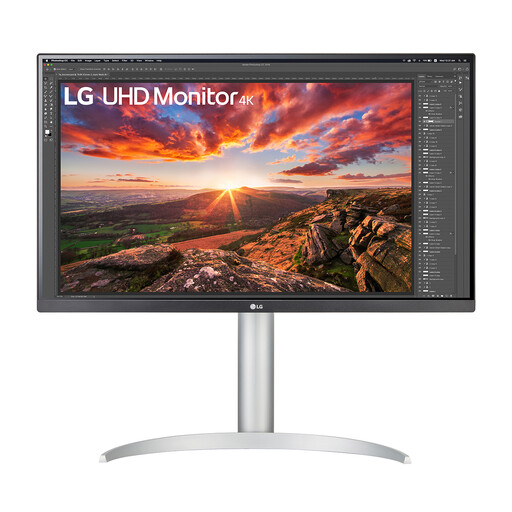
Why It Stands Out: The LG 27UP850K-W is a superb all-rounder that balances professional-grade features with practical design. Its 27-inch 4K IPS panel delivers sharp, vibrant images with wide colour coverage, making it a strong candidate for a 4K monitor for photo editing. The inclusion of USB-C with 90W power delivery makes it an excellent companion for modern laptops, streamlining your workspace with a single-cable solution.
Pros:
Who is it for? This monitor is ideal for creative professionals, remote workers and MacBook users who need a colour-accurate display with modern connectivity for a tidy and efficient setup.

Why It Stands Out: The ASUS ProArt PA32UCG-K is engineered for creative professionals who demand exceptional fidelity. This 32 inch 4K monitor uses Mini LED backlight technology to achieve outstanding brightness and contrast, making it suitable for professional HDR workflows. With a factory calibration ensuring a Delta E of less than 1 and extensive colour gamut support, it delivers reference-grade accuracy for colour-critical tasks like a 4K monitor for video editing.
Pros:
Who is it for? This is a tool for professional video editors, colourists and digital artists whose work depends on uncompromising colour accuracy and high-end HDR performance.
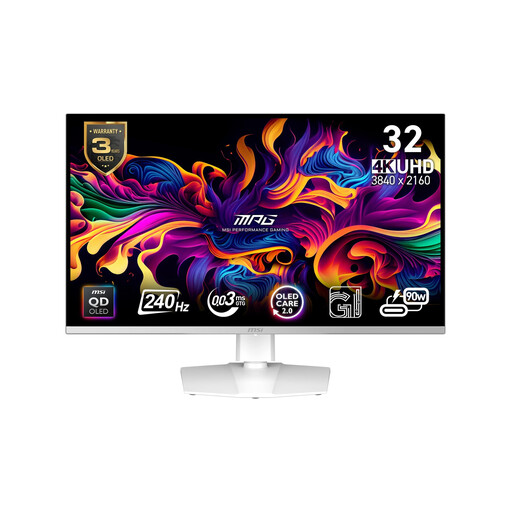
Why It Stands Out: For those seeking the ultimate gaming and media experience, the MSI MPG 321URXW is a standout contender. This OLED 4K monitor combines the perfect blacks and infinite contrast of its panel with a blistering 240Hz refresh rate and a near-instant 0.03ms response time. This makes it a top-tier 4K gaming monitor for both competitive and immersive single-player titles. Its excellent colour coverage (99% DCI-P3) also makes it a viable option for content creation.
Pros:
Who is it for? This monitor is built for serious gamers on PC and consoles who want the highest level of performance, as well as for anyone who prioritises cinematic image quality for watching films and series.
If the models above don't quite match what you're looking for, there are many other excellent displays available. Different sizes, feature sets, and price points can cater to every specific need.
Explore our full range of 4K UHD monitors to find the perfect display for your setup.
For most users, yes. The 3840 x 2160 resolution offers four times the pixels of a standard 1080p display. This results in significantly sharper text, more detailed images and more usable screen space for multitasking. For creative work and gaming, the added clarity is a substantial improvement.
This depends on your desk space and viewing distance. A 27-inch 4K monitor offers very high pixel density, resulting in incredibly sharp images. A 32-inch 4K monitor provides a more immersive experience and allows you to use applications at their native scaling without making text too small, which is great for productivity.
For general office work, browsing and watching videos, most modern integrated graphics from Intel and AMD are sufficient to drive a 4K display at 60Hz. However, for demanding tasks like 4K gaming or GPU-accelerated video editing, a powerful dedicated graphics card is essential to achieve smooth frame rates and take full advantage of the monitor's capabilities.