
24/7 Customer Support

Free returns

Same-day & Next-day Delivery

Quality Guaranteed

Unlock Your Welcome Offers: FREE Delivery | Up to 80% OFF | Free 30-day JoyPlus trial
Download the APP
Are you looking to reclaim some valuable desk space without sacrificing the essential keys you use every day? A full-size keyboard can feel cumbersome, while ultra-compact 60% layouts often mean giving up dedicated arrow and function keys. This is where the 75% mechanical keyboard comes in, offering a balanced solution for gamers, programmers and writers across the UK.
This layout provides a compact mechanical keyboard footprint, similar to that of a laptop, but retains a full function row, arrow keys and a column of navigation keys like Page Up and Page Down. It’s an efficient design that optimises ergonomics and frees up room for your mouse. To help you navigate the options, we've put together this guide and highlighted some standout models available right now.
Choosing the right keyboard involves more than just its size. Here are a few key factors to consider to ensure you find a model that suits your needs.
How you connect your keyboard to your PC or laptop is a primary consideration.
One of the main appeals of mechanical keyboards is the ability to tailor the typing experience.
The materials and extra functions can significantly enhance the user experience.
We've selected a few 75% mechanical keyboards that offer a great combination of features, performance and value.
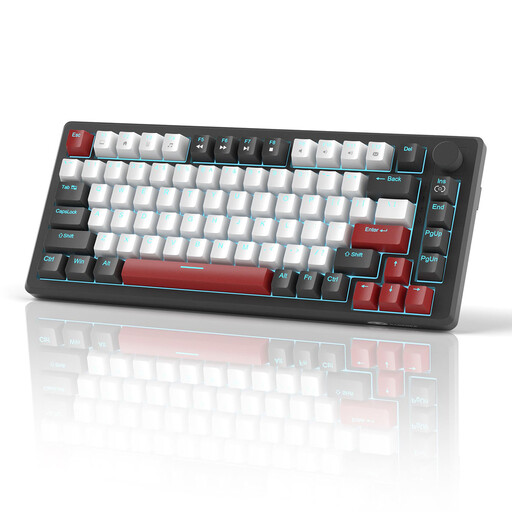
Why It Stands Out: The MageGee STAR75 is an excellent entry point into the world of 75% keyboards. It combines essential features like a multi-function knob and smooth linear switches into an accessible, wired package. The double layer of sound-dampening foam is a notable inclusion at this price point, reducing internal noise for a more solid typing sound.
Pros:
Who is it for?
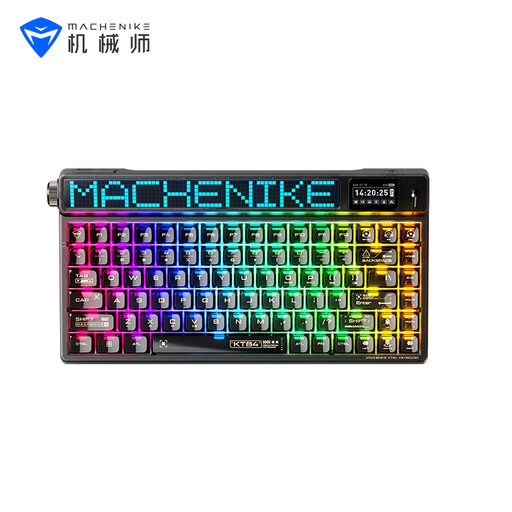
Why It Stands Out: The Machenike KT84-B84W steps things up with versatile tri-mode connectivity and a unique OLED smart screen. This small display can show system stats, time or custom animations, adding a layer of functional flair. Paired with Gateron switches, it delivers a dependable performance whether you're connected via cable, Bluetooth or the low-latency 2.4GHz receiver.
Pros:
Who is it for?

Why It Stands Out: For those seeking a premium, enthusiast-level experience, the Ticktype EVO75 is a formidable option. It features a full aluminium case with a unique spray-coated finish, giving it a substantial and high-end feel. Its standout feature is the leaf spring mount, which provides a softer, bouncier typing feel compared to more rigid mounting styles. With a massive 8000mAh battery, hot-swappable sockets and VIA compatibility for deep customisation, this keyboard is built for discerning users.
Pros:
Who is it for?
The 75% layout is a fantastic middle ground, but the world of mechanical keyboards is vast. If you're interested in exploring different sizes, switch types or feature sets, there are many other models to discover.
? Explore our full collection of mechanical computer keyboards to find the perfect fit for your desk.
A 75% mechanical keyboard is a compact layout that typically includes 80-84 keys. It retains the full function row (F1-F12), dedicated arrow keys and a few navigation keys (like Del, PgUp, PgDn) from a larger keyboard, but condenses them into a smaller frame without the number pad or the full navigation cluster.
Yes, a 75% keyboard is an excellent choice for gaming. It provides more desk space for wide mouse movements, which is crucial for FPS and other fast-paced games. At the same time, it keeps the essential function and arrow keys easily accessible, making it more versatile than smaller 60% or 65% layouts for games that require more keybinds.
The main difference is compactness. A Tenkeyless (TKL keyboard) layout is essentially a full-size keyboard with the number pad removed. It maintains the standard spacing between the main key cluster, the function row and the navigation block. A 75% keyboard further condenses this by pushing all the keys together, removing any empty space to create an even smaller footprint. The navigation keys are usually arranged in a single vertical column on the right side.