
24/7 Customer Support

Free returns

Same-day & Next-day Delivery

Quality Guaranteed

Unlock Your Welcome Offers: FREE Delivery | Up to 80% OFF | Free 30-day JoyPlus trial
Download the APP
Keeping track of notes from meetings, lectures and brainstorming sessions can be a challenge. Piles of paper notebooks create clutter, and typing on a laptop during a conversation can feel impersonal and distracting. If you are looking for a more streamlined way to capture, organise and access your thoughts, an AI note taking tablet might be the solution.
These devices are designed to bridge the gap between traditional handwriting and digital efficiency. This guide will walk you through the key features to consider and present some recommended options to help you find a device that fits your workflow.
Choosing the right device depends on your specific needs. Here are a few key factors to consider before making a decision.
The screen is where you will spend all your time, so its quality is paramount. Many dedicated note-taking devices use E-Ink technology. An e-ink writing tablet offers a matte, paper-like surface that is glare-free and comfortable to view even in bright light. Unlike the backlit screens of standard tablets and laptops, E-Ink displays reflect ambient light, which many users find reduces eye strain during long sessions of reading or writing.
The "smart" in a smart notebook for work comes from its software. Look for features that genuinely improve productivity. A key function is handwriting to text tablet conversion, which transforms your scribbled notes into editable digital text. For professionals and students, a built-in meeting transcription device is invaluable. This feature uses microphones to capture audio and transcribe it in real-time, ensuring you never miss an important detail. Check which languages are supported and whether an internet connection is required for these features.
Your digital notebook should be easy to carry and durable enough for daily use. Consider the device's weight, thickness and battery life. A slim, lightweight tablet is ideal for commuting between the office, university and home. Battery longevity is also crucial, as you need a device that can last through a full day of meetings or classes without needing a constant charge.
Here are our recommendations, selected to meet a range of needs from high-tech productivity to classic simplicity.

Why It Stands Out The iFLYTEK AINOTE 2 is a purpose-built AI note taking tablet designed for serious productivity. Its large 10.65-inch E-Ink screen with a 300PPI resolution provides a crisp, paper-like canvas for writing and reading. The device integrates AI tools, including support for ChatGPT-5, to help summarise, translate and organise your notes. According to the brand, its real-time transcription function supports 16 languages, making it a powerful tool for international meetings and academic research.
Pros
Who is it for? This device is well-suited for professionals, academics and students who need a powerful, distraction-free digital notebook with pen to capture and process large amounts of information from meetings and lectures.

Why It Stands Out Once you have your digital tablet, protecting it is the next step. The VoxorAI Notebook Sleeve offers a slim and stylish solution. Made from a water-repellent and wear-resistant PU imitation leather fabric, it is designed to shield your device from scratches and minor bumps. The magnetic closure provides secure and easy access.
Pros
Who is it for? Anyone who has invested in a portable electronic device like an AI tablet or a slim notebook and wants a sleek, functional sleeve for protection during their daily commute.
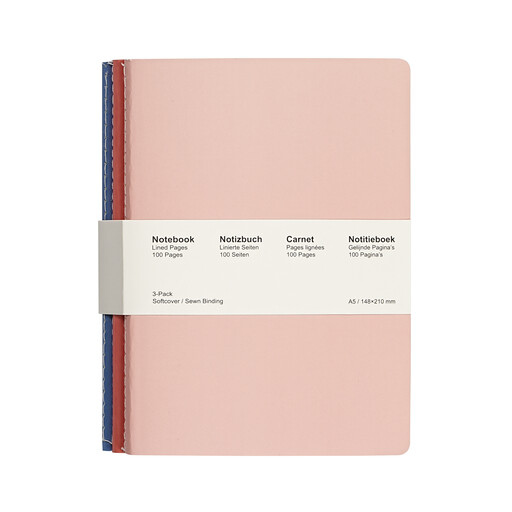
Why It Stands Out For those who still appreciate the tactile experience of pen on paper, a high-quality traditional notebook is essential. The Jubiluu A5 Softcover Notebooks offer a simple and effective solution. This 3-pack features stitched binding that allows the notebooks to lay flat for comfortable writing. The 80g offset cream paper is smooth and minimises ink bleed-through.
Pros
Who is it for? Students, writers and professionals who prefer the simplicity of analogue note-taking or want a reliable paper backup to complement their digital tools.
If you prefer to stick with a classic paper notebook, protecting it is key. A quality cover can keep your notes safe and add a professional touch. Explore our collection of journal covers to find the perfect match for your needs.
Explore Our Range of Journal Covers
An AI note taking tablet is a specialised tool designed for writing, reading and annotation. While some offer web browsing and app support, they are not intended to replace the full functionality of a laptop, which is better suited for complex software, heavy multitasking and video conferencing. Think of it as a powerful companion device that enhances your productivity.
The accuracy of handwriting-to-text has improved significantly with modern AI. Devices like the iFLYTEK AINOTE 2 use advanced recognition engines to deliver high accuracy. However, the final result can still depend on the neatness of your handwriting. Most systems perform well with clear print or cursive writing.
Many users find e-ink writing tablet displays more comfortable for extended use. Because they are not backlit and reflect ambient light like paper, they can help reduce the eye strain often associated with looking at LCD screens for long periods. This makes them an excellent choice for avid readers and prolific note-takers.