
24/7 Customer Support

Free returns

Same-day & Next-day Delivery

Quality Guaranteed

Unlock Your Welcome Offers: FREE Delivery | Up to 80% OFF | Free 30-day JoyPlus trial
Download the APP
In any professional or academic setting, managing information is a constant challenge. Handwritten notes get lost, audio recordings take hours to transcribe and digital documents become a disorganised maze across multiple apps. If you find yourself struggling to capture, organise and recall important information from meetings, lectures or brainstorming sessions, you are not alone.
An AI note taking tablet offers a focused solution. These devices are designed to bridge the gap between traditional pen-and-paper and the digital world, using intelligent features to streamline your workflow. This guide will walk you through the key considerations when choosing a device and present a few recommendations to help you find a tool that fits your needs.
Selecting the right device goes beyond just screen size. To find a tablet that genuinely enhances your productivity, consider these key aspects.
The display is arguably the most important feature. Many specialised devices use E-Ink screens, creating a paper-like tablet experience that is easy on the eyes and free from the glare and notifications common on standard tablets. This is ideal for long reading and writing sessions. In contrast, traditional LCD or LED screens offer vibrant colours and high refresh rates, making them better suited for multimedia and general-purpose use.
A smart notebook with AI should do more than just store your notes. Look for core functionalities that actively save you time. A reliable handwriting to text converter is essential for turning your scribbles into searchable, editable text. For those who attend many meetings or lectures, a voice to text tablet with multi-language support can be a game-changer, functioning as a dedicated meeting transcription device. Advanced models can even summarise long passages or help you organise ideas.
A modern workflow is rarely confined to a single device. Check if the tablet can sync with your existing tools, such as Google Calendar, to function as an effective electronic planner. Cross-device apps for mobile and PC are also a significant plus, allowing you to access and edit your notes anywhere. Finally, for a device you'll carry daily, a slim, lightweight design is crucial for portability.
Here are a few options that cater to different needs, from specialised note-taking to all-around productivity.

Why It Stands Out The iFLYTEK AINOTE 2 is a purpose-built e-ink writing tablet designed for serious note-takers. Its standout feature is the advanced AI integration, including support for ChatGPT-5, which assists with summarising text and organising ideas. The device excels as a meeting transcription device, offering real-time transcription in 16 languages. Its 10.65-inch E-Ink screen provides a comfortable, paper-like writing surface and at just 4.2mm thick and 295g, it is exceptionally portable.
Pros
Who is it for? Professionals, academics and students who need a dedicated, distraction-free device for capturing detailed notes, transcribing meetings or lectures and organising information efficiently.
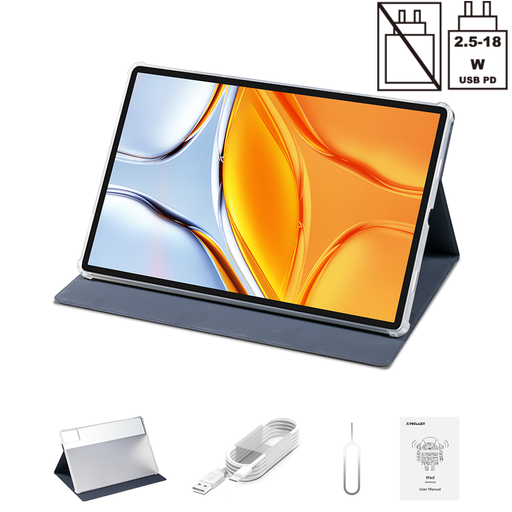
Why It Stands Out The Teclast T70 is a powerful, large-format Android tablet built for versatility. While not a specialised note-taker, its massive 14-inch 1920x1200 display provides an expansive canvas for multitasking, document review and media consumption. Powered by a MediaTek Helio G99 octa-core processor and equipped with 20GB of RAM (including 12GB virtual), it handles demanding applications with ease. The inclusion of Dual SIM 4G LTE and 5G WiFi ensures you stay connected anywhere.
Pros
Who is it for? Users who prioritise a large, vibrant screen for media and multitasking over a specialised E-Ink display. It’s a solid choice for those wanting a single, powerful device for work, entertainment and general productivity.
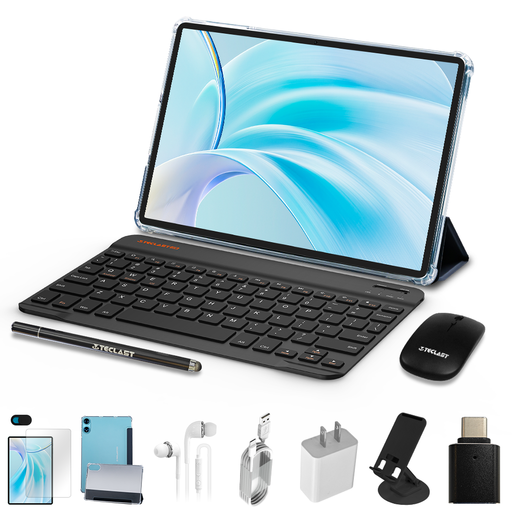
Why It Stands Out This TECLAST P50 bundle represents outstanding value by providing a complete mobile workstation straight out of the box. It includes the 11-inch tablet, a protective case, a Bluetooth keyboard and a mouse. The tablet itself features a smooth 90Hz display and runs on Android 15, making it a modern and responsive device for everyday tasks. It’s an excellent entry point into the world of digital notebooks for work.
Pros
Who is it for? Budget-conscious students and professionals looking for a complete, portable setup for writing, email and light productivity. It’s a practical choice for those who need a functional tablet without requiring specialised AI or E-Ink features.
If these specific models aren't quite what you're looking for, or if you'd like to explore a wider range of devices for professional use, browse our full collection. Discover more options in our best work tablet category.
It depends on your workflow. A specialised e-ink writing tablet like the AINOTE 2 excels at focused tasks like note-taking, reading and transcription. It is designed to minimise distractions and replicate the feel of paper. A laptop remains superior for heavy multitasking, running complex software (like video editing or coding) and intensive content creation. Many professionals find they work best as complementary tools.
The accuracy of transcription largely depends on the recording conditions. Factors like background noise, the clarity of the speaker's voice and the quality of the device's microphones all play a role. Devices such as the iFLYTEK AINOTE 2 use multi-microphone arrays and sophisticated AI algorithms to deliver high accuracy in typical meeting and lecture environments, especially when connected to the internet.
Yes, the core functions of an e-ink tablet, such as writing and storing notes or reading documents saved on the device, work perfectly offline. However, advanced features that rely on cloud processing—like real-time transcription, syncing notes across devices and certain AI-powered summarisation tools—typically require an active internet connection to function.