
24/7 Customer Support

Free returns

Same-day & Next-day Delivery

Quality Guaranteed

Unlock Your Welcome Offers: FREE Delivery | Up to 80% OFF | Free 30-day JoyPlus trial
Download the APP
As a Joybuy Product Recommendation Officer, my role is to help you navigate the crowded market of modern gadgets. Many professionals and students find themselves buried under stacks of paper notebooks or struggling to type fast enough in meetings and lectures. An AI note taking tablet offers a streamlined solution, merging the familiar feel of handwriting with powerful digital organisation. This guide will walk you through the key features to consider and present some carefully selected options to enhance your productivity.
Before diving into specific products, it's useful to understand what sets a high-quality device apart. Here are a few practical points to consider when searching for an electronic notebook for work or study.
The display is where you'll spend all your time, so it's a critical factor. Many advanced digital notebooks use E-Ink technology. Unlike the backlit LCD screens on typical tablets, an E-Ink display mimics the appearance of paper. This significantly reduces eye strain during long reading or writing sessions. A screen size around 10.65 inches often provides a good balance between a comfortable writing area and portability.
The "AI" in an AI note taking tablet is its main selling point. Look for features that genuinely save you time. A voice to text tablet function can transcribe meetings or lectures in real-time, saving you from manual typing. Other valuable tools include the ability to convert your handwritten notes into searchable text, summarise long documents and integrate with your calendar. Some devices even incorporate large language models, functioning as a ChatGPT tablet to help you brainstorm and organise ideas directly from your notes.
A smart notebook should fit seamlessly into your existing workflow. Check for features like Wi-Fi connectivity (with WiFi 6 being the current standard for speed and reliability), Bluetooth for connecting accessories and cloud synchronisation. The ability to access and edit your notes on a companion PC or mobile app is essential for a truly connected and productive experience.
Here are our recommendations, chosen to meet the needs of different users, from those ready to embrace a fully digital workflow to those seeking to upgrade their traditional tools.

Why It Stands Out: The iFLYTEK AINOTE 2 is a purpose-built device designed to replace your paper notebooks entirely. Its standout feature is the 10.65-inch E-Ink screen, which offers a glare-free, paper-like writing experience with its included passive stylus. The device is powered by an Android 14 operating system and integrates AI tools for summarising text, organising ideas and converting handwriting to editable text. Its real-time transcription feature supports 16 languages, making it a powerful tool for multilingual meetings.
Pros:
Who is it for? This is for the tech-savvy professional, academic, or student who needs a high-performance writing tablet for adults. If your goal is to digitise your note-taking, manage meeting minutes efficiently and organise study materials in one place, the AINOTE 2 is a compelling option.
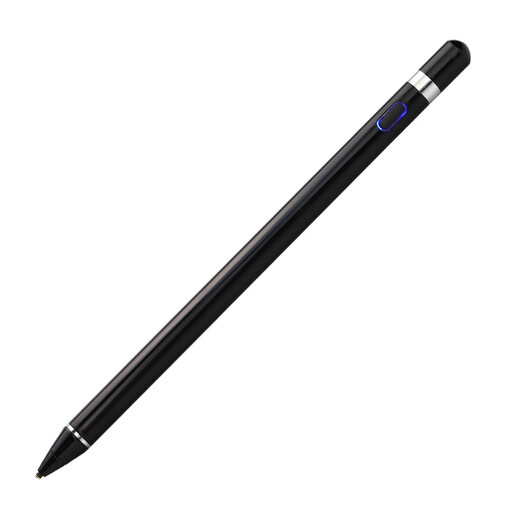
Why It Stands Out: If you already own a tablet with a capacitive screen (like an iPad or Android device) but want a more precise writing experience, the VoxorAI HL-U05 is a versatile accessory. It’s designed to provide the control and precision of a dedicated stylus without requiring you to buy a new device. It supports writing, drawing and navigation with a fine tip that mimics a pen-on-paper feel.
Pros:
Who is it for? This stylus is ideal for users who want to upgrade their existing tablet into a more effective digital notebook with pen. It's a practical choice for anyone seeking greater precision for writing or creative work on their current device.
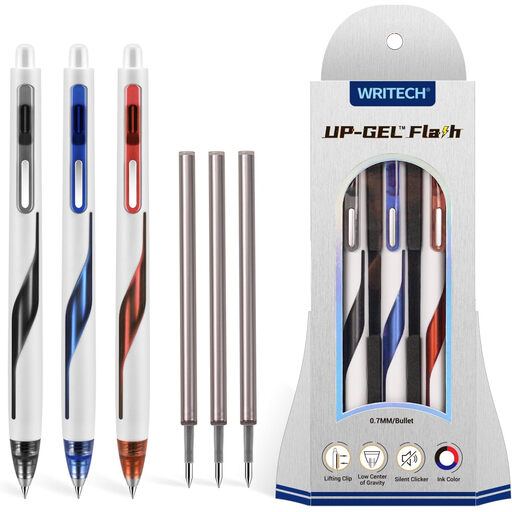
Why It Stands Out: For those who aren't ready to give up paper, a high-quality pen can still make a world of difference. The WRITECH Up-Gel Flash pens are engineered for comfort and control. They feature a low centre of gravity for better balance and a patented silent click mechanism, making them ideal for quiet environments like offices or libraries.
Pros:
Who is it for? This pen set is for anyone who appreciates the tactile experience of writing on paper but demands a tool that is a clear step up from standard office supplies. It’s perfect for journalers, students and professionals who take pride in their handwriting.
If you're exploring a wider range of writing tools, from premium pens to other smart accessories, browse our full collection of Stationery equipment to find the perfect fit for your workflow.
An E-Ink screen offers two main benefits. First, it's not backlit, so it reflects ambient light just like paper, which can significantly reduce eye strain compared to LCD screens. Second, it consumes very little power, giving devices with E-Ink screens exceptionally long battery life.
For many users, yes. A digital notebook offers powerful advantages that paper cannot, such as instant search, automatic cloud backup, easy organisation of notes into folders and AI-powered transcription. However, the choice is personal. Some people simply prefer the physical feel of paper, while others find the efficiency of a digital system indispensable.
The accuracy of transcription depends heavily on the quality of the device's microphones, the sophistication of its software and the level of background noise. Devices like the iFLYTEK AINOTE 2, which use a four-microphone array, are specifically engineered to capture clear audio in environments like meetings and lectures. For optimal performance, a stable internet connection is typically required.