
24/7 Customer Support

Free returns

Same-day & Next-day Delivery

Quality Guaranteed

Unlock Your Welcome Offers: FREE Delivery | Up to 80% OFF | Free 30-day JoyPlus trial
Download the APP
Juggling meeting notes, lecture summaries and fleeting ideas can feel like a constant battle against clutter. Traditional paper notebooks pile up, and typing on a laptop during a conversation can feel impersonal. While standard tablets offer a digital solution, they often come with distracting notifications and a screen glare that strains the eyes.
This is where a dedicated AI note taking tablet comes in. These devices are designed to bridge the gap between the tactile feel of paper and the organisational power of digital tools. They offer focused environments for writing, drawing and, most importantly, using artificial intelligence to streamline your workflow.
As a Joybuy Product Recommendation Officer, my role is to help you navigate the options. This guide provides practical advice and highlights a few noteworthy models to help you find a device that genuinely supports your work or study habits.
Before diving into specific products, it's useful to understand the key features that differentiate these devices. Focusing on these aspects will help you select a tablet that aligns with your needs.
The screen is where you'll spend all your time, so its technology is a critical factor.
The "AI" in an AI note taking tablet is more than just a buzzword. Look for practical features that will actually save you time. A key function is its ability to act as a voice to text transcription device. Consider the number of languages it supports and whether it can differentiate between speakers. Another powerful tool is handwriting to text tablet conversion, which turns your scribbled notes into editable, searchable text.
A great device should fit seamlessly into your existing workflow. Check for compatibility with services you already use, such as Google Calendar or cloud storage platforms. The ability to sync notes to a companion app on your phone or PC is also a significant advantage, ensuring your work is accessible everywhere.
Here are a few recommendations that cater to different needs, from dedicated E-Ink devices to versatile, high-performance tablets.

Why It Stands Out The iFLYTEK AINOTE 2 is a purpose-built E-Ink tablet for work and study. Its standout feature is its advanced AI integration, powered by ChatGPT-5, which allows for intelligent summarisation, translation and organisation of your notes. It excels as a meeting notes transcription tablet, supporting real-time transcription in 16 languages with its four-microphone array. At just 4.2mm thick and weighing 295g, it is exceptionally portable, while the 300PPI E-Ink screen provides a crisp, paper-like writing experience.
Pros
Who is it for? Professionals, academics and students who need a dedicated device for heavy note-taking, interviews and lectures. It is ideal for those who want to capture and organise information efficiently without the distractions of a conventional tablet.
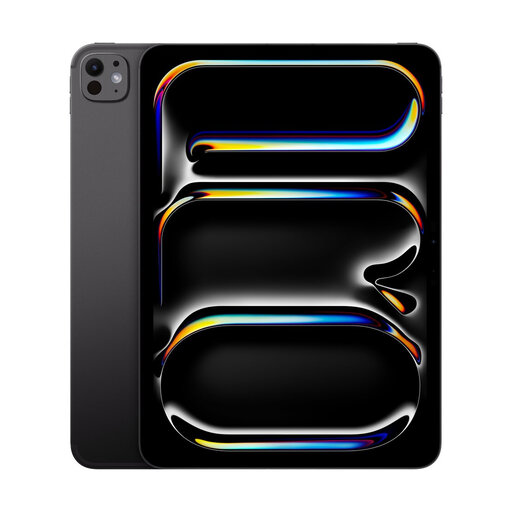
Why It Stands Out The Apple iPad Pro is not a dedicated note-taker, but its sheer power and versatility make it a top contender. The M5 chip delivers desktop-class performance for everything from 4K video editing to complex design work. When paired with the Apple Pencil (sold separately), it becomes a formidable digital notebook with pen. The Nano-Texture Glass option minimises glare, making it more comfortable for writing and drawing in various lighting conditions. Its vast ecosystem of productivity and creative apps is unmatched.
Pros
Who is it for? Creative professionals, power users and students already invested in the Apple ecosystem. It's the right choice for someone who wants a single, powerful device for note-taking, high-end creative work and entertainment.
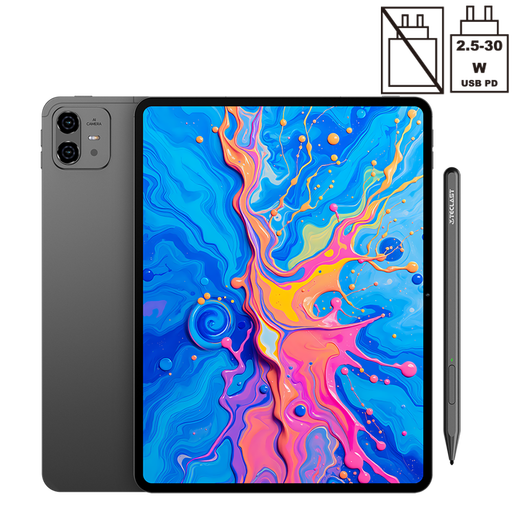
Why It Stands Out The TECLAST ArtPad Pro focuses on delivering a large canvas for a reasonable price. Its 12.7-inch 2K display provides ample space for note-taking, drawing and media viewing. It supports 4096 levels of pressure sensitivity with the included T-Pen, making it a capable tool for digital artists and students. With a massive 10,000mAh battery, Dual SIM 4G LTE and 5G WiFi, it offers excellent connectivity and endurance for users on the go.
Pros
Who is it for? Students, artists and general users looking for a large-screen tablet for media, drawing and note-taking without a premium price tag. It's a practical choice for those who value screen real estate and connectivity.
The world of tablets is vast, with models suited for every specific need and budget. If the recommendations above aren't quite what you're looking for, there are many other devices to consider.
Explore our full range of WiFi tablet models to find the right fit for your needs.
For most people, a dedicated AI note taking tablet, especially an E-Ink model, is a companion device rather than a laptop replacement. It excels at focused tasks like writing, reading and transcription. More versatile tablets like the iPad Pro can come close to replacing a laptop for many tasks, particularly when paired with a keyboard, but may not handle specialised desktop software.
Transcription accuracy has improved significantly. It depends on the quality of the device's microphones, the sophistication of its AI software and external factors like background noise. A specialised voice to text transcription device like the iFLYTEK AINOTE 2 uses a microphone array to isolate speech, leading to higher accuracy. A stable internet connection is often required for the best results.
An E-Ink screen offers distinct advantages for note-taking. The matte, glare-free surface provides a paper-like writing tablet experience that reduces eye strain and feels more natural. These screens also contribute to exceptionally long battery life. However, their slow refresh rates and lack of colour make them unsuitable for watching videos or playing games. The choice depends on whether you prioritise a focused writing experience over multimedia capabilities.