
24/7 Customer Support

Free returns

Same-day & Next-day Delivery

Quality Guaranteed

Unlock Your Welcome Offers: FREE Delivery | Up to 80% OFF | Free 30-day JoyPlus trial
Download the APP
Finding the right Android tablet can feel like a difficult task. You need a device that can handle everything from detailed creative work to streaming your favourite series, but the high price tags of flagship models can be a significant barrier. Many people are looking for a capable Android drawing tablet that delivers on performance without emptying their wallet.
As a Joybuy Product Recommendation Officer, my role is to help you navigate the market and find products that offer genuine value. This guide focuses on practical features and specifications, helping you identify a tablet that meets your needs for digital art, study or entertainment, all while respecting your budget.
Before diving into specific models, it’s useful to understand the key features that make a tablet suitable for creative tasks and general use.
For any visual task, the display is paramount. A large screen Android tablet provides more canvas space for drawing and a more immersive experience for watching films. Look beyond just the size; pay attention to the resolution and technology. A Full HD (1920x1200) or 2K display offers sharp, clear images, while a high refresh rate, such as 120Hz, ensures smoother scrolling and more responsive pen input, which is crucial for a digital art tablet.
If drawing is your priority, a tablet with stylus pen support is non-negotiable. The key specification to look for is pressure sensitivity. Measured in levels, this feature determines how the tablet registers different amounts of pressure from the stylus, allowing you to create varying line weights and opacity, much like a real pen or brush. A device with 4096 levels of pressure sensitivity offers excellent control for both aspiring and seasoned artists.
A tablet's performance hinges on its processor (CPU), RAM and storage. An octa-core processor, like the MediaTek Helio G99, provides a solid foundation for multitasking and running demanding applications without lag. Ample RAM (8GB or more is ideal) ensures smooth operation, while sufficient storage (128GB or 256GB) gives you space for your apps, projects and media files. Look for models with expandable storage via a microSD card for extra flexibility.
Here are a few recommendations that balance features, performance and affordability, making them excellent choices for a wide range of users.
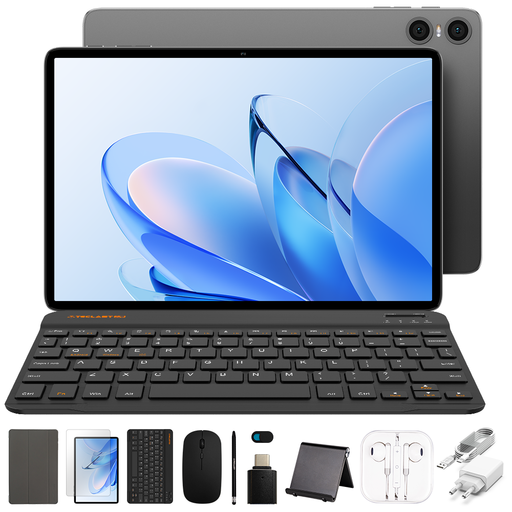
Why It Stands Out: The TECLAST P30T is an excellent entry-point into the world of Android tablets. It offers a complete package with a protective case and accessories included, making it a fantastic value proposition for general use and light creative work.
Pros:
Who is it for? This tablet is ideal for students, families or anyone needing a reliable device for daily tasks like browsing, streaming and casual gaming. It's a great affordable drawing tablet for beginners who are just starting to explore digital art.
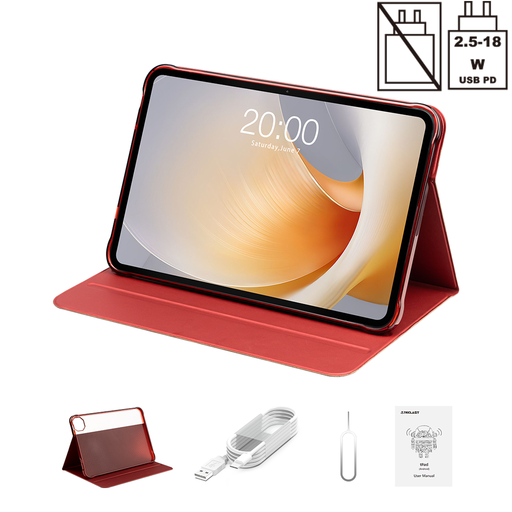
Why It Stands Out: With its huge 13.4-inch display and a 120Hz refresh rate, the T65 Plus is built for an immersive media and productivity experience. The powerful Helio G99 processor and extensive connectivity options make it a true workhorse.
Pros:
Who is it for? This large screen Android tablet is perfect for media enthusiasts who want a cinema-like viewing experience and professionals who need a large digital canvas for presentations or multitasking.
View Details for TECLAST T65 Plus
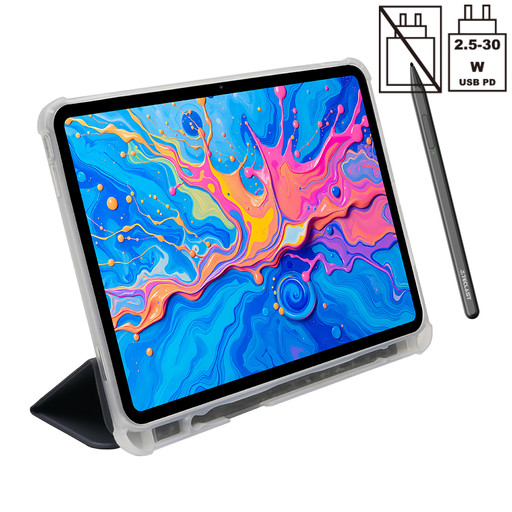
Why It Stands Out: As its name suggests, the TECLAST ArtPad Pro is specifically designed for creators. It combines a high-resolution 2K display with a pressure-sensitive stylus, making it a formidable tool for digital artists who demand precision and performance.
Pros:
Who is it for? This is the go-to choice for digital artists, designers and note-takers looking for a dedicated digital art tablet that provides professional-grade features without the premium price.
View Details for TECLAST ArtPad Pro
Once you have chosen your ideal tablet, keeping it safe is the next step. A good case protects your investment from the inevitable scratches, bumps and accidental drops of daily life. It is a small addition that can significantly extend the lifespan of your device.
Explore our selection of durable and stylish Android cases to find the perfect match for your new tablet.
Can you use an Android tablet for professional drawing? Yes, absolutely. Modern Android tablets, particularly those equipped with high-resolution screens, powerful processors and a pressure-sensitive tablet with stylus pen, are highly capable tools for professional artists. Paired with advanced drawing apps, they offer a robust platform for creating detailed illustrations, designs and digital paintings.
What is a good budget drawing tablet? A good affordable drawing tablet effectively balances cost with essential features. Look for models that include a stylus, offer a screen resolution of at least Full HD and have enough RAM (4GB or more) to run art applications smoothly. Brands like TECLAST specialise in providing these features at an accessible price point.
Is a Helio G99 good for a tablet? The MediaTek Helio G99 is a very capable octa-core processor commonly found in high-performing mid-range tablets. It delivers a smooth and responsive experience for everyday use, media consumption and even more demanding tasks like gaming and digital art. A Helio G99 tablet is a solid choice for users who prioritise performance and value.