
24/7 Customer Support

Free returns

Same-day & Next-day Delivery

Quality Guaranteed

Unlock Your Welcome Offers: FREE Delivery | Up to 80% OFF | Free 30-day JoyPlus trial
Download the APP
Navigating the world of Android tablets can feel overwhelming. With a vast array of models promising different features at wildly different prices, it's easy to get lost. You might be a parent looking for a durable and affordable device for your child, a student needing a portable tool for notes and drawing or someone who simply wants a large screen for enjoying films and browsing on the sofa.
This guide is designed to cut through the clutter. As the Joybuy Product Recommendation Officer, my role is to help you understand the key features that matter for your specific needs. We will look at what makes a good value tablet in 2026 and highlight a few standout options that deliver on performance and features without the premium price tag.
Before we look at specific models, let's cover a few key considerations. Focusing on these will help you identify the right device for you.
The processor, or chipset, is the engine of your tablet. For everyday tasks like browsing, streaming and light gaming, you don't need the most expensive chip on the market. A modern octa-core processor is more than capable. For instance, a Helio G99 tablet offers a great balance of power and efficiency, handling multitasking and more demanding apps smoothly, making it a popular choice in many well-regarded affordable devices.
The screen is your window to everything. For watching films and TV shows, look for a tablet that supports Widevine L1. This certification is crucial as it allows you to stream content from services like Netflix, Prime Video and Disney+ in high definition (HD). Without it, you'll be stuck with standard definition.
Additionally, consider how you'll use your tablet. If you plan to use it outside your home Wi-Fi, a tablet with a SIM card slot is essential. This gives you 4G LTE tablet connectivity, allowing you to stay online, take video calls and stream media wherever you have a mobile signal. For those who enjoy an immersive viewing experience, a large screen tablet (11 inches or more) can make a significant difference.
Are you an aspiring artist or a diligent note-taker? A standard tablet might not suffice. In this case, look for a drawing tablet with stylus support, specifically one that offers pressure sensitivity. This feature allows the tablet to register how hard you press with the stylus, enabling you to create lines of varying thickness and opacity, much like a real pen or brush.
For families, a dedicated kids tablet is often the most practical choice. These devices typically come with robust parental controls, access to age-appropriate content and durable cases to protect against accidental drops.
Here are a few Android tablets that offer compelling features for their respective price points, catering to different user needs.
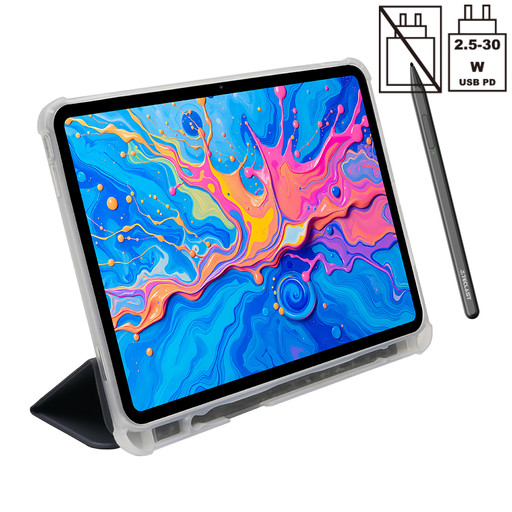
Why It Stands Out: The ArtPad Pro is built for users who need more than just a media consumption device. Its main draw is the large 12.7-inch 2K display combined with support for 4096 levels of pressure sensitivity. The included T-Pen stylus makes it a capable tool for digital drawing, sketching and detailed note-taking straight out of the box.
Powered by the reliable Helio G99 processor and a substantial amount of RAM (8GB physical + 12GB virtual), it handles creative applications and multitasking with ease. The inclusion of a dual SIM 4G LTE slot and a massive 10,000mAh battery ensures you can stay creative and connected all day, wherever you are.
Pros:
Who is it for? Students, aspiring artists and professionals looking for a versatile and affordable drawing tablet with a stylus for both work and play.
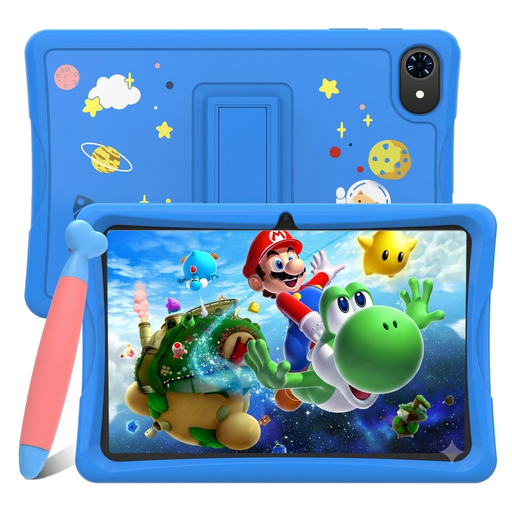
Why It Stands Out: The TABWEE K10 is a purpose-built kids tablet that prioritises safety, content and affordability. It comes pre-loaded with Google Kids Space, a dedicated mode that provides a curated library of age-appropriate apps, games, books and videos.
Despite its low price, it doesn't skimp on essential features. The 10.1-inch screen is a good size for small hands, and crucially, it is a Widevine L1 tablet, meaning children can watch their favourite shows in crisp HD. The inclusion of a stylus adds another layer of fun for doodling and educational games.
Pros:
Who is it for? Parents seeking an affordable Android tablet as a first device for their children, offering a safe and engaging digital environment for learning and entertainment.
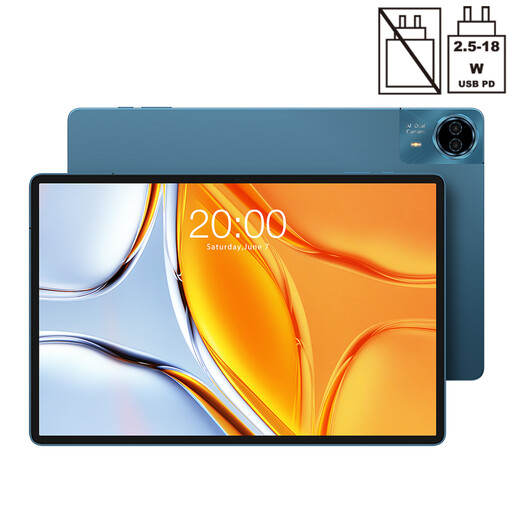
Why It Stands Out: If screen size is your top priority, the TECLAST T70 is hard to overlook. Its huge 14-inch display transforms it into a portable cinema, perfect for immersive film-watching or comfortable split-screen multitasking. This is a true large screen tablet designed for media lovers.
Like its sibling, the ArtPad Pro, it is powered by the capable Helio G99 processor, ensuring smooth playback and responsive browsing. The 10,000mAh battery is well-suited to power the large display for hours, and the dual SIM 4G LTE capability means your entertainment isn't limited by Wi-Fi availability.
Pros:
Who is it for? Anyone who prioritises screen real estate for watching films, browsing the web or reading digital magazines. It's an excellent entertainment hub for the home or on the move.
If staying connected on the go is your primary concern, the models above are excellent starting points. However, the market offers a wide variety of devices with cellular capabilities.
? Explore our full range of tablets with SIM card slots to find the perfect match for your mobile needs.
Widevine is a DRM (Digital Rights Management) technology used by streaming services like Netflix, Prime Video and others to protect their content. There are different security levels, L3 and L1. A tablet with only L3 certification can only stream content in standard definition (typically 480p). A Widevine L1 tablet has the highest level of certification, allowing it to stream content in high definition (720p, 1080p or higher), which is essential for a good viewing experience on a sharp tablet screen.
Yes, but it's important to choose the right one. For serious drawing, you need a tablet that not only comes with a stylus but also supports pressure sensitivity. This feature allows the device to detect subtle changes in pressure, creating more natural-looking lines. The TECLAST ArtPad Pro is a good example of an affordable Android tablet that includes this feature, making it a suitable choice for aspiring digital artists.
This depends entirely on your usage. If your tablet will never leave your house and its reliable Wi-Fi, then you likely don't need one. However, if you want to use your tablet for navigation in the car, work during your commute or stream videos while travelling, a tablet with a SIM card slot is incredibly useful. It provides the freedom to get online anywhere you have a mobile data signal, turning your tablet into a truly portable and connected device.