
24/7 Customer Support

Free returns

Same-day & Next-day Delivery

Quality Guaranteed

Unlock Your Welcome Offers: FREE Delivery | Up to 80% OFF | Free 30-day JoyPlus trial
Download the APP
Navigating the world of Android tablets can feel overwhelming. With countless models boasting different screen sizes, processors and price points, it’s easy to get lost in technical specifications. Whether you're searching for a durable first device for your children, a portable study companion for university or a large-screen tablet for enjoying films and browsing the web, finding the right balance of features and value is key.
This guide is designed to cut through the clutter. As the Joybuy Product Recommendation Officer, my role is to provide clear, practical advice to help you identify an Android tablet that genuinely meets your needs and budget. We will explore what to look for when buying and highlight a few standout options that offer excellent functionality for their price.
Before diving into specific models, let's cover a few key considerations. Keeping these points in mind will help you narrow down your search for a great budget tablet UK residents can rely on.
The first question to ask is: what will you primarily use the tablet for?
large screen tablet (11 inches or more) offers a more immersive and comfortable experience. An 11 inch tablet is often a great middle-ground, providing ample screen real estate without being too cumbersome.kids tablet. It's easier for smaller hands to hold and more convenient to carry in a backpack.You don't need the most powerful processor for everyday tasks. However, look for a device with at least 3-4GB of RAM for smooth browsing and app-switching. An up-to-date operating system, such as Android 15, is also important for security updates and compatibility with the latest apps.
To find the best tablet deals, pay close attention to what's included in the box. A tablet with keyboard and a protective case can save you a considerable amount of money and effort, transforming your device into a versatile tool for work or study right from the start.
Here are a few recommendations that stand out for their features, value and suitability for different types of users in the UK.
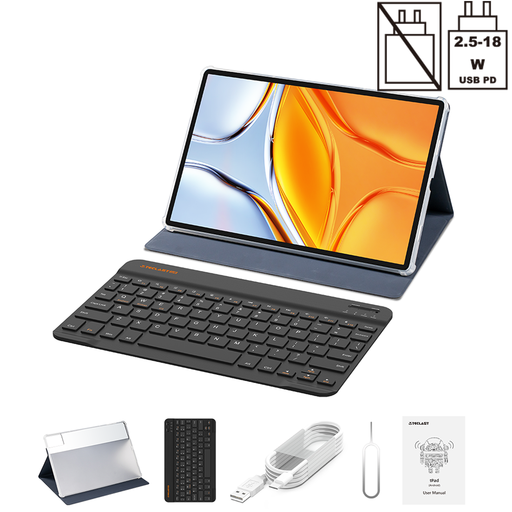
Why It Stands Out: The TECLAST T70 is built for an immersive experience. Its expansive 14-inch 1920x1200 display is a clear highlight, making it ideal for watching films or working on documents side-by-side. Paired with a massive 10,000mAh battery, it’s designed for extended use without being tethered to a power socket. The inclusion of both a protective case and a Bluetooth keyboard makes it a highly versatile package straight out of the box.
Pros:
Who is it for? This tablet is an excellent choice for anyone who prioritises screen size. It's perfect for film lovers, students who need a large canvas for research or home users wanting a large screen tablet that can double as a secondary device for light work and browsing.
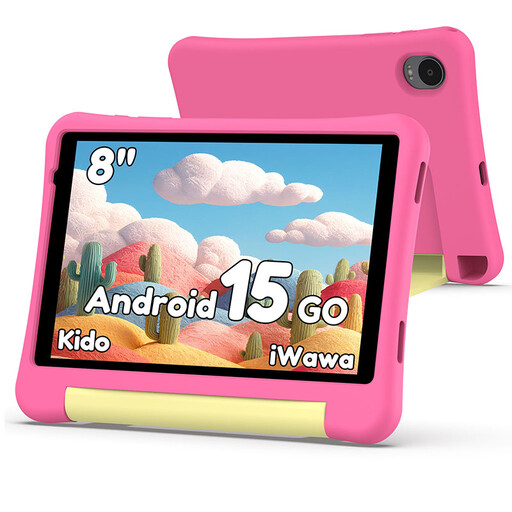
Why It Stands Out: The Alldocube Kido is designed from the ground up with children and parents in mind. Its most compelling feature is the robust, built-in Child Lock software, which gives parents comprehensive control over content, app access and screen time. The included durable pink case provides essential protection against the inevitable bumps and drops of daily use, making it a practical and cheap Android tablet option for families.
Pros:
Who is it for? This is the ideal kids tablet for parents looking for a safe, controlled and affordable introduction to technology for their children. It provides peace of mind while offering a fun and educational platform for games, videos and learning.
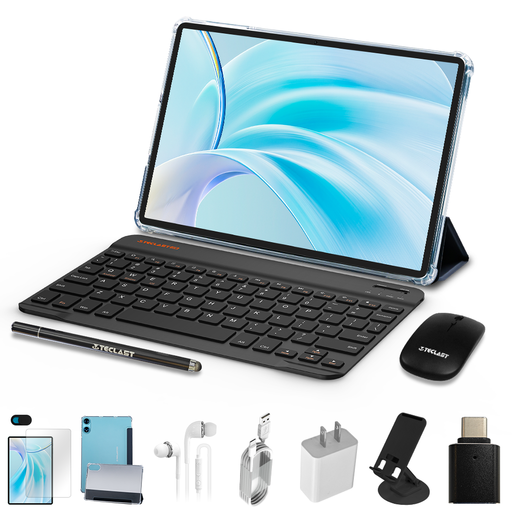
Why It Stands Out: The TECLAST P50 bundle represents exceptional value. It’s not just a tablet; it’s a complete productivity and entertainment station. The inclusion of a protective case, a Bluetooth keyboard and a mouse means you are ready for any task from day one. The 11-inch display also features a 90Hz refresh rate, a feature not always found on budget tablets, which makes scrolling and animations feel noticeably smoother.
Pros:
tablet with keyboard solution.Who is it for? This package is perfect for students, home office workers or anyone seeking maximum value. If you want a capable 11 inch tablet for browsing, typing emails and watching videos without the hassle and expense of buying accessories separately, this is a compelling option.
If these specific models aren't quite what you're looking for or if you'd like to compare a wider range of specifications and tablet deals, we have a broader selection available. You can browse different screen sizes, performance levels and price points to find the perfect device for your household.
Explore our full collection of Tablets in the UK to find the perfect match for your budget and needs.
For general use like web browsing, streaming video and using social media apps, 3GB to 4GB of RAM is generally sufficient for a smooth experience. If you plan on heavy multitasking or playing more demanding games, opting for a model with 6GB or more (including virtual RAM expansion) will provide better long-term performance.
Yes, an Android tablet can be an excellent tool for children. They provide access to a vast ecosystem of educational apps, games and creative tools via the Google Play Store. For peace of mind, it is advisable to choose a kids tablet model that includes robust parental controls and comes with a durable, protective case.
For many common tasks, it absolutely can. When equipped with a keyboard and mouse, a tablet with keyboard is perfectly capable of handling word processing, spreadsheets, emails, video calls and extensive web browsing. For professionals who rely on specialised, desktop-grade software or require complex file management, a traditional laptop may still be more suitable.