
24/7 Customer Support

Free returns

Same-day & Next-day Delivery

Quality Guaranteed

Unlock Your Welcome Offers: FREE Delivery | Up to 80% OFF | Free 30-day JoyPlus trial
Download the APP
Navigating the world of Android tablets can feel overwhelming. With countless models available, each promising a unique set of features, how do you find the one that truly fits your needs and budget? Whether you're searching for a durable first device for your child, a versatile tool for school or a large-screen hub for entertainment, the choice matters.
As the Joybuy Product Recommendation Officer, my role is to help you cut through the clutter. This guide offers practical advice and highlights a few standout options to make your decision-making process clearer and simpler. Let's find the right Android tablet for you.
Before diving into specific models, let's cover a few key considerations. Keeping these points in mind will help you identify what features are most important for your intended use.
The size and quality of the display are fundamental. An 8-inch screen, for instance, is lightweight and easy for smaller hands to manage, making it a great choice for a kids tablet. For a more versatile device intended for schoolwork or streaming films, a 10 inch tablet or 11-inch model offers a better balance of portability and viewing space. If your primary use is media consumption or you need to multitask with split-screen apps, a large screen tablet of 14 inches or more can provide a more immersive, laptop-like experience.
Beyond the screen, the internal hardware determines the tablet's performance. Look for devices running a recent operating system like Android 15, which provides up-to-date security features and a smoother user interface. For connectivity, 5G WiFi support ensures faster and more stable internet connections compared to older standards, which is crucial for streaming high-definition video or downloading large files. Finally, consider a tablet with long battery life. A battery capacity of 5000mAh is a good starting point for casual use, while 8000mAh or more is recommended for a full day of school, work or travel.
A tablet's features should align with who will be using it. For a child, look for robust parental controls, durable construction and an included protective case. For a student, a tablet for school should have sufficient RAM (4GB or more) for multitasking and a processor capable of handling educational apps and video calls smoothly. For those seeking an affordable android tablet, focus on models that prioritise core features like a good display and battery life over non-essential extras.
Based on a combination of features, user needs and value, here are a few recommendations from our current selection.
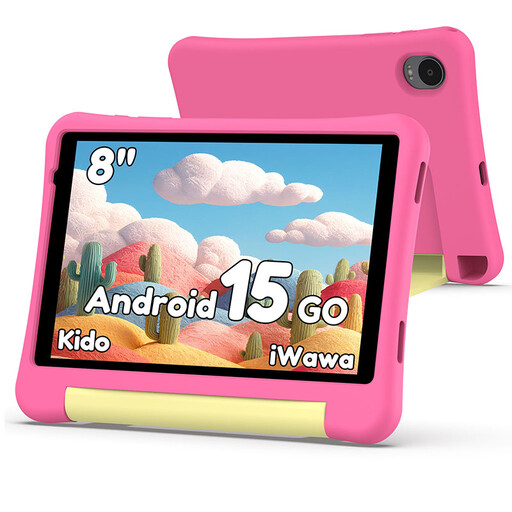
Why It Stands Out: The Alldocube Kido is designed from the ground up as a safe and engaging first tablet for children. It combines a durable, kid-friendly design with comprehensive parental controls, giving you peace of mind while your child explores, learns and plays.
Pros:
Who is it for? Parents looking for an affordable, secure and feature-rich kids tablet that is ready to use straight out of the box.
View the Alldocube Kido Tablet on Joybuy.co.uk
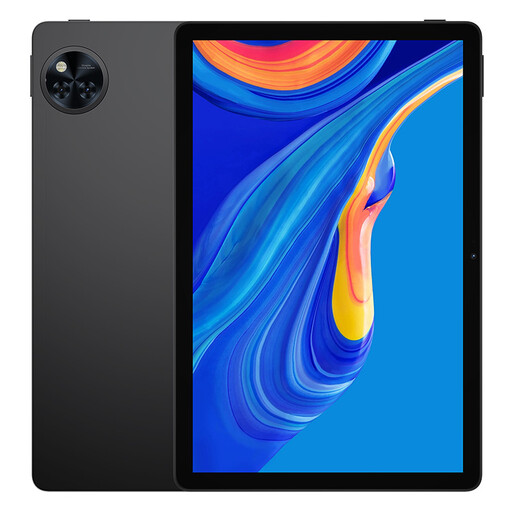
Why It Stands Out: The DOOGEE U11 strikes an excellent balance between performance, display quality and battery life. Its 11-inch screen with a 90Hz refresh rate offers a noticeably smoother experience for everything from scrolling through web pages to watching action films.
Pros:
Who is it for? Students, families and professionals who need a versatile and responsive tablet for school, work and entertainment without a premium price tag.
Explore the DOOGEE U11 Tablet on Joybuy.co.uk
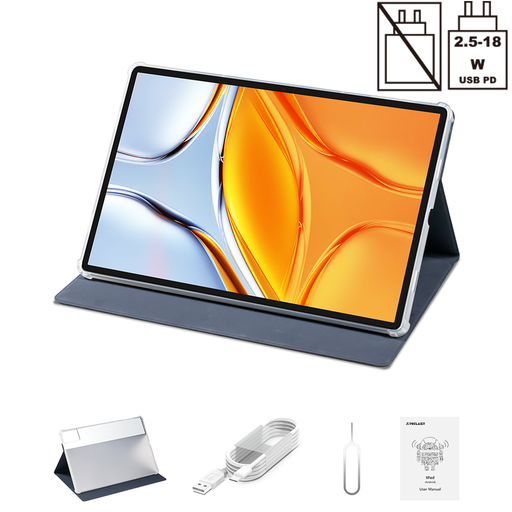
Why It Stands Out: With its huge 14-inch 2.2K display, the Teclast T70 is built for an immersive viewing experience. It functions as a portable cinema and a powerful productivity tool, supported by a massive battery and impressive multitasking capabilities.
Pros:
Who is it for? Media enthusiasts who want a cinematic experience on the go, or multitaskers who need a large digital canvas for their projects.
Discover the Teclast T70 Tablet on Joybuy.co.uk
These three tablets cater to specific, popular needs, but every user is different. If you're looking for a different screen size, specification or price point, there are many other models to consider.
Our full range of touchscreen tablets offers a wider selection. Explore the complete collection to find your ideal match.
What should I look for in a tablet for a child? Prioritise three things: durability (look for included protective cases), comprehensive parental controls to manage content and screen time and a manageable screen size. An 8-inch display is often a good fit for smaller hands.
How much RAM do I need in an Android tablet? For basic web browsing, social media and video streaming, 3GB to 4GB of RAM is generally sufficient. If you plan on using the device for more intensive tasks like gaming, multitasking between several apps or as a primary tablet for school, aiming for 6GB or more will provide a much smoother experience.
Is a tablet with long battery life really that important? Yes, it is one of the most critical features for user satisfaction. Battery capacity is measured in milliampere-hours (mAh). A higher number means more time away from the charger. For a device intended for all-day use, such as for work or travel, look for a capacity of 8,000mAh or more. For a child's tablet used in shorter bursts, 5,000mAh is a solid baseline.