Solo learners in noisy or shared homes
Private listening, clear speech and quick muting matter when nearby conversations or household noise may be heard. Compare wired USB headsets with a boom microphone and accessible controls.


For one person taking part in a lesson, a wired USB headset is usually the most practical starting point because it combines private listening, a close microphone and reachable controls. Choose a speakerphone when several people in the same room need shared audio, and keep it as the room’s only active meeting-audio device. A separate USB or clip-on microphone can help with voice pickup or movement, but it still needs a planned listening setup and echo control.
Private listening, clear speech and quick muting matter when nearby conversations or household noise may be heard. Compare wired USB headsets with a boom microphone and accessible controls.
When more than one person needs to listen and speak, compare speakerphones for central placement, echo handling, mute access and stated participant guidance. Only one nearby device should have meeting audio active.
A wireless clip-on microphone can suit demonstrations or standing presentations when its receiver connects to the computer. Plan separate listening and echo control before the session.
Start with the room: decide whether one person needs private audio or a group needs to share one audio endpoint, then check the connection and controls on the device you will actually use.
| Priority | What to check | Your needs |
|---|---|---|
| Avoiding feedback and echo | Check whether you will use headphones, open speakers or a speakerphone. Keep TV, soundbar and computer speakers away from the microphone, and use one active meeting-audio device in the room. | I want to hear the class and speak without the room audio returning through my microphone. |
| Connection and device selection | Match USB-C, USB-A, 3.5 mm or Bluetooth to the actual computer or tablet. In the meeting app, confirm the device appears separately as both speaker output and microphone input. | I need the setup to work with the device used for lessons, not just play music or system audio. |
| Voice pickup in household noise | For a solo learner, compare a close boom or clip-on microphone. For a shared room, consider central placement, microphone coverage and the maker’s room guidance. | I want classmates and tutors to hear my voice rather than keyboard sounds, household conversation or general room noise. |
| Mute access and session comfort | Look for an inline or on-device mute control where quick muting matters. Check the wearing style for longer lessons, or choose a speakerphone when headsets are impractical for the group. | I need a setup that is comfortable for the lesson and lets me stop transmitting quickly when I am not speaking. |
A USB or wireless microphone provides input only. Open TV, soundbar or computer speakers can feed lesson audio back into the microphone and create echo, especially if another device also joins with audio.
List the required input and output before buying: microphone, headphones or room speakerphone, mute method, and the ports on the computer or tablet.
You may need headphones, a speakerphone or a compatible output adapter alongside the microphone.
A device may play audio but still need pairing or separate selection in the operating system and meeting app before its microphone is used. Wireless models also need charging and reconnection management.
Make a test call before the return period ends and confirm that the exact device is selected for both speaker and microphone functions in the intended app.
Muting one microphone does not stop another nearby device’s speaker from contributing to echo. Zoom identifies multiple devices with active audio and speakers placed too close together as potential echo sources.
Use one device as the room’s meeting-audio endpoint. Disconnect meeting audio, rather than only muting the microphone, on other phones, tablets and computers nearby.
Pickup changes with central placement, distance, room noise and participant numbers. Manufacturer capacity guidance applies to the stated model and does not guarantee the same result in every home layout.
Match the device to the seating arrangement, place it centrally, and test with the furthest participant speaking at normal volume before relying on it for a class.
Relevant for wired meeting headsets and webcams. Zone Wired is a USB-C headset supplied with a USB-A adapter, while Brio webcam ranges provide integrated microphones for video-first desk setups.
Relevant for wired USB and 3.5 mm headsets where broad connection options and on-cable call controls are important.
Relevant for portable speakerphones for a small group gathered around one computer, with USB and Bluetooth connection routes.
Relevant for speakerphones with USB-C, Bluetooth and supplied-dongle connection choices for shared rooms.
Relevant for wireless clip-on microphone systems when a participant must speak while moving away from the computer.
Joybuy product options for solo lessons, shared-room participation and mobile individual setups.
 No image available
Consider this speakerphone when a small group needs to share one lesson-audio setup in the same room.
Listed features include eight microphones, 360° voice pickup, Bluetooth 5.3, USB-C, dual-device use and a 5 W speaker.
Test it with the furthest participant in the intended room, and keep other nearby meeting-audio devices disconnected.
 No image available
A wired over-ear headset is a private-listening route for one learner who needs accessible controls during a lesson.
The listing specifies USB and 3.5 mm plugs, inline volume and microphone-mute controls, an adjustable headband and memory-foam ear cushions.
Check which audio and microphone functions are available through each plug on the intended computer before buying.
 No image available
This is a shared-room option for several participants using one computer rather than separate nearby devices.
The listing specifies USB-C, four omnidirectional microphones, a stated 2.5 m pickup range, plus mute and volume controls.
Confirm acoustic echo cancellation and full-duplex operation if several people may speak at the same time, and check USB-C compatibility.
 No image available
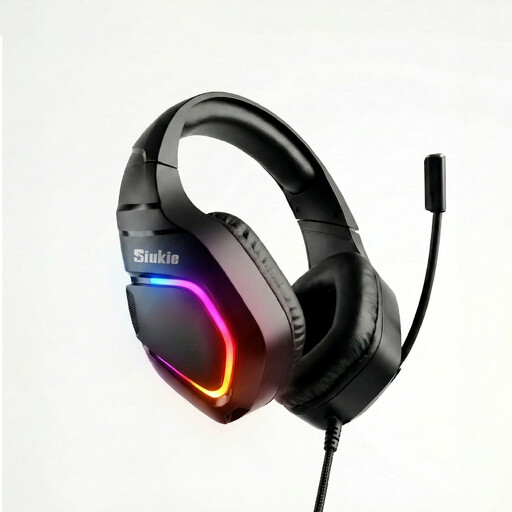
For a solo learner at a desk, this headset provides private listening with a detachable microphone route.
The listing states USB wired connection, a detachable noise-cancelling microphone, PC and Mac compatibility, soft ear cushions and a flexible headband.
Check for a physical microphone-mute control if quick muting is essential, and confirm compatibility with the intended device.
 No image available
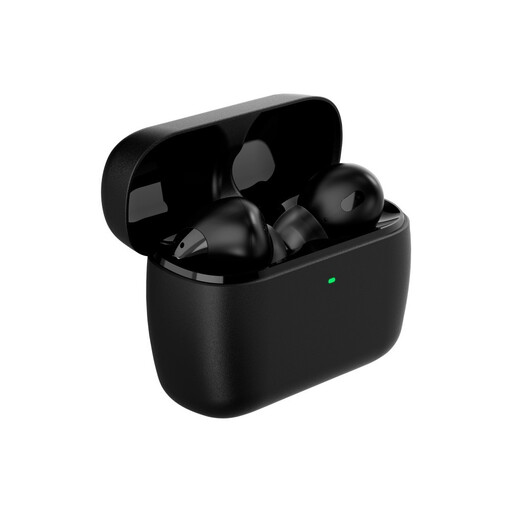
These earbuds suit an individual who needs a more mobile, private-listening setup for lessons or calls.
The listing specifies Bluetooth, 2.4 GHz wireless through a USB-C dongle, a built-in microphone, multiple ear tips and a charging case.
Make a test call to confirm that the lesson app uses them for both microphone input and headphone output; check mute behaviour before relying on them.
Connect it first, then select it separately as the speaker or headphone output and microphone input in the meeting app. Zoom supports testing built-in, USB and inline headset microphones and changing the selected audio devices; Microsoft Teams also provides speaker, microphone and test-call settings.
You can, but test carefully for echo before class. Zoom identifies loud TV or soundbar speakers, nearby speakers and multiple devices with active room audio as echo causes; use one active meeting-audio device, keep volume moderate and place the microphone away from speakers. A headset is generally the simpler route for one participant.
Use a speakerphone when people are intentionally participating together in one room and need shared pickup and playback. Check the maker’s placement and participant guidance; Jabra’s manual for the Speak 750 specifies central placement and says one unit is ideal for up to six people.
Use an electrical-equipment recycling or retailer take-back route where available rather than placing it with ordinary household waste. UK government guidance on WEEE states that the regulations encourage recovery, reuse and recycling of electrical and electronic equipment.