For a fixed, computer-connected overhead demonstration, start with a USB visualiser; for recording independently or filming away from the desk, consider a compact, pocket or interchangeable-lens camera. Whichever route you choose, check that you can mount it securely, frame the whole work area and focus on small details at the height your desk allows.
Who needs which setup?
Fixed-desk tutorial makers
If you demonstrate bookbinding at the same worktable, an adjustable USB visualiser can provide a repeatable overhead position for computer-based classes or recordings. IPEVO lists an integrated arm, light and USB video output for its V4K PRO 120; check that its capture area fits everything you need to show.
Detail-first craft filmmakers
If viewers need to follow stitching, folds or material texture, prioritise focus and framing at your intended camera height. A published close-focus distance helps narrow the choice, but it does not by itself show how much of the book and your hands will fit in frame.
Desk-and-away creators
If the same camera must also cover handheld or other non-desk footage, a compact, pocket or interchangeable-lens model offers a different workflow from a computer-connected visualiser. You will still need to establish how it can be held safely above the bookbinding area.
What matters when choosing?
Choose the recording workflow first, then check the overhead position, focus and storage against the work you actually film.
USB visualiser
Choose when: Your camera will stay at the desk for live demonstrations or computer-assisted recording.
Trade-off: IPEVO describes the V4K PRO 120 as a USB, computer-connected device, so check your computer and recording software rather than planning to use it as an independent recorder.
Compact camera
Choose when: You want a dedicated camera for card-based recording that can also leave the desk.
Trade-off: A built-in stand, such as the one Canon lists for the PowerShot V10, does not establish a secure overhead position.
Interchangeable-lens camera
Choose when: Lens choice matters because your intended view may change between a whole-desk shot and closer work.
Trade-off: The supplied lens, support, power and storage all need to work together at your desk.
Pocket gimbal camera
Choose when: Handheld filming away from the desk is an important part of using the same camera.
Trade-off: DJI’s mechanical stabilisation on Osmo Pocket 3 does not replace a fixed overhead support; that model also requires a microSD card for recording.
| Concern |
What to check |
Who this matters to |
| Stable overhead framing |
Measure the visible work area and available mounting height. Compare a visualiser’s capture area or check a compatible overhead support for another camera. |
If my book, tools and hands need to stay visible throughout a demonstration, I need a position I can repeat without obstructing the desk. Around 36% of consumers put stable overhead framing first. |
| Close detail and focus |
Check focus at the intended camera-to-work distance and whether the full task remains in frame. Canon specifies 5 cm closest focus for the PowerShot V10; IPEVO specifies autofocus from 10 cm for the V4K PRO 120. |
When I show stitching or a folded edge, I need viewers to follow the small action without losing the surrounding work area. For around 29% of consumers, close detail is the primary concern. |
| Recording workflow |
Decide between computer-connected output and recording to a camera card; confirm compatible software or media and a practical plan for longer takes. |
I may teach live or record a task that takes time, so I need a way to capture and keep the footage that fits how I work. Sustained recording and file handling come first for around 21% of consumers. |
| Use beyond the desk |
Consider handheld use only alongside a workable overhead mount and desk framing. Check the chosen camera’s working distance in both settings. |
If I also film away from my bookbinding table, I want the same camera to serve both settings without compromising the desk shot. Around 14% of consumers make that flexibility their main priority. |
Mistakes to avoid
-
Choosing the camera before planning its overhead position
A small desk leaves limited room for a support, and neither a compact camera’s built-in stand nor a pocket camera’s gimbal establishes a secure top-down setup.
Measure the desk edge, mounting height and area you need to film. Check that the complete camera setup can be supported without getting in the way of your hands.
A compatible arm, clamp or tripod may be needed in addition to the camera.
-
Assuming 4K will make small details clear
Resolution alone does not establish that the camera can focus on stitching or frame a book at the height available above your desk.
Check the focus range and field of view together, then try your smallest typical task at the intended mounting height.
-
Leaving the recording workflow until later
A computer-connected visualiser and a card-recording camera need different equipment. IPEVO specifies USB video output for the V4K PRO 120, while DJI specifies that Osmo Pocket 3 has no built-in storage.
Decide where the footage will be recorded and check the required computer connection, software or compatible card before buying.
-
Waiting too long to try the complete setup
A camera can function as intended yet fail to fit your desk, focus at the required distance or work with your software. For most UK online purchases, GOV.UK describes a change-of-mind cancellation period of 14 days after delivery, followed by another 14 days to return the goods; applicable exceptions and conditions matter. Remedies for faulty goods are separate.
Test framing, focus, mount stability and recording promptly while handling the item carefully. Check the seller’s return instructions without treating them as a replacement for statutory rights.
Brands to consider for desk filming
IPEVO
IPEVO’s V4K PRO 120 is a desk-oriented USB visualiser for demonstrations using a connected computer.
- IPEVO lists an adjustable arm, LED light, USB UVC output and a 440 × 330 mm capture area for this model.
- Its computer-connected workflow needs a suitable host device and software; check those requirements if you intend to record rather than only show a live view.
Canon
Canon’s PowerShot V10 and V1 are compact creator cameras for buyers who want a dedicated recorder that can also be used away from the desk.
- Canon specifies 5 cm closest focus and microSDXC compatibility for the V10, and 4K 60p and active cooling for the V1.
- Check overhead mounting and framing separately; the V10’s built-in stand is not, by itself, an overhead desk mount.
Sony
Sony’s ZV-E10 II is an interchangeable-lens option for a more configurable desk-filming setup.
- Sony specifies an APS-C sensor, E-mount lens compatibility and 4K 60p recording for the ZV-E10 II.
- The lens and camera body are only part of an overhead setup; assess the support, power and storage you will use with them.
DJI
DJI’s Osmo Pocket 3 is a pocket gimbal camera for people who also plan to film while moving.
- DJI specifies a 0.2 m minimum focus distance, rotatable screen and three-axis mechanical stabilisation for Osmo Pocket 3.
- Check the fixed overhead mount and desk view separately, and obtain a compatible microSD card for recording.
Joybuy products for desk filming
These cameras cover portable recording, interchangeable-lens filming and computer-connected video. For each one, check the overhead support, work-area framing and focus distance your bookbinding desk requires; a USB webcam is not the same setup as an adjustable-arm visualiser.
 No image available
DJI Osmo Pocket 3 Creator Combo
Consider this pocket gimbal camera if you also film away from the bookbinding desk; check how you would hold it securely overhead. The named Creator Combo lists a 1-inch CMOS sensor, 4K/120fps video, three-axis stabilisation and an included microphone. Check focus and framing at your intended working height.
View on Joybuy
 No image available
Sony Alpha ZV-E10 II K with 16–50 mm kit lens
Consider this interchangeable-lens kit if you want to assess lens options for different desk views. It pairs an APS-C ZV-E10 II body with a 16–50 mm f/3.5–5.6 Power Zoom lens and lists 4K 60p recording. Check the supplied lens at your intended focus distance, plan a secure overhead support and confirm the recording card you need.
View on Joybuy
 No image available
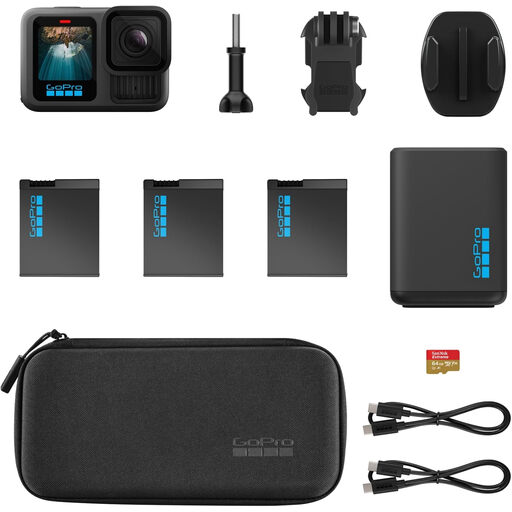
GoPro HERO13 Black Extended Power Bundle
This action-camera bundle is a choice to assess if filming beyond the desk also matters to you. The bundle is identified as the HERO13 Black Extended Power variant. Before using it for bookbinding, check close focus, a secure overhead mount and whether the whole work area fits in frame.
View on Joybuy
 No image available
Sony ZV-E10K with 16–50 mm Power Zoom lens
Consider this interchangeable-lens kit if you want to plan a desk rig around a supplied zoom lens. The named ZV-E10K kit includes a 16–50 mm Power Zoom lens. Check its focus and coverage at your mounting height, along with overhead support and what recording media is included.
View on Joybuy
 No image available
j5create JVCU435 USB 4K Ultra HD Webcam
Consider this USB webcam for a computer-connected demonstration if you can establish a suitable overhead position. The JVCU435 name specifies 4K video, 5× digital zoom and a remote control. Check computer compatibility, close focus and full-desk framing rather than treating digital zoom as a substitute for either.
View on Joybuy
Frequently asked questions
Should I use a USB visualiser or a conventional camera for bookbinding?
Choose a USB visualiser for a repeatable overhead view when you will use a connected computer; choose a conventional camera if independent recording or use away from the desk matters more. IPEVO specifies an adjustable arm and a 440 × 330 mm capture area for the V4K PRO 120, but whichever type you choose must frame your actual work area.
Can the IPEVO V4K PRO 120 record without a computer?
Plan to use the V4K PRO 120 with a connected computer rather than as a standalone recorder. IPEVO specifies a USB Video Class interface and computer requirements for live streaming and recording; confirm your computer, USB connection and preferred software.
Do pocket and compact cameras need a memory card?
Check the card requirement for the particular model before you start filming. DJI states that Osmo Pocket 3 has no built-in storage and uses a microSD card, while Canon specifies microSDXC compatibility for the PowerShot V10; also check whether a suitable card is included with the product you choose.
What if a camera bought online does not fit my desk setup?
For most UK online purchases, GOV.UK describes a change-of-mind right to notify the seller within 14 days of delivery and then return the item within another 14 days, subject to applicable conditions and exceptions. Test the intended setup promptly and handle the camera carefully; if it is faulty or misdescribed, the Consumer Rights Act 2015 provides separate remedies rather than making them dependent on a seller’s voluntary returns policy.


