Choose a camera and lens that can frame your largest folded textile from the available overhead height, then build a repeatable lighting and colour-reference setup around them. The Canon EOS R50 offers a compact, vari-angle stills route; the Fujifilm X-S20 adds in-body stabilisation for handheld work; and the Sony α6700 is worth considering if you already use compatible E-mount lenses. None removes the need to check lens fit, camera support and colour workflow before buying.
Who needs which setup?
Colour-critical textile cataloguers
If photographs are used for listings, archives or client approval, repeatable colour matters alongside visible detail. RAW capture allows later editing, while consistent lighting and a grey card or colour checker provide a reference for that work, as described in National Museums Scotland’s collection-photography guidance.
Shared-space product photographers
When you set up and clear away around other workshop users, consider the space taken by the camera, lens and overhead support together. A screen you can view from the planned camera position also matters; Canon specifies a vari-angle touchscreen on the EOS R50.
Makers producing stills and short video
If folded-product photographs are the main task but you also record handheld process footage, stabilisation may be useful for the moving shots. Keep a fixed support and repeatable lighting for static product frames rather than relying on stabilisation to match one session to the next.
What matters when choosing?
For folded textiles, plan the lighting and colour reference, then check whether the intended lens frames the whole item at your available overhead height. Handling and video features matter most once those still-photography requirements are covered.
| Concern |
What to check |
Who this matters to |
| Repeatable colour and exposure |
Check RAW capture and software compatibility; plan consistent lighting and a grey card or colour checker. |
If textile colour must remain comparable across listing or approval photographs, I need a reference I can use in each session. Around 40% of consumers put that colour workflow first. |
| Shared-space handling |
Check the camera-and-lens weight, screen viewing angle and whether the support fits your workstation. |
When equipment must be moved after a shoot, I need to frame the camera without leaving a permanent setup in place; roughly 30% of consumers prioritise that handling need. |
| Detail and cropping |
Compare native image dimensions and the intended lens’s close-focus capability; test framing at the planned overhead height. |
If I need both a full folded-item photograph and closer views of weave or labels, I need the lens to cover those views at my working distance. About 20% of consumers make detail their primary concern. |
| Video and handheld capture |
Check the exact model’s video modes and whether its stabilisation suits your lens and shooting method. |
For short clips of folding or making alongside product stills, I want a camera that also fits a handheld workflow; around 10% of consumers put that combination first. |
Buying pitfalls to avoid
-
Treating the camera body as the whole setup
An interchangeable-lens body needs a compatible lens, and a repeatable textile photograph also depends on the position of the camera, lighting and colour reference. National Museums Scotland’s collection-photography guidance addresses lighting, colour management and RAW editing as parts of the workflow.
Before choosing a body, check whether a lens is included and whether it can frame your largest folded item from the available overhead height. Plan where the support, lights and colour reference will go.
A separate lens, support or lighting setup can also take up storage and setup space in a shared workshop.
-
Assuming a small megapixel increase fixes colour
Canon specifies 24.2MP for the EOS R50, Fujifilm 26.1MP for the X-S20 and Sony approximately 26.0MP for the α6700. Those figures alone do not establish which setup will reproduce textile colour more consistently.
Prioritise repeatable lighting and a grey card or colour checker, then assess image dimensions and lens choice against the detail your photographs must show.
-
Replacing a fixed overhead setup with stabilisation
Stabilisation addresses camera shake; it does not keep framing or lighting in the same position between sessions. Fujifilm’s stated X-S20 stabilisation figure is based on CIPA testing with a specified lens, not every handheld arrangement.
Secure the camera on a tripod, copy stand or overhead rig for matching product frames. Consider in-body stabilisation separately if you also shoot handheld footage.
-
Leaving image use undecided in a shared workshop
The UK Intellectual Property Office says the creator of a photograph will generally be its first copyright owner. In collaborative or client work, that general position is a reason to establish who can use the resulting images rather than assume everyone has the same permission.
Agree who may use, edit and publish the photographs before the shoot, especially when they are intended for listings or client materials.
Relevant brands for reference
Canon
The EOS R50 is a compact APS-C interchangeable-lens option for a workshop stills setup with a compatible RF or RF-S lens.
- Canon specifies a 24.2MP APS-C sensor and vari-angle touchscreen for the EOS R50.
- Canon lists no sensor-shift stabilisation for this body. Use stable support for repeatable overhead frames, and check lens or adapter compatibility before purchase.
Fujifilm
The X-S20 combines APS-C stills, 14-bit RAW recording and in-body stabilisation for buyers who also shoot handheld workshop images.
- Fujifilm specifies 26.1 effective megapixels and five-axis sensor-shift stabilisation for the X-S20.
- Fujifilm’s 7.0-stop figure depends on its stated CIPA test with the XF35mmF1.4 R lens; it is not a substitute for fixed support and controlled lighting.
Sony
The APS-C α6700 is a route to consider when compatible E-mount lens ownership is already part of the decision.
- Sony specifies approximately 26.0 effective megapixels and 14-bit RAW recording for the α6700.
- Those file specifications do not establish that an existing lens will frame your textiles at the available height or remove the need for lighting and a colour reference.
Joybuy camera options
These Sony options include interchangeable-lens camera kits and a compact zoom camera for photographing folded textiles. Compare the supplied lens or built-in zoom with your overhead distance and detail needs; the camera alone does not settle the lighting or colour workflow.
 No image available
Sony A6700 with 16–50mm lens
Consider this kit if you want an included zoom for the overhead setup and an editable still-image workflow. Sony specifies approximately 26.0MP APS-C stills and 14-bit RAW for the α6700. Check whether the supplied lens frames your largest textile and focuses closely enough for detail views.
Joybuy
 No image available
Sony Alpha ZV-E10 II K with 16–50mm power zoom lens
Consider this kit if you need folded-textile stills alongside occasional process video. Its product title specifies an APS-C interchangeable-lens camera, 26MP stills and 4K60p video. Check the supplied lens’s framing and close-focus capability for your workstation.
Joybuy
 No image available
Sony A6400 with 16–50mm power zoom lens
This lens kit is an option if an adjustable zoom range is useful when positioning the camera above a shared workstation. Check RAW capture if post-shoot colour editing is essential, and test the lens’s framing and close-focus capability at your planned camera height.
Joybuy
 No image available
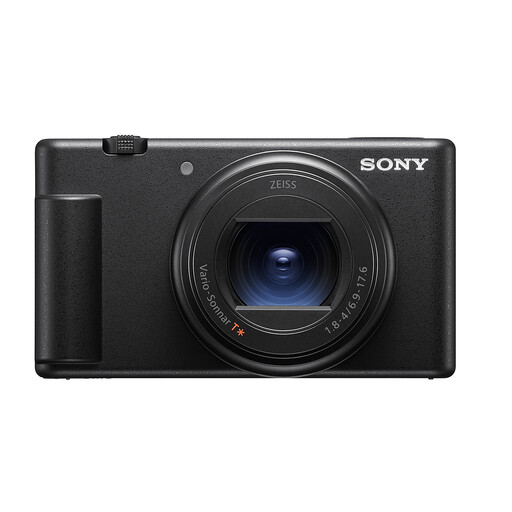
Sony ZV-1 II, 1-inch sensor and zoom lens
Consider this compact zoom-camera option if storing and moving equipment is a priority, rather than assuming it offers the lens choices of an interchangeable-lens kit. Its product title specifies a 1-inch sensor, 20MP stills and 4K video. Check its framing, close-focus ability and screen position against your overhead setup.
Joybuy
 No image available
Sony Alpha 7 III with 28–70mm zoom lens
This full-frame lens kit is a different format from the APS-C routes discussed above, so assess it against your actual framing distance rather than treating sensor format as a shortcut to a decision. The product title identifies a 28–70mm zoom lens. Check RAW capture for your editing workflow and whether that lens covers both full-item and close-detail photographs.
Joybuy
Frequently asked questions
How can I keep folded-textile colours consistent between sessions?
Keep the lighting arrangement repeatable and photograph a grey card or colour checker under that lighting as a reference for editing. National Museums Scotland includes colour references and RAW editing in its collection-photography guidance; a higher megapixel figure does not replace those steps.
Do I need in-body stabilisation for folded textiles?
In-body stabilisation is not a prerequisite when the camera is securely fixed for static overhead photographs. It is more relevant to handheld work; Fujifilm’s X-S20 stabilisation figure applies to its stated CIPA test conditions with a specified lens.
Should I buy a camera body or a kit with a lens?
Buy a body on its own only if you already have a compatible lens or have chosen one separately. For any kit, check whether the supplied lens can fit the whole folded textile into the frame from your available height and focus closely enough for the details you need.
Who can use photographs taken in a UK shared workshop?
The UK Intellectual Property Office says the photographer will generally be the first copyright owner, but that general rule should not replace an agreement about how collaborative or client images will be used. Establish who may edit and publish the photographs before shooting.


