What matters when choosing?
Choose for the device running the game before considering finish or extra features. These routes address different host devices; game support and the number of simultaneous players still need checking.
Xbox or Windows PC
Choose when: The game runs on an Xbox console or Windows PC and you want the documented Xbox Wireless Controller family for that device.
Bear in mind: Microsoft’s device support does not establish compatibility with every PC game or make it a native PlayStation or Nintendo controller.
PS5
Choose when: You need an additional native DualSense controller for a PS5 local session.
Bear in mind: DualSense haptic feedback and adaptive triggers depend on game support and are not required for basic cooking-game controls.
Nintendo Switch
Choose when: You want a conventional full-size Nintendo Switch Pro Controller for a Switch session, particularly when playing docked.
Bear in mind: Each Pro Controller serves one player. Check the precise console and controller models before buying, especially for a Switch 2 setup.
| Concern |
What to check |
Who this matters to |
| Platform and game compatibility |
Check the host console or PC and the particular game’s controller support. |
If my controller cannot run the game on our device, its other features will not help. Roughly 40% of consumers put confirmed platform and game compatibility first. |
| Enough controllers for the group |
Compare the local-player limit with the compatible controllers already available and able to pair simultaneously. |
For a group session, I need a working input for everyone playing at once. Around 30% of consumers chiefly prioritise having enough controllers ready for local play. |
| Easy identification and handling |
Consider grip and button reach; use distinguishable finishes or removable labels if controllers look alike. |
When we pass controllers around the bright lounge, I want to recognise mine and hold it comfortably. Roughly 20% of consumers place that shared-use need first. |
| Charging and device switching |
Check the power method, included charging accessories and support for each device you intend to use. |
I do not want a controller to interrupt a session or complicate a move between supported devices. Around 10% of consumers make charging or device-switching convenience their primary concern. |
Joybuy controller choices
These controllers cover Xbox or PC, PS5 and Nintendo Switch-family setups, including a model named specifically for Switch 2. Choose by your actual host device and game support; the finishes and controller formats offer further ways to distinguish equipment used in a shared lounge.
 No image available
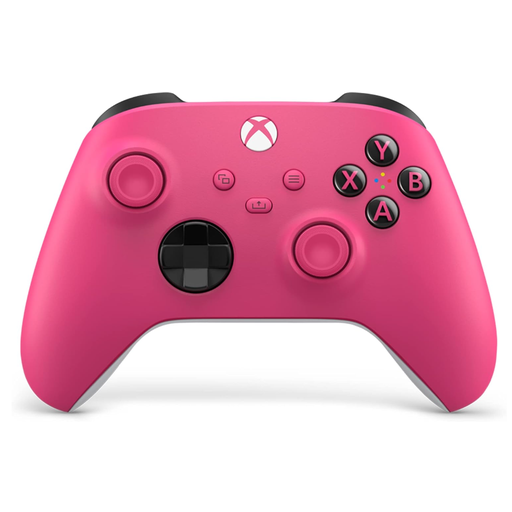
Xbox Wireless Controller, Deep Pink
Consider this for an Xbox or Windows-PC cooking-game session once you have checked the game’s controller support. The Deep Pink finish can help distinguish it from differently coloured controllers in a shared room.
View on Joybuy
 No image available
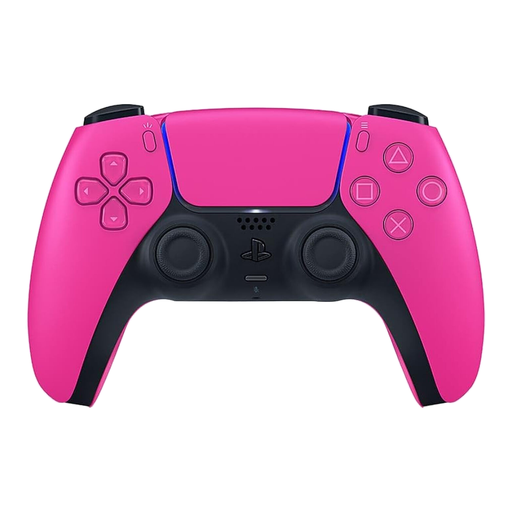
Sony PlayStation DualSense Wireless Controller V3, Nova Pink
For a PS5 local session, this is an additional DualSense option if the game accommodates another player. Its Nova Pink finish may make it easier to tell apart from a controller with a different finish.
View on Joybuy
 No image available
Lexip SteelPlay Twin Pads Controllers
Consider this twin-pad option for a Nintendo Switch setup only after checking how the particular cooking game uses the controllers. Confirm the pairing arrangement and simultaneous player support before counting it towards your group’s controller needs.
View on Joybuy
 No image available
Nintendo Switch 2 Pro Controller, Black
This named Switch 2 model is a controller choice for a Nintendo Switch 2 session, subject to the cooking game’s controller support. Do not assume that guidance for the original Nintendo Switch Pro Controller, including its battery-life figure, applies to this distinct model.
View on Joybuy
 No image available
Machenike G3 V2 Tri-mode Controller, White
This tri-mode controller may suit a PC or Nintendo Switch setup if your device and cooking game support the connection you intend to use. Check that setup before buying rather than treating multiple connection modes as a guarantee of game compatibility.
View on Joybuy
Common questions
How many controllers do I need for a co-op cooking game?
Plan for the number of people playing locally at the same time, then subtract the compatible controllers you already have. Steam lists Overcooked! All You Can Eat with local co-op and four-player tags, but check the player limit and controller arrangements for your particular game.
Can I use an Xbox Wireless Controller for a PC cooking game?
Yes, if the game and your chosen connection method support it. Microsoft documents the Xbox Wireless Controller for Windows PC; check the specific game’s controller information before purchase.
How do I add a Nintendo Switch Pro Controller for group play?
Nintendo says the original Nintendo Switch Pro Controller can be paired wirelessly through the console’s controller settings or connected to the dock by USB cable. The number usable at once can vary with controller types and enabled features, so also check the game’s player arrangements. Check separate guidance for a Switch 2 controller.
Does a bright lounge call for a special controller?
No special lighting-based controller choice is established for this setup. Prioritise device and game compatibility, then consider whether players can distinguish the controllers and hold them comfortably; a particular finish does not prove better game performance.
What should I do with an old controller or battery in the UK?
Take unwanted electrical products and batteries to an appropriate recycling collection point rather than putting them in household rubbish, as UK government guidance advises. Use a collection route suitable for the controller or battery you have.


