Who this is for

Students on document-based or browser-led courses

For coursework centred on office tools, virtual learning environments, research, online classes and written assignments. A portable laptop with a supported operating system, webcam, microphone, adequate RAM and SSD storage is usually more relevant than high-end graphics hardware. University of Warwick and University of York both advise checking departmental requirements where specialist software is involved.

Creative, programming and technical-course students

For work involving programming, data analysis, media editing, rendering, visualisation, CAD or engineering applications. Check the named course software first: UWE Bristol, the University of Bath and Ravensbourne University London show that these workloads can require more memory, storage, graphics capability or Windows-specific software.

Students considering a Mac or Chromebook

For students comparing operating systems as well as specifications. A Mac can be suitable when required applications support macOS, while a Chromebook needs confirmation that course software, assessment tools and network access work on ChromeOS. UWE Bristol advises that many specialist applications cannot be installed on Chromebooks.

What to check before buying

Windows laptop

Choose it when: Your course uses installed specialist software, engineering tools or applications with uncertain macOS support.

Keep in mind: The required processor, memory, storage and graphics level still depends on the course workload.

Mac laptop

Choose it when: Your department confirms that the required applications and assessment workflows support macOS.

Keep in mind: Some specialist applications may be unavailable, and some engineering routes are explicitly Windows-only.

Chromebook

Choose it when: Coursework is browser-led and the institution confirms ChromeOS compatibility for every required tool.

Keep in mind: It is not a default primary device for courses needing installed specialist applications.

Priority What to check Your needs
Software compatibility Ask for the current course software list; check operating-system support for every required app; confirm assessment and university-licensed tools. I need my laptop to run required coursework software without relying on a different device or campus equipment. UWE Bristol says course software determines the type of device needed, and the University of Bath identifies Windows-only engineering software for its mechanical-engineering route.
Performance and storage Match RAM, SSD capacity, processor and graphics to named workloads; check whether CAD, rendering or media software needs dedicated graphics; compare departmental minimums with general guidance. I want enough capacity for the files and applications I will actually use, without paying for hardware that does not improve my course work. University of York recommends 8GB RAM and 256GB or more SSD storage for general taught-student use, while specialist courses can require more.
Portability and support Consider weight and screen size for your commute; confirm webcam and microphone provision; compare repair arrangements, warranty exclusions and returns terms. I need a laptop that is practical to carry between home and campus and ready for online sessions. A larger screen may suit graphics-heavy work, but University of Strathclyde notes that it can add bulk and affect battery use.

Common mistakes to avoid

  • Buying to a generic student specification before checking course software

    Document-based coursework can run on modest hardware, but specialist courses may need Windows-only applications, more memory and storage, or particular graphics capability. A laptop that cannot run required software may leave you dependent on campus labs or remote access.

    Ask the department or programme leader for the current software list, supported operating systems and minimum specification before buying. Give published course guidance priority over general laptop advice.

  • Assuming a Chromebook or Mac is compatible because web browsing works

    Browser access does not show that installed specialist software, assessment features or technical applications will work. UWE Bristol notes that many specialist applications cannot be installed on Chromebooks, while the University of Bath identifies Windows-only software for mechanical engineering.

    For a Mac or Chromebook, confirm each required application and assessment workflow. If a course may use specialist desktop software and compatibility is unclear, choose the Windows route or wait for departmental guidance.

  • Paying for a high specification that the course does not need

    Extra processor power, memory, graphics and storage can increase cost, weight or battery trade-offs without helping document-based coursework. University of York says non-specialist courses may see no benefit above an i5 processor, 16GB RAM and 500GB SSD.

    Match the performance tier to named software and workload. For mainly document- and web-based study, prioritise reliable operation, portability, webcam and microphone provision, SSD storage and suitable warranty terms.

  • Treating warranty length as the only ownership check

    Repair arrangements, exclusions, battery cover and the retailer’s returns process can affect how quickly a problem is resolved. University of Strathclyde notes that longer service cover can add significantly to ownership costs.

    Compare what repair or replacement service is included, who handles return or collection, and whether battery or accidental damage is excluded. Keep the order confirmation and condition evidence, especially for refurbished purchases.

    Extended service cover can add to the overall cost, so compare its terms as well as its duration.

Relevant brand routes

Microsoft

Windows laptops are the broadest-compatibility route for students whose course includes installed specialist applications or Windows-only engineering tools.

  • UWE Bristol describes Windows as the most compatible choice for most university and specialist software.
  • Windows compatibility does not replace course-specific checks for processor, memory, storage or graphics requirements.

Apple

Mac laptops can suit courses whose required applications and institutional services support macOS.

  • UWE Bristol says MacBooks are suitable for many courses.
  • Some specialist applications may be unavailable, and the University of Bath does not recommend MacBooks for its mechanical-engineering software route.

Google

ChromeOS and Chromebook devices are a conditional route for browser-led coursework rather than a default primary device for every college student.

  • A Chromebook can be considered where the institution confirms that course software, assessment tools and network access work on ChromeOS.
  • UWE Bristol and Heriot-Watt advise caution where programme software or installed specialist applications are required.

Joybuy laptop options

Joybuy laptop options for students choosing a Windows route for broad coursework compatibility or a Mac route where course software supports macOS.

Lenovo IdeaPad Slim 3 15.3-inch WUXGA laptop

Lenovo IdeaPad Slim 3 15.3-inch WUXGA, Ryzen 5 7535HS, 24GB, 512GB SSD, Windows 11 Home (83K7009MUK)

A Windows option for coursework that may include demanding applications, subject to the department’s software and graphics requirements.

Stated specifications include 24GB DDR5 RAM, 512GB PCIe SSD, a 15.3-inch WUXGA anti-glare display, Wi-Fi 6, HD webcam with privacy shutter, numeric keypad, 1.59kg weight and 1.5cm thickness.

Check whether its integrated graphics meet any CAD, rendering, video-editing or course-specific graphics requirement, and confirm warranty and repair arrangements before buying.

Joybuy

ASUS Vivobook 15 X1504VA laptop

ASUS Vivobook 15 X1504VA, Intel Core 5 120U, 24GB, 1TB SSD

A Windows laptop for coursework involving larger file collections, online study and common external accessories.

Stated specifications include 24GB RAM, 1TB SSD, a 15.6-inch Full HD IPS anti-glare display, webcam and microphone, Wi-Fi 6, HDMI, USB-A and USB-C ports. The listed weight is 1.70kg.

Integrated graphics are listed, so confirm any dedicated-graphics requirement for CAD, rendering or intensive media work. The listed warranty is one year; check repair arrangements, exclusions and return terms.

Joybuy
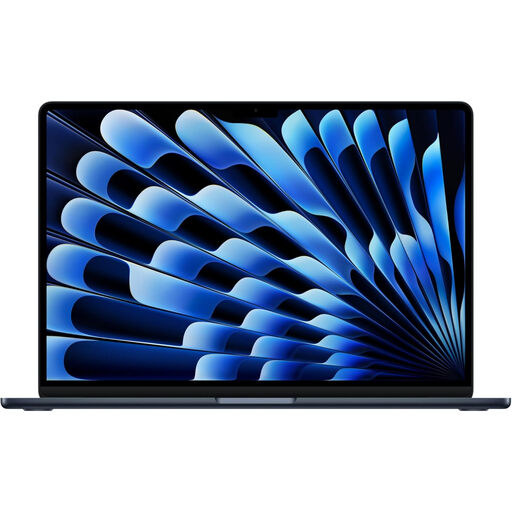
Apple 13-inch MacBook Air 2026 with M5 chip

Apple 13-inch MacBook Air (2026), M5, 24GB, 1TB SSD

A compact Mac option for portable study, creative work or multitasking where the department has approved macOS for required applications.

Stated specifications include an M5 chip with 10-core CPU and 10-core GPU, 24GB unified memory, 1TB SSD, a 13.6-inch 2560 × 1664 display, 12MP camera, two Thunderbolt 4 ports, MagSafe charging and Wi-Fi 7.

Do not choose this model for a Windows-only course route. Confirm support for course applications, assessment tools and specialist software, then check warranty, repair and return terms.

Joybuy

Acer Aspire Go 15 AG15-71P laptop

Acer Aspire Go 15 AG15-71P, Core i5-13420H, 8GB, 256GB SSD, Windows 11 Home

A Windows option for general coursework and courses that may require Windows-only applications.

Stated specifications include an Intel Core i5-13420H processor, 8GB DDR5 RAM, 256GB NVMe SSD, a 15.6-inch Full HD anti-glare display, 720p webcam with microphone, HDMI, USB-C, USB-A and Wi-Fi 6. The stated weight is 1.8kg.

The 8GB RAM and integrated graphics may not meet demanding programming, editing, CAD or rendering requirements without an upgrade. Its listed two-year manufacturer warranty is worth checking alongside the repair process and exclusions.

Joybuy

ASUS Vivobook 14 X1407QA-LY003W laptop

ASUS Vivobook 14 X1407QA-LY003W, Snapdragon X, 16GB, 512GB SSD

A lighter Windows laptop for document-based study, online learning and students using USB-C accessories or external displays.

Stated specifications include a Snapdragon X platform, 16GB RAM, 512GB SSD, 14-inch WUXGA 16:10 anti-glare display, FHD IR camera with privacy shutter, Wi-Fi 6E, two USB4 Type-C ports and HDMI 2.1. The listed weight is 1.49kg.

Check every required course, assessment and specialist application for Windows on ARM compatibility. Memory is onboard with a stated 16GB maximum, and integrated graphics may not suit courses requiring dedicated graphics.

Joybuy

Frequently asked questions

Should I buy a Windows laptop, MacBook or Chromebook for college?

Check the exact course software before choosing. UWE Bristol describes Windows as the most compatible route for most university and specialist software, says MacBooks suit many courses but may not run some specialist applications, and does not recommend Chromebooks as a primary device where specialist apps must be installed. The University of Bath says key mechanical-engineering software is Windows-only for that course route.

What specification is enough for ordinary coursework?

For general taught-student work, the University of York recommends at least an Intel i3 or AMD Ryzen 3 processor, 8GB RAM and 256GB or more SSD storage. Course guidance should take priority over this general reference, and York says non-specialist courses may not benefit from exceeding an i5 processor, 16GB RAM and 500GB SSD.

When do I need more than a basic student laptop?

Consider a higher specification when coursework includes programming, data analysis, image or video editing, rendering, visualisation, advanced programming, AR/VR, CAD or engineering applications. UWE Bristol and Ravensbourne University London provide course-specific examples involving 16GB RAM, 512GB storage and, for some architecture work, dedicated graphics; these are not universal minimums.

Is a refurbished laptop acceptable for college coursework?

Yes, provided it meets confirmed course requirements, runs a supported operating system and has an acceptable battery and condition. Ravensbourne University London says used or refurbished equipment from a reliable provider can be a more cost-effective option; check the seller’s warranty and returns terms before ordering.

Do I have legal protection if a laptop bought online is faulty in the UK?

For online, mail and telephone purchases, GOV.UK says customers generally have 14 days after receiving an item to tell the seller they want to cancel, followed by another 14 days to return it, subject to applicable exceptions. Citizens Advice says warranties add to legal rights and that rights for a fault can last up to six years, or five years in Scotland; keep the invoice, condition report and warranty documentation.