Players choosing for an existing platform
If you play mainly on PS5, Xbox, Switch, PC or a mobile device, your first concern is whether the controller and its intended connection method work with your setup and game.


Start with a controller listed for your console or device, then consider whether its controls and power arrangements suit a long session. For PC or mobile play, check the particular game and connection mode; if a standard grip or fixed button layout is difficult to use, consider an adaptive setup compatible with your console.
If you play mainly on PS5, Xbox, Switch, PC or a mobile device, your first concern is whether the controller and its intended connection method work with your setup and game.
Extended stretches of dialogue, navigation and puzzles make button reach, grip and a manageable power routine worth considering alongside compatibility.
If holding a conventional pad or reaching its controls is difficult, adjustable positioning, remapping or external inputs may matter more than extra buttons on a standard controller.
Confirm the platform and game before comparing how a controller feels to hold, how it is powered and whether its controls can be adapted to your needs.
| Concern | What to check | Who this matters to |
|---|---|---|
| Platform and game compatibility | Check the exact console or device, the game’s controller support and the required connection method. Features such as DualSense haptics depend on the game and may require USB. | I want the controller to work with the games I already play, without assuming that Bluetooth support means every feature will work. Around 36% of consumers put compatibility first. |
| Comfort over time | Consider the grip, weight and reach of the sticks, buttons and triggers; assess the shape for your own hands where possible. | During a long stretch of reading clues and moving through menus, I need controls I can reach without an awkward grip. Roughly 29% of consumers prioritise comfort. |
| Power between sessions | Check the battery arrangement, stated charge time and whether a cable or dock is included. Treat published runtime as an estimate. | I do not want an unplanned power break halfway through a session, so a workable charging or spare-battery routine matters to me. About 21% of consumers make power continuity their main concern. |
| Adaptable controls | Check remapping, physical positioning and any required external inputs against the intended console and your control needs. | If holding a pad or reaching fixed controls is the barrier, I need a setup I can position and operate differently. Around 14% of consumers put adaptable controls first. |
A connection alone does not establish support for your console, operating system or game. PlayStation says DualSense haptic feedback and adaptive triggers depend on supported games and may require USB.
Check the exact controller model, device and game, then confirm that your preferred connection method supports the features you intend to use.
An incompatible setup may leave you needing a different controller or a suitable accessory.
Nintendo says its approximately 40-hour estimate for the original Switch Pro Controller can be shorter depending on software and functions. It should not be applied to a different model, including the Switch 2 Pro Controller.
Check the power arrangement for the particular controller you choose and plan how you will charge it or replace its batteries between sessions.
Remappable controls on a conventional pad do not necessarily address difficulty holding it, reaching its triggers or positioning it for play.
Identify the movement or reach problem first. Then compare a standard controller’s adjustments with the positioning and external-input options of an adaptive system for your console.
An adaptive setup may also require time to configure and separately obtained switches, mounts or other inputs.
These product lines illustrate different platform and control approaches; the right model still depends on your device, game and preferred way to play.
Sony offers the standard DualSense controller and the PS5-focused Access controller for players who need a more configurable physical setup.
Microsoft offers a standard Wireless Controller for Xbox and other listed devices, alongside an Adaptive Controller built around external inputs.
Nintendo’s original Switch Pro Controller is a conventional controller for Switch play.
The Ultimate 2 Wireless Controller is an option to investigate for PC and compatible mobile-device play with a docked charging routine.
The Wolverine V3 Tournament Edition takes a wired, remappable-control approach for Xbox and PC.
These controllers cover mobile play and several console or PC setups. Choose for the device and game you use, rather than treating the models as interchangeable ways to play.
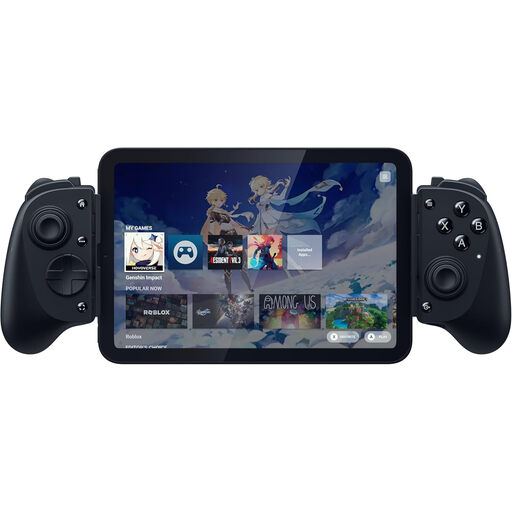 No image available
Consider this attached-device controller for mobile mystery games if your device fits and the game accepts controller input. Check the exact device, case and connector requirements before choosing it.
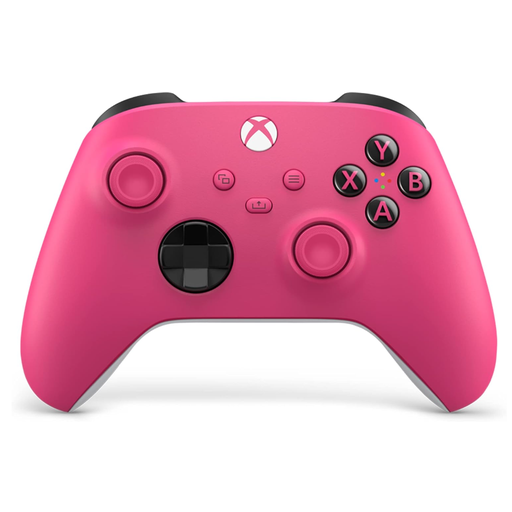 No image available
This standard Xbox controller is worth considering for Xbox play or a listed Windows or mobile device. Microsoft lists Xbox Wireless and Bluetooth connectivity for the controller line; check support in your particular game and decide how you will manage its batteries during longer sessions.
 No image available
Consider this tri-mode controller if you need a choice of connection methods. Before planning a long session around it, confirm which mode works with your device and game, as well as the charging arrangement you intend to use.
 No image available
This is the model to consider for a Nintendo Switch 2 setup. Check your game’s controller support and plan charging for your session; battery figures published for the original Switch Pro Controller should not be applied to this Switch 2 model.
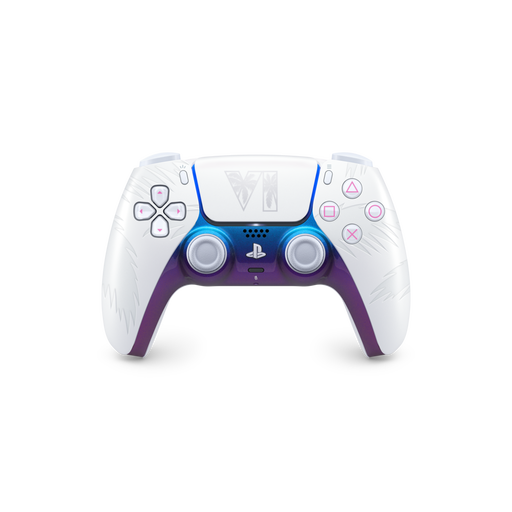 No image available
Consider this DualSense variant for PS5 play, or check its compatibility with your intended PC, Mac or mobile setup. PlayStation says haptic feedback and adaptive triggers require game support and may require USB, so do not assume those features will work in every mystery game.
Choose wired play if avoiding battery management matters more to you than a cable-free seat; choose wireless if you have a charging or battery routine that works for your setup. Check whether your chosen controller can be used while connected by cable rather than assuming that every USB connection supports play.
Not necessarily: check the game and connection mode for the features you want. PlayStation says DualSense haptic feedback and adaptive triggers depend on game support and may require USB; listed device compatibility alone does not establish support for every feature in a PC game.
Consider an adaptive setup when holding a standard pad, reaching its triggers or using fixed button positions is the main difficulty. PlayStation Access offers configurable physical controls for PS5, while Xbox Adaptive Controller acts as a hub for external inputs; check console compatibility and any switches, mounts or other devices your setup requires.