Choose for the device running the game, not the television: an Xbox Wireless Controller is a documented route for Xbox and Windows PC, while DualSense suits PS5 and can connect to compatible PCs. For a Windows PC across the room, check the controller’s documented connection method and whether your intended game supports controller input before choosing a layout or extra features.
Who is playing on the large screen?
TV-connected PC puzzle players
If your Windows PC runs the game while you sit on the sofa, check the game’s controller support and the connection your PC can use. 8BitDo, for example, specifies a 2.4 GHz receiver or wired USB for Windows use with its Ultimate 2C Wireless Controller.
PS5 narrative-game players
DualSense gives PS5 players the PlayStation layout. If you also plan to use it on a PC, Sony says haptic feedback requires USB there, and haptics and adaptive triggers depend on game support.
Multi-device living-room players
If you move between an Xbox console, Windows PC, tablet or phone, compare documented support for each device rather than choosing by controller shape. Microsoft lists Xbox consoles, Windows PC, iOS and Android for the standard Xbox Wireless Controller.
What matters when choosing a controller?
For large-screen narrative puzzles, establish which device runs the game and whether the game accepts controller input. Then choose a connection and power routine that works from your seat; consider layout and game-specific features once those basics fit.
Xbox Wireless Controller
Choose when: You play on Xbox or a compatible Windows PC and want the standard Xbox layout across those devices.
Bear in mind: Microsoft specifies AA batteries or an optional rechargeable pack for the standard model; check whether the particular bundle includes a cable for wired play.
DualSense Wireless Controller
Choose when: You mainly play on PS5, or prefer a PlayStation layout for compatible PC games.
Bear in mind: Sony says PC haptic feedback requires USB, while haptics and adaptive triggers also need game support.
8BitDo Ultimate 2C Wireless Controller
Choose when: Your large screen is connected to a Windows PC and a supplied 2.4 GHz receiver suits your setup.
Bear in mind: 8BitDo specifies Bluetooth for Android, but 2.4 GHz or wired USB for Windows; this model is not presented as a PS5 or Xbox console controller.
| Concern | What to check | Who this matters to |
|---|
| Platform and game compatibility |
Match the controller to the console or PC running the game, then check that game’s controller-support information. |
I need my chosen narrative puzzle to accept controller input on the device I own; otherwise, the layout and extra buttons will not settle the choice. Around 42% of consumers would put platform and game compatibility first. |
| Sofa-distance connection and power |
Check the host’s wireless or USB options, cable reach, and the controller’s battery or charging arrangement. |
From my usual seat, I want a connection and power routine I can repeat without moving the PC or console. Roughly 33% of consumers would make that practical setup their primary concern. |
| Comfort and supported features |
Compare the grip and button layout; check the intended game before choosing for haptics, adaptive triggers or extra controls. |
Once my game and connection are covered, I care most about comfortable navigation through dialogue, menus and puzzles. Around 25% of consumers would prioritise comfort and supported features. |
Common buying mistakes
-
Choosing for the TV instead of the gaming device
A TV-connected PC, PS5 and Xbox do not have interchangeable controller requirements, and PC game support can vary by title.
Identify the device running your puzzle game and check that game’s controller information before settling on a controller.
-
Assuming DualSense features work in every PC game
Sony says PC haptic feedback requires USB, and haptics and adaptive triggers depend on game support.
Check the intended game for those features and the particular bundle for a suitable cable if you plan to use USB.
-
Treating all wireless modes as interchangeable
8BitDo specifies 2.4 GHz or wired USB for Windows on the Ultimate 2C Wireless Controller, but Bluetooth for Android.
Check the exact model’s connection methods against your PC, console or other device before buying.
-
Overlooking the complete sofa setup
The standard Xbox Wireless Controller uses AA batteries or an optional rechargeable pack. Sony says its standard DualSense package does not include a USB cable.
Check what your chosen listing includes, how the controller is powered and whether any cable reaches your seat.
Controller brands to consider
Xbox / Microsoft
The standard Xbox Wireless Controller is a first-party option for Xbox consoles with documented Windows PC, iOS and Android support.
- Microsoft lists textured grips, a hybrid D-pad and button mapping on the standard controller.
- It uses AA batteries or an optional rechargeable pack rather than an integrated rechargeable battery.
PlayStation / Sony
DualSense is Sony’s PS5 controller and can also connect to compatible computers and mobile devices.
- Sony documents Bluetooth and USB-C connection options for compatible PCs.
- Haptics and adaptive triggers depend on game support; PC haptics require USB.
8BitDo
The Ultimate 2C Wireless Controller is a third-party option with documented Windows and Android connection methods.
- 8BitDo specifies a 2.4 GHz adapter, Hall Effect sticks and triggers, and two extra remappable bumpers for this model.
- Its documented Windows wireless method is 2.4 GHz, while Bluetooth is specified for Android; check the exact model before choosing it for a device.
Joybuy controllers for large-screen play
These choices cover Xbox and Windows PC play, a DualSense option for PS5, and a wired controller listed for PS4 and Windows PC. Choose for the device running your puzzle game, then check game support and whether the connection reaches your seat.
 No image available
Turtle Beach PDP Victrix Pro BFG Wireless Controller, Black
Consider this model if the game runs on an Xbox console or a Windows 10/11 PC and you want a wireless controller.
The listed platforms are Xbox Series X|S, Xbox One and Windows 10/11 PC. Check your intended game’s controller support and the connection options in the particular bundle.
View on Joybuy
 No image available
Microsoft Xbox Elite Wireless Controller Series 2
This is an Xbox and PC option if you want the Elite Series 2 model, though its additional controls need not determine a narrative-puzzle purchase.
The product name lists Xbox One, Xbox Series X/S and PC. Check game support and the contents of the particular bundle before choosing it.
View on Joybuy
 No image available
Xbox Wireless Controller, Carbon Black
Choose the standard Xbox controller route if your game runs on Xbox or a compatible Windows PC and you prefer its layout.
Microsoft specifies textured grips, a hybrid D-pad and AA batteries or an optional rechargeable pack for this controller. Check the listing for included power accessories and your game for controller support.
View on Joybuy
 No image available
Sony PlayStation 5 DualSense Wireless Controller V3, Starlight Blue
This PS5 controller suits players who want the PlayStation layout; Sony also documents DualSense connections to compatible PCs.
On PC, Sony says haptic feedback requires USB, and haptics and adaptive triggers depend on game support. Check the game and this bundle’s cable contents if those features matter to you.
View on Joybuy
 No image available
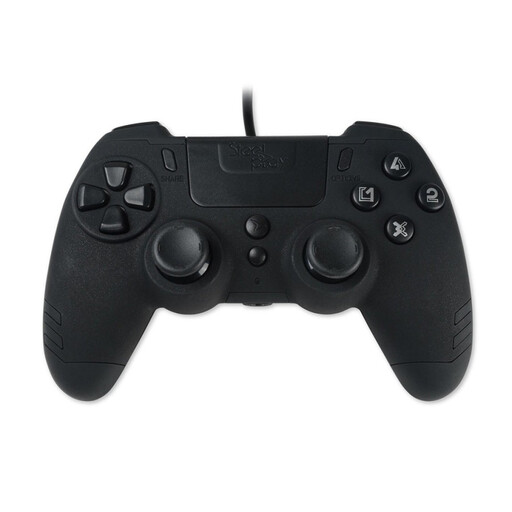
LEXIP SteelPlay Slim Pack Wired Controller, Ebony Black
A wired controller may suit a PS4 or Windows PC setup when the cable can reach your large-screen seating position.
Check cable reach and support for your intended game; do not assume this model is compatible with PS5 or Xbox.
View on Joybuy
Controller questions answered
Will any controller work with every narrative puzzle on PC?
No. Check the particular game’s store page or launcher information for controller support before buying; the controller’s ability to connect to your PC does not, by itself, establish support in that game.
Can I use DualSense wirelessly with a Windows PC connected to a TV?
Yes, on a compatible Windows PC, Sony documents a Bluetooth connection for DualSense. If you want haptic feedback on PC, Sony says it requires USB, and the game must support the feature.
How is the standard Xbox Wireless Controller powered?
Microsoft says it uses AA batteries or an optional rechargeable battery pack. Rechargeable AA cells do not charge inside the controller, so check the particular bundle and your preferred charging routine.
Should I update an Xbox Wireless Controller after buying it?
Check for controller updates when setting it up. Microsoft recommends keeping its controller software updated for compatibility and capabilities; an update does not replace the need to check support for your particular game.


